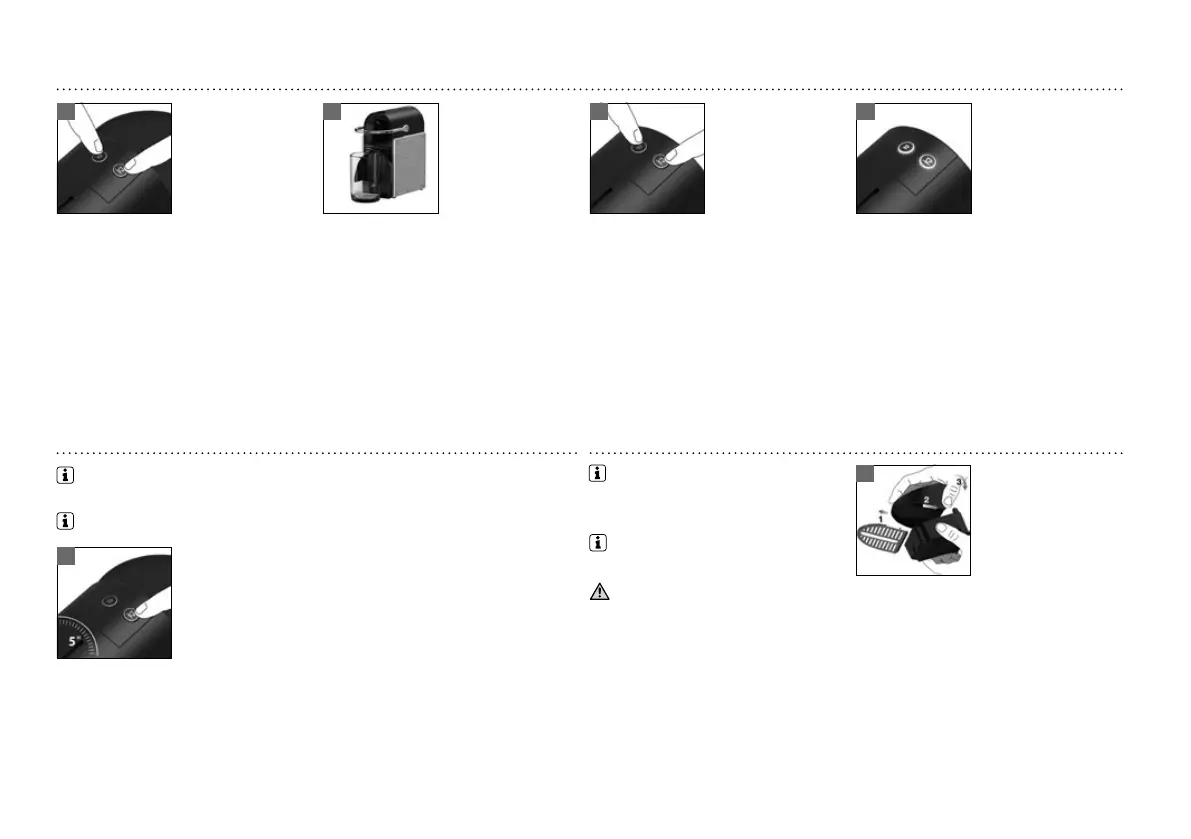
12
1 2 3 4
1
1
EMPTYING THE SYSTEM BEFORE A PERIOD OF NONUSE, FOR FROST PROTECTION OR BEFORE A REPAIR
Machine switches o automatically.
CLEANINGRESET TO FACTORY SETTINGS
Press both the Espresso and Lungo button for 3
seconds. Both LEDs blink alternatively. Espera até
que não saia mais água.
Remove the water tank. Close the Lever. Place a
container under the coee outlet.
To assemble the cup support and the drip tray:
take o the grid, place them side by side and clip
the drip tray to the cup support.
Clean the coee outlet regularly with a damp
cloth.
Do not use any strong cleaning agent or
solvent cleaner. Do not put in a dishwasher.
请勿把机器及其部分浸入
水中/
Never immerse the appliance
or part of it in water.
将长时间不使用,为避免结霜或在维修前需要清空机器内部的水
机器自动关机。
清洗恢复出场设置
同时按住浓缩咖啡和大杯咖啡按
键 3 秒 钟 。两 个 L E D 指 示 灯 交 替 闪
烁 ,机 器 开 始 清 空 ,一 直 到 没 有 水
再流出。
移 开 水 箱 ,关 闭 机 器 把 手 。将 一 个
容器置放在咖啡出口。
组 装 杯 托 和 滴 水 盘 。取 下 网 格 ,将
杯托和滴水盘边对边对齐后,按
扣位装起。
咖啡出口经常用湿布擦 拭。
请不要使用任何强烈的清洗剂
或溶剂清洗。请勿放入洗碗机内
清洗。
同时按下浓缩咖啡按键和大
杯咖啡按键关机。
机器处于关机状态下,持续按住
大杯咖啡 按键5 秒 钟。
LED指示灯快速闪烁3次,确认完
成恢复出场设置操作。
LED指示灯将继续闪烁,表示咖啡
机 正 在 加 热 ,直 至 机 器 处 于 就 绪
状态。
指 示 灯 常 亮 :准 备 就 绪 。
出 场 设 置 :浓 缩 咖 啡 杯 量 :40 ml, 大杯咖啡杯量:110 ml. 自动关机时
间:9分 钟。
To enter the emptying mode, press both
the Espresso and Lungo button to turn
the machine o.
With machine turned o, press and hold down
the Lungo button for 5 seconds.
LEDS will blink fast 3 times to conrm machine
has been reset to factory settings.
LEDs will then continue to blink normally, as
heating up, until ready.
- Steady Lights: ready
Factory settings: Espresso cup: 40 ml, Lungo cup: 110 ml; Auto O mode: 9 mins.






 To Next Page