Hook the wire clockwise around the screw and tighten the screw into place.
● Make sure your connections are secure. Lightly pull on the wires to make sure
everything is securely attached.
● Find a place for the chime connector. Make sure the chime connector won’t interfere
with moving parts and muffle the chime. You can use the adhesive backing to stick it
outside the box, or tuck it in if there’s room.
● The final wire (orange in this example) that connects the transformer to the doorbell
remains unchanged.
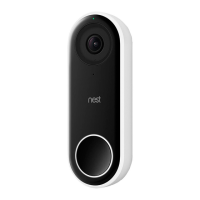
6. Replace existing doorbell with Nest Hello
With the Nest Chime Connector wired and installed, you are now ready to remove the existing doorbell
and replace it with Nest Hello. Before you begin, double check to make sure the power is still switched
off at the circuit breaker.
Remove the old doorbell. Remove the screws attaching the doorbell to the wall or framing
and remove any additional hardware. Before disconnecting any wires, take a picture of the
existing wiring for reference.
Disconnect the wires. If needed, wrap the wires around a pen or pencil to keep them from
falling into the hole in the wall.
Consider the camera angle. Determine if you need to use the enclosed 15-degree wedge.
The wedge allows you to orient Nest Hello’s field of view to the left or to the right if the
existing doorbell is in a corner or any location that does not provide a good view of the area
directly in front of the door.
Mark screw holes. Using the Nest Hello wall plate as a template, mark any new holes that
need to be drilled. Reuse existing holes when possible.
Screw in the Nest Hello wall plate with the logo upright (and the 15-degree wedge behind it
if you have decided to use it) with the screws provided. For hard surfaces like brick or
stucco, use the included masonry bit to drill holes at your markings. Then use a mallet or
hammer to insert the wall anchors.
Connect the wires to the doorbell screw terminals on the back of Nest Hello. It doesn’t
matter which wire is connected to which terminal. Trim excess wire if wires are too long or
use optional extension wires if they are too short. Using a phillips screwdriver, connect the
wires to the terminals on the back of the Nest Hello device and push any excess wire into
the hole. Upon doing this, you will close the doorbell circuit shown in step 2d above.


 To Next Page