| AlphaDisc BLE quick user guide V1.0
2
INITIAL OPERATION OF THE ALPHADISC™ BLE CONTROLLER:
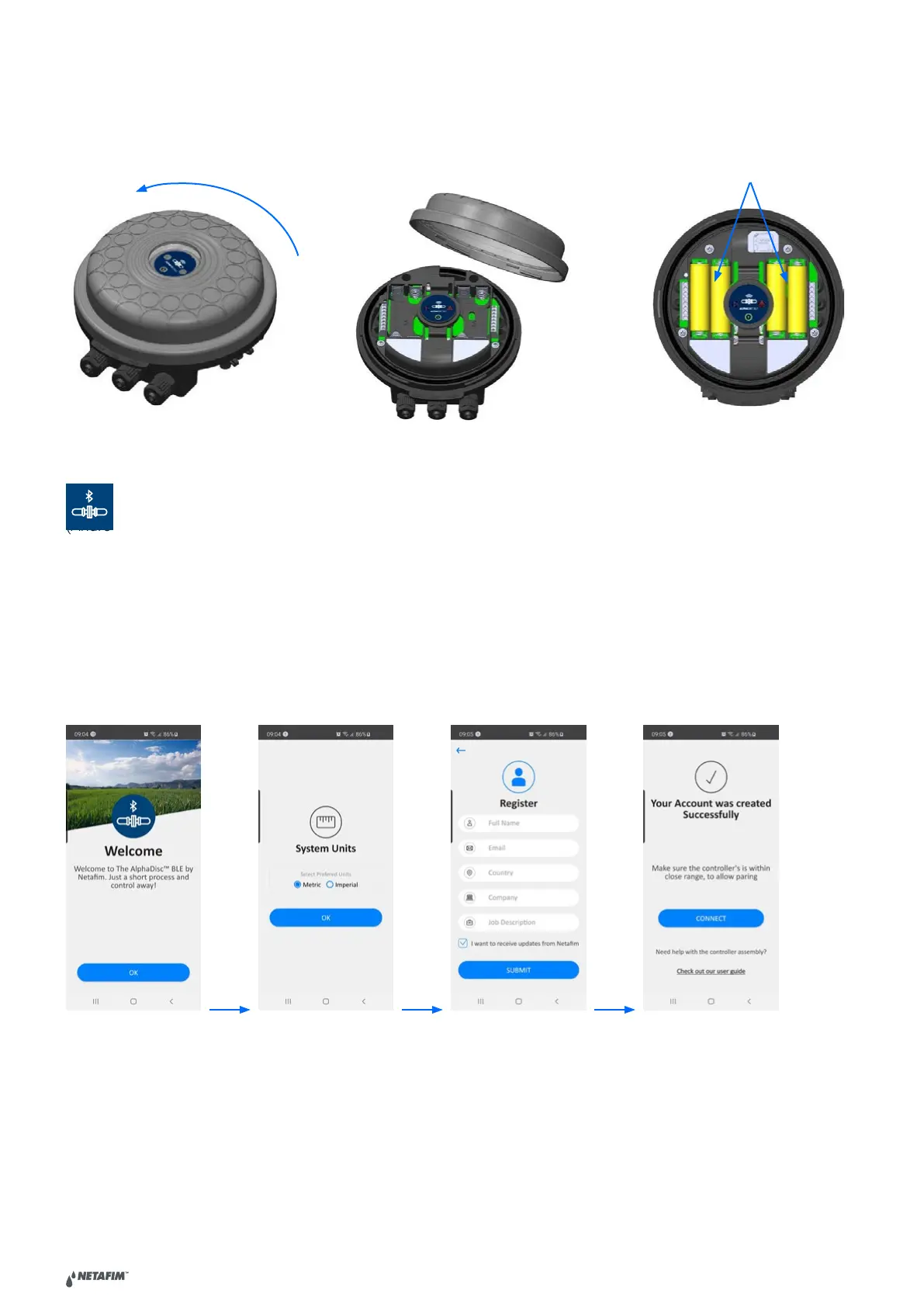
Open the cover of the AlphaDisc™ BLE Controller by turning it counterclockwise [1] and insert four alkaline 1.5V AA
batteries [2]. The Power LED turns on and the AlphaDisc™ BLE Controller starts operating according to its pre-defined
DOWNLOADING THE MOBILE APPLICATION:
The free AlphaDisc™ BLE application by Netafim is available for download on Google Play
(Android version 5 and up) or the App Store (iOS version 9 and up).
PAIRING THE CONTROLLER WITH YOUR MOBILE PHONE:
1. Activate your phone’s Bluetooth® discovery mode and start the AlphaDisc™ BLE application.
2. Select the applicable SYSTEM UNITS.
3. REGISTER your filter to create an account.
Click CONNECT. The application scans for controllers within Bluetooth® range.
5. Select your controller from the list of controllers in range. Verify the that the blue/green LED on your controller is
blinking before clicking YES to initiate the paring process.
6. Confirm the paring process.
1
2



 To Next Page