EasyManua.ls Logo

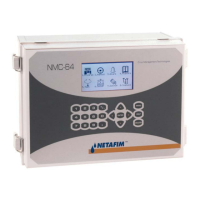
Netafim NMC-64 - User Manual

Netafim NMC-64
100 pages
Print Icon
To Next Page IconTo Next Page
Loading...
NMC-64 USER & INSTALLATION
MANUAL
Manual version: 2.00
Date of issue: January 2005
Publisher: Netafim
TM
(A.C.S.) Ltd.
© Copyright 2003, Netafim
No part of this publication may be reproduced, stored in an automated data file or
made public in any form or by any means, whether electronic, mechanical, by
photocopying, recording or in any other manner without prior written permission of the
publisher.
Although Netafim takes the greatest possible care both with its products and the
associated manuals, there may be deficiencies in them.
Netafim will not however accept responsibility for damage resulting from the use of
Netafim products or damage resulting from the use of this manual. Netafim also
reserves the right to make changes and improvements to its products or to the
associated manuals without notice.
1

Table of Contents

Questions and Answers

  • G
    George Kline MDAug 3, 2025
    How to troubleshoot Netafim Controller when relays aren't working and there are no sensor readings?
    • P
      Patrick West MDAug 3, 2025
      If your Netafim Controller relays aren't working, sensor readings are absent, and there's no hardware communication, the issue might stem from the I2C bus being pulled down by one of the cards. To troubleshoot: * Check if the LEDs on the output cards are blinking. * If not, disconnect the output and digital input cards one by one to see if the remaining cards' LEDs start blinking or sensor readings become correct. * If the problem persists, the CPU card may be faulty. Contact your nearest Netafim dealer.
  • E
    emily59Aug 9, 2025
    What to do if Netafim Controller detects a short circuit but it does not point to the correct device?
    • J
      Jessica JacksonAug 9, 2025
      If your Netafim Controller detects a short circuit but doesn't identify the correct device, it could be due to two reasons: * There might not be a short circuit, and the threshold value is too high. In this case, increase the short circuit threshold value. * A short circuit may be occurring in a device connected at a distance, with the additional electric current load being too small for the system to detect accurately. In this situation, operate the devices manually and detect the defected device using table 5.1 RELAYS.
  • J
    Jeremiah HamptonAug 15, 2025
    What to do if there is a short circuit and the Netafim Controller doesn’t recognize which output is creating it?
    • K
      kirbyjasonAug 15, 2025
      If your Netafim Controller has a short circuit but doesn't recognize which output is causing it, there are two possible scenarios: * There might not be any short circuits; the threshold is simply too high. Increase the short circuit threshold value. * The short circuit might be in a distant device, making the current load too small for the system to pinpoint the responsible output. In this case, lower the short circuit threshold value to increase the system's sensitivity.
  • S
    shawn43Aug 21, 2025
    Why does my Netafim Controller show Temp Sensor Shorted or Opened alarm messages?
    • M
      Michele LunaAug 21, 2025
      If you receive alarm messages related to temperature sensors on your Netafim Controller (e.g., 'Temp Sensor Shorted,' 'Temp Sensor Opened'), it's likely that one of the sensors is either shorted or disconnected. To resolve this: * Check the alarm messages to identify the sensor number and the failure description ('Opened' or 'Shorted'). * Use an ohmmeter to check the resistance between the black and red wires of the temperature sensor. It should read approximately 30 kOhm. Note that readings will vary with temperature; resistance decreases above 25°C and increases below 25°C.
  • R
    Robert LeonardAug 27, 2025
    What to do if one of the output cards isn’t working at all on my Netafim Controller?
    • J
      jgardnerAug 27, 2025
      If one of the output cards on your Netafim Controller isn't working (LED is off), it's likely due to a short circuit in one of the relay coils. The suggested solution is to replace the relay card.

Summary

NMC-64 User and Installation Manual

NMC-64 Software and Program Configuration

Irrigation Program Configuration

Details how to set up automatic irrigation programs, including start times, cycles, and valves.

Dosing and Fertigation Control Setup

Explains how to configure fertilizer programs, methods, and EC/pH settings.

System History, Testing, and Setup

System Setup and Calibration Procedures

Covers time/date settings, system configuration, and calibration of sensors like temperature, humidity, EC/pH.

Configuration Options

Dosing Channel and EC;pH Configuration

Sets up dosing channels, methods, and EC/pH control parameters.

Installation and Hardware Details

Troubleshooting and Appendix

Common Problems and Solutions

Provides a table of common problems with their corresponding troubleshooting advice.

Electrical Grounding and Safety

Covers essential electrical grounding practices and lightning protection measures.

Netafim NMC-64 Specifications

General IconGeneral
ModelNMC-64
ManufacturerNetafim
Irrigation ZonesUp to 64
Enclosure RatingIP65
Controller TypeModular
Number of Stations64
CommunicationEthernet

Related product manuals