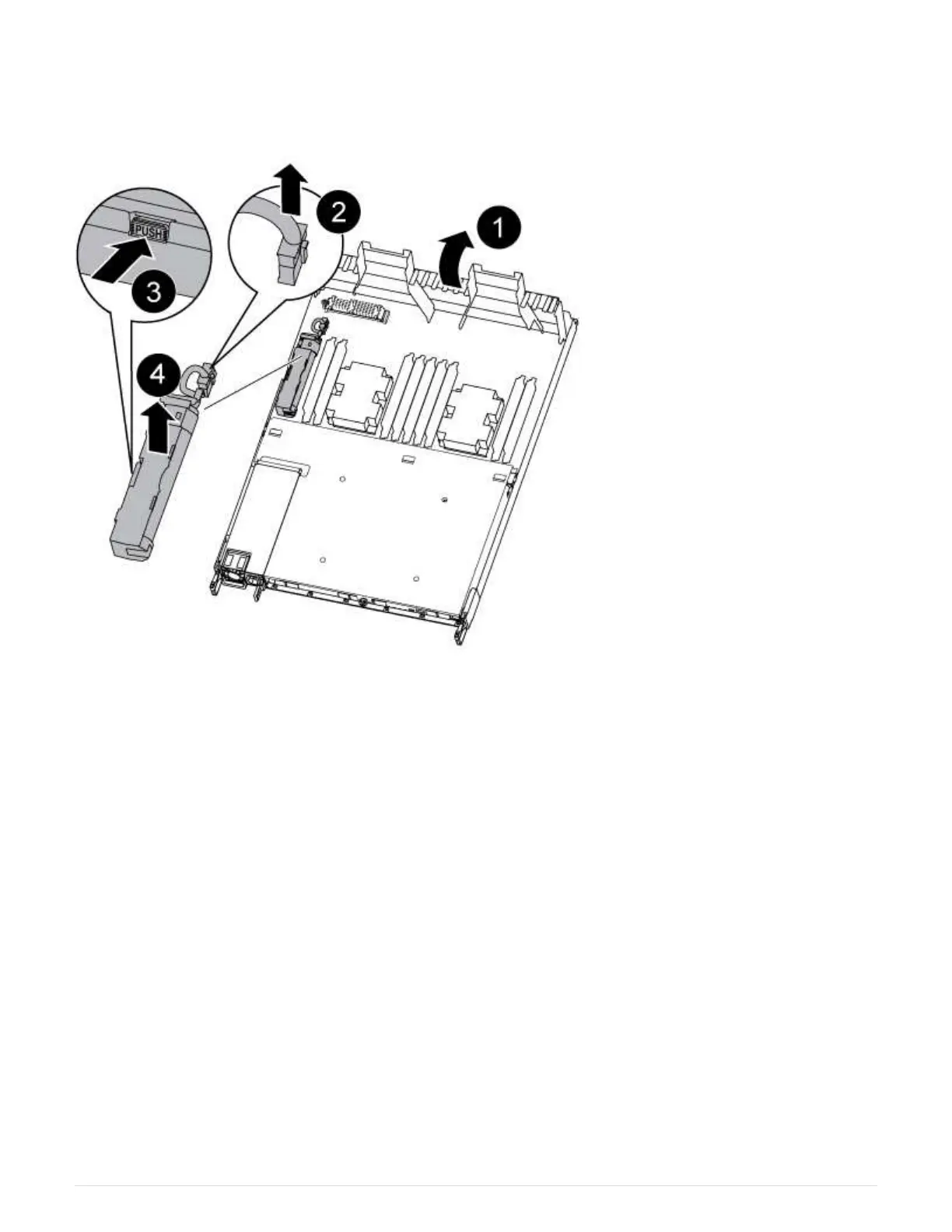
Step 3: Replace the NVDIMM battery
To replace the NVDIMM battery, you must remove the failed battery from the controller
module and install the replacement battery into the controller module.
1. Open the air duct and locate the NVDIMM battery.
2. Locate the battery plug and squeeze the clip on the face of the battery plug to release the plug from the
socket, and then unplug the battery cable from the socket.
3. Grasp the battery and press the blue locking tab marked PUSH, and then lift the battery out of the holder
and controller module.
4. Remove the replacement battery from its package.
5. Align the battery module with the opening for the battery, and then gently push the battery into slot until it
locks into place.
6. Plug the battery plug back into the controller module, and then close the air duct.
Step 4: Install the controller module
After you have replaced the component in the controller module, you must reinstall the
controller module into the chassis, and then boot it to Maintenance mode.
1. If you have not already done so, close the air duct at the rear of the controller module and reinstall the
cover over the PCIe cards.
2. Align the end of the controller module with the opening in the chassis, and then gently push the controller
module halfway into the system.
558



 To Next Page