Step 3: Cable controllers to your network
You can cable the controllers to your network by using the two-node switchless cluster method or by using the
cluster interconnect network.
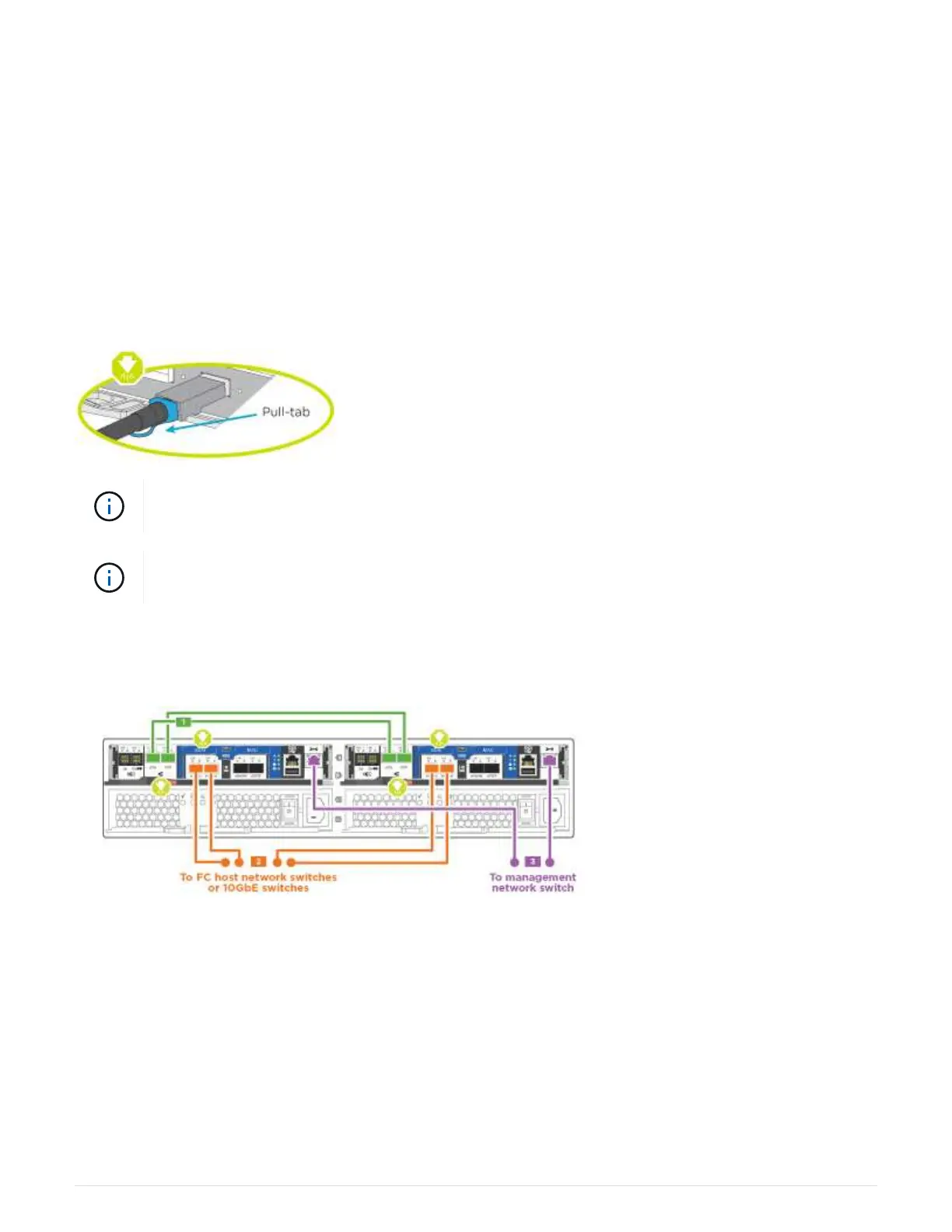
Option 1: Cable a two-node switchless cluster, unified configuration
UTA2 ports and management ports on the controller modules are connected to switches. The cluster
interconnect ports are cabled on both controller modules.
Before you begin
Contact your network administrator for information about connecting the system to the switches.
Be sure to check the illustration arrow for the proper cable connector pull-tab orientation.
As you insert the connector, you should feel it click into place; if you do not feel it click, remove
it, turn it around and try again.
If connecting to an optical switch, insert the SFP into the controller port before cabling to the
port.
Steps
1. Use the illustration or the step-by-step instructions to complete the cabling between the controllers and to
the switches:
4



 To Next Page