NETGEAR, the NETGEAR logo, and Connect
with Innovation are trademarks and/or
registered trademarks of NETGEAR, Inc. and/
or its subsidiaries in the United States and/or
other countries. Information is subject to
change without notice. © NETGEAR, Inc. All
rights reserved.
For indoor use only. Valid for sale in all EU
member states, EFTA states, and Switzerland.
March 2013
Installation Guide
NETGEAR, Inc.
350 East Plumeria Drive
San Jose, CA 95134 USA
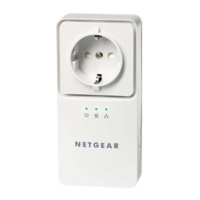
LED and Button Descriptions
Item Description
Power
LED
• Solid green. The electrical power is on.
• Solid amber. The adapter is in power saving mode.
Power saving mode is disabled by default.
• Blinking green. The adapter is in the process of
setting up security.
• Off. There is no electrical power.
Ethernet
LED
• Solid. The adapter is connected through the
Ethernet port to a powered-on Ethernet device.
• Off. There is no Ethernet connection.
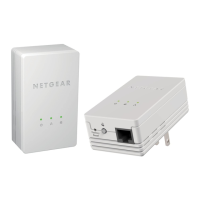
Powerline AV 200 Mini Set XAVB1301
Support
Thank you for selecting NETGEAR products.
After installing your device, locate the serial number on the
label of your product and use it to register your product at
https://my.netgear.com.
You must register your product before you can use NETGEAR
telephone support. NETGEAR recommends registering your
product through the NETGEAR website.
For product updates and web support, visit
http://support.netgear.com.
NETGEAR recommends that you use only the official
NETGEAR support resources.
You can get the user manual online at
http://downloadcenter.netgear.com or through a link in the
product’s user interface.
For the current EU Declaration of Conformity, visit
http://support.netgear.com/app/answers/detail/a_id/11621/.
Package Contents
WARNING: Do not press the Security button on the Powerline
adapter until installation is complete and the adapters are
communicating with each other (indicated by the blinking Powerline
LED). Pressing this button too soon can temporarily disable Powerline
communication. If this should occur, use the Factory Reset button to
return the Powerline adapter to its factory default settings.
Powerline
LED
• Solid. The adapter is connected to a Powerline
network.
• Off. The adapter has not found any other
compatible Powerline devices using the same
encryption key.
The Pick A Plug feature lets you pick the electrical
outlet with the fastest link rate, indicated by the color of
the LED.
Green: Link
rate > 80 Mbps
(Fast)
Amber: Link rate >
50 and < 80 Mbps
(Medium)
Red: Link
rate < 50
Mbps (Slow)
Factory
Reset
Press the Reset button for 1 second, then release it to
return the Powerline adapter to its factory default
settings.
Security
Button
After you plug in your new adapter, press the Security
button for 2 seconds, then press the Security button
on one of the other adapters in your existing network
for 2 seconds. Both buttons must be pressed within 2
minutes.
To enable power saving mode, press and hold the
Security button for 10 seconds or more, then release
it. Pressing the Security button again powers the
adapter back on.
Item Description
Powerline
AV 200 Mini
Adapters
Ethernet
cables

 Need help?
 General



 To Next Page