ADSL2+ Modem Router User Manual
62
4.4.2 IP/Port Filter
4.4.2.1 IP/Port Filter
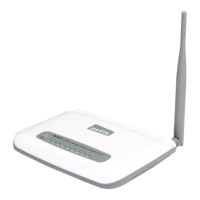
Go to Firewall->IP/Port Filter page, you can set the IP/Port filter rules to secure or restrict
your local network.
On the front of the page, you can see the default action of outgoing/incoming connection. If
the IP connection doesn’t match any filter rules, the router will handle the connection with
the default action setting.



 To Next Page