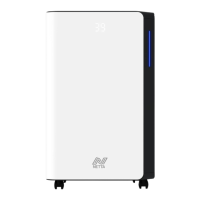
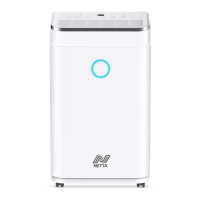
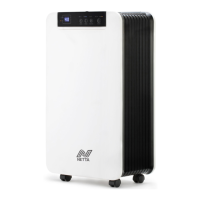
This document is an instruction manual for the NETTA OL20-B270R dehumidifier, a compact appliance designed to remove excess moisture from the air in homes and offices, thereby creating a more comfortable environment and protecting against the adverse effects of high humidity. Its portable design allows for easy movement between rooms.
Function Description
The dehumidifier operates by drawing in moist air, extracting the water vapor, and then releasing drier air back into the room. This process helps to reduce the relative humidity, preventing issues such as mold growth, mildew, and damage to property caused by excessive moisture. The unit uses R290 (propane) as a refrigerant, which is an environmentally friendly option with no damaging influence on the ozone layer and a negligible greenhouse effect. Due to the flammability of R290, specific safety precautions are outlined for its use and servicing.
Usage Features
The OL20-B270R dehumidifier offers several modes and settings for user convenience:
- Power On/Off: The unit is turned on and off with a single power button. Upon activation, it defaults to normal mode with a 50% relative humidity (RH) setting and low fan speed. Pressing the power button again stops the compressor, and the fan will stop within 60 seconds.
- Operating Modes:
- Normal Mode: This is the default operating mode where users can adjust the desired humidity level.
- Drying Clothes Mode: In this mode, the machine works continuously at a high fan speed to facilitate clothes drying. The humidity level cannot be set in this mode.
- Humidity Adjustment: In normal mode, the desired room humidity can be set between 20% and 80% RH, with adjustments made in 5% increments or decrements using the Add and Minus buttons.
- Fan Speed Control: The fan speed can be switched between low (sleep mode) and high (turbo mode) using the Fan button.
- Timer Function: A timer can be set from 0 to 24 hours in one-hour increments/decrements. When the machine is running, the timer can be set to turn off the machine. When the machine is in standby mode, the timer can be set to turn on the machine. To cancel the timer, the button should be pressed until "00" is displayed.
- Display: The unit features a display that shows the current room humidity when powered on. When adjusting humidity, it shows the set humidity data, and when setting the timer, it shows the timing data.
- Indicator Lights:
- Power Indicator: Illuminates green when the unit is plugged in, regardless of whether it's operating.
- Water-Full Indicator: Turns red and the unit buzzes five times when the water tank is full. At this point, the machine stops, and all buttons are locked until the water tank is emptied and reinserted.
- Timer Indicator: Illuminates green when the timer function is active.
- Sleep Indicator: Illuminates green when the unit is running at a low fan speed.
- Turbo Indicator: Illuminates green when the unit is running at a high fan speed.
- Drying Clothes Indicator: Illuminates green when the drying clothes function is active.
- Clean Filter Indicator: Turns red and the unit buzzes 20 times after 600 hours of accumulated running time, signaling that the air filter needs cleaning. All buttons are locked, the compressor stops, and the fan closes 60 seconds later. To reset the warning, the power button must be pressed for 5 seconds, which resets the fan running time to 0.
- Water Drainage: The unit collects water in a removable water tank. When full, the water-full indicator alerts the user. The tank can be easily pulled out from the back of the machine and emptied. For continuous operation without manual emptying, a continuous drainage option is available. This involves opening a cover on the back, removing the water tank, inserting a PVC pipe (9.5mm inner diameter, recommended length 300mm) into the water outlet, and directing the other end to a container or drain, ensuring it is lower than the water outlet.
Maintenance Features
Regular maintenance is crucial for the dehumidifier's efficiency and longevity:
- Cleaning the Unit: Before any cleaning, the unit must be unplugged. The housing can be cleaned with a soft, wet cloth. Chemical solvents, steel wool, abrasive dusters, or other harsh cleaning agents should not be used as they can damage the unit.
- Air Filter Cleaning: The unit is equipped with a washable air filter. It is recommended to clean the filter every two weeks to maintain efficiency. To clean, the filter should be removed, immersed gently in warm water (about 40℃) with a neutral detergent, rinsed, and then thoroughly dried in a ventilated place. A vacuum cleaner with a brush attachment can be used to remove dust. After cleaning and drying, the filter should be reinserted slowly.
- Water Tank Care: The water tank should be cleaned with cool or warm water if it becomes dirty. Avoid using harsh cleaners or solvents that could damage the tank and cause leakage. It is important not to remove the float from the water tank, as this mechanism prevents overflow when the tank is full. The water tank must be correctly inserted into the machine for it to operate, otherwise, the water-full indicator will remain red, and the machine will not work.
- Storage: For extended periods of non-use, the dehumidifier should be prepared for storage. This involves completely draining the water tank, unplugging the unit and coiling the power cord, and removing and cleaning the air filter before reinstalling it. The unit should then be stored in a cool, dry location, away from direct sunlight, extreme temperatures, and excessive dust.
- Upright Position: It is crucial to keep the machine upright for 24 hours before its first use and always keep it upright during operation to ensure proper functioning and prevent damage.
The manual also includes a troubleshooting guide to help users identify and resolve common issues before contacting service professionals. It emphasizes safety precautions related to the flammable R290 refrigerant, including checks to the area, work procedures, general work area safety, checking for refrigerant presence, fire extinguisher availability, avoiding ignition sources, ensuring a ventilated area, checks to refrigeration equipment, and checks to electrical devices. Disposal information advises against disposing of electrical appliances as unsorted municipal waste and recommends using separate collection facilities in accordance with local government guidelines.

 Need help?
 General

 To Next Page