EasyManua.ls Logo

NeurOptics NPi-200 - User Manual

NeurOptics NPi-200
14 pages
Print Icon
To Next Page IconTo Next Page
Loading...
NeurOptics® NP-200 Pupillometer SystemInstructions for Use © 2018 NeurOptics, Inc. 1
Introduction
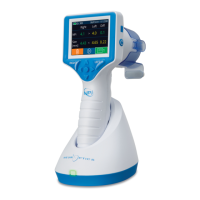
The NeurOptics® NP-200 Pupillometer offers clinicians quantitative infrared
technology to objectively and accurately measure and trend pupil size and
reactivity in their critically ill patients with neuronal injuries. The NeurOptics
NPi-200 Pupillometer is designed to upload into any hospital electronic medical
record (EMR) system using the SmartGuard® Reader by Omnikey®. The NPi-200
provides a comfortable ergonomic design, easy-to-read touchscreen LCD and
graphics, simple patient identification (ID) number entry and trending capabilities
customized to the clinician preference.
Indications for Use
NPi-200 Pupillometer is a handheld optical scanner which measures pupil size and pupil reactivity in patients requiring
neurological pupil examinations. The results obtained from the Pupillometer scans are used for information only and are
not to be used for clinical diagnostic purposes. The NPi-200 Pupillometer should only be operated by properly trained
clinical personnel, under the direction of a qualified physician.
Contraindications
Avoid use when the orbit structure is damaged, or surrounding soft tissue is edematous or has an open lesion.
Table of Contents
Warnings and Cautions ..................................................... 2
Classification ...................................................................... 2
Patents, Copyright and Trademark Notice ........................ 2
Getting Started .................................................................. 3
Power Up ........................................................................... 3
Scan the Patient ID ............................................................ 4
Measure Pupils .................................................................. 5
Pupil Measurements - Special Considerations ................. 6
Trend for Changes ............................................................. 7
Power Off ........................................................................... 7
Rebooting the NPi-200 Pupillometer ............................... 7
Troubleshooting ................................................................. 7
Cleaning and Maintenance ............................................... 8
Customer Service .............................................................. 9
Ordering Information ........................................................................ 9
Appendix A
Pupillary Measurement Parameters..............................10
Appendix B
Technical Specifications ...............................................10
Appendix C
Bluetooth® and Radio Frequency Identification Device
(RFID) Broadcast Range and Frequency .......................11
Appendix D
Pupillometer Display Limits for Electronic Medical Record
(EMR) Flowsheet Integration .......................................................11
Appendix E
International Symbol Definition ................................................12
NPi
®
-200
Pupillometer
Instructions for Use
NPi®-200 Pupillometer
NeurOptics® NPI®-200 Pupillometer SystemInstructions for Use © 2022 NeurOptics, Inc.

Other manuals for NeurOptics NPi-200

Questions and Answers

Summary

Instructions for Use

Introduction

Overview of the NeurOptics NPi-200 Pupillometer and its technology.

Indications for Use

Specifies the intended applications for the NPi-200 Pupillometer in neurological examinations.

Contraindications

Lists conditions to avoid using the NPi-200 Pupillometer for patient safety.

Warnings and Cautions

General Safety Warnings and Cautions

Covers essential safety guidelines for operating and maintaining the NPi-200 Pupillometer.

Technical Notices and Compliance

Includes EMC, MRI, Bluetooth notices, classification, and FCC compliance details.

Getting Started

Initial Setup and Powering On

Guides users through initial device setup, charging, and turning on the NPi-200.

Scanning and Manual Patient ID Entry

Pairing the NPi-200 to the Barcode Scanner

Instructions for connecting the NPi-200 to a barcode scanner for ID entry.

Manual Patient ID Entry

Procedure for manually inputting patient identification information into the device.

Measuring Pupils and Managing Data

Measuring Pupils

Step-by-step guide on how to perform pupil measurements using the NPi-200.

Video Replay and SmartGuard Disabling

Features for reviewing recorded scans and managing patient data on SmartGuard.

Pupil Measurement Considerations and Interpretation

Special Measurement Considerations

Addresses specific scenarios like blinks, non-responsive pupils, and small pupils.

Neurological Pupil Index (NPi) Interpretation

Explains the NPi scale and scenarios resulting in an NPi of 0.

Data Trending, Power Management, and Troubleshooting

Trending Patient Data

How to visualize and select parameters for trend display.

Powering Off and Rebooting

Procedures for shutting down and restarting the NPi-200 Pupillometer.

Troubleshooting Common Issues

Solutions for frequently encountered device problems.

Cleaning and Maintenance Procedures

General Cleaning and Maintenance

Guidelines for safely cleaning the NPi-200 Pupillometer and charging station.

Drying and Inspection After Cleaning

Steps to ensure the device is dry before use or charging.

Advanced Cleaning and Support Information

Specific Cleaning Considerations

Detailed advice for cleaning connector pins, blades, and the LCD screen.

Customer Service and Ordering

Contact details for support and information on ordering accessories.

Appendices: Measurement Parameters and Specifications

Appendix A: Pupillary Measurement Parameters

Definitions and descriptions of all pupillary measurement parameters.

Appendix B: Technical Specifications

Comprehensive technical details and operating environment of the device.

Appendices: Specifications, Connectivity, and EMR Integration

Appendix B (cont.): Further Technical Specifications

Additional technical details including dimensions, weight, and classification.

Appendix C: Bluetooth and RFID Information

Broadcast range and frequency for Bluetooth and RFID communication.

Appendix D: EMR Flowsheet Integration Limits

Display limits for parameters when integrating with EMR systems.

Appendix E: International Symbol Definitions

International Symbol Definitions

Explains various symbols used in the manual and on the device, their sources, and compliance.

Appendix E: International Symbol Definitions - Continued

International Symbol Definitions - Continued

Continues the explanation of symbols found on the device and in documentation.

Appendix E: International Symbol Definitions - Further

International Symbol Definitions - Further

Further symbols and their meanings are described for user understanding.

Overview

The NeurOptics NPi-200 Pupillometer is a handheld optical scanner designed for clinicians to objectively and accurately measure and trend pupil size and reactivity in critically ill patients with neuronal injuries. This device is intended for use by trained clinical personnel under the direction of a qualified physician. It provides quantitative infrared technology for neurological pupil examinations.

Function Description

The NPi-200 Pupillometer measures pupil size and reactivity. It is designed to upload data into any hospital electronic medical record (EMR) system using the SmartGuard Reader by Omnikey. The device features a comfortable ergonomic design, an easy-to-read touchscreen LCD with graphics, simple patient identification (ID) number entry, and trending capabilities customizable to clinician preferences.

The pupillometer measures several parameters, including:

  • NPi (Neurological Pupil index): A numerical expression of pupil reactivity, assessed using the NPi Pupil Assessment Scale.
  • Size (Maximum Diameter): The maximum pupil size before constriction.
  • MIN (Minimum Diameter): The pupil diameter at peak constriction.
  • CH (% Change): The percentage of change in pupil size, calculated as (Size-MIN) / Size.
  • LAT (Latency of Constriction): The time of onset of constriction following the initiation of the light stimulus.
  • CV (Constriction Velocity): The average speed at which the pupil diameter constricts, measured in millimeters per second.
  • MCV (Maximum Constriction Velocity): The maximum velocity of pupil constriction in response to the flash of light, measured in millimeters per second.
  • DV (Dilation Velocity): The average pupillary velocity when the pupil recovers and dilates back to its initial resting size after reaching peak constriction, measured in millimeters per second.

The NPi-200 Pupillometer has a measurement threshold for pupil size of 1.0 mm. If the pupil size is less than 1.0 mm, the device will not detect the pupil and will not initiate a measurement. The minimum measurement threshold for detecting a change in pupil size is 0.03 mm (30 microns). If the change in pupil size is less than 0.03 mm, the pupillometer will display an NPi of 0.

The Neurological Pupil index (NPi) Pupil Reactivity Assessment Scale categorizes measured values:

  • 3.0-4.9: Assessed as Normal/"Brisk".
  • < 3.0: Assessed as Abnormal/"Sluggish".
  • 0: Assessed as Non-Reactive, Immeasurable, or Atypical Response. A difference in NPi between the right and left pupils of ≥ 0.7 may also indicate an abnormal pupil reading.

Usage Features

The NPi-200 Pupillometer is packaged with essential components, including the NPi-200 Pupillometer itself, a charging station, a power adapter and plug, a lens cloth, a quick start guide, and cleaning and maintenance instructions.

Initial Set-up and Power Up:

To power up, connect the power adapter and plug to the charging station and a power outlet. A green light on the charging station indicates power. Place the NPi-200 into the charging station; the touchscreen will display a blue battery icon while charging, turning green when fully charged. The date and time can be modified from the main screen via the Settings icon.

Turning On/Off:

When in the charging station, the NPi-200 remains powered ON. If not in the charging station, it enters sleep mode after 5 minutes (activated by touching the screen, pushing any button, or placing it in the charging station) and powers down after 30 minutes to conserve battery life. To turn on, press and hold the power button (red circle). To return to the Home Screen, press the LEFT or RIGHT button (green circles). To power off, select the power icon from the main screen and confirm.

Rebooting:

If needed, the device can be rebooted by pressing and holding the power button until it powers ON.

Patient ID Entry:

The SmartGuard is opened and positioned onto the NPi-200 with an audible click. For the first patient use, the patient ID can be entered via Barcode Scanner or Manual ID.

  • Barcode Scanner Pairing: Connect the Barcode Scanner and Charging Cradle to power. Turn on the scanner until an audible beep and blue light appear. Position the scanner next to the NPi-200. On the NPi-200, select "Barcode Scanner," which will display "Connecting..." Once paired, the touchscreen will prompt to scan the patient ID barcode. The patient ID will then appear on the NPi-200 touchscreen for confirmation and acceptance.
  • Manual Entry: Press "Manual Entry," then "Patient ID." Use "Shift" to toggle between alpha and numeric input. After entering the ID, check for accuracy and press "Enter."

Measuring Pupils:

Position the NPi-200 with the SmartGuard at a right angle to the patient's axis of vision, minimizing tilt. Press and hold either the RIGHT or LEFT button until the eye is centered and a green circle appears around the pupil on the touchscreen. Release the button and hold the device in place for approximately three seconds until the result screen is displayed. Repeat for the other eye to complete a bilateral pupil exam. Measurement results for the right eye are displayed in green, and for the left eye in yellow. The touchscreen or keypad can be used to navigate between pages displaying pupil measurement parameters and the pupillary light reflex waveform.

Special Considerations During Measurement:

  • Blinking: If blinking or a tracking problem occurs, measurement results will be displayed in red font as "Rescan," indicating invalid results that should not be relied upon. The measurement should be repeated.
  • Non-Responsive Pupil: For non-responsive pupils, the measurement is automatically repeated for confirmation. The operator is asked to wait a few more seconds. If a second confirmatory measurement is not needed, press the RIGHT or LEFT button to skip.
  • Small "Pinpoint" Pupil Measurement: The NPi-200 can measure pupils as small as 1.0 mm. If pupil size is less than 1.0 mm, the pupillometer will not detect the pupil. The minimum threshold for detecting a change in pupil size is 0.03 mm (30 microns); if the change is less than this, an NPi of 0 will be displayed. An NPi of 0 also indicates non-reactive pupillary response, immeasurable response, or an atypical pupillary light reflex waveform.

Video Replay:

From the Results screen, the Video icon allows playback of the last measurement's video. This video is not accessible once the device has been turned off.

The Chart icon on the main screen allows visualization of parameter trend displays. The DOWN arrow on the keypad shows a trend display of the patient's NPi and Size measurements. Additional parameters can be trended by selecting "Trending Variables" from the Settings menu.

Disabling SmartGuard:

The SmartGuard is designed for single patient use. To comply with HIPAA guidelines, patient data stored on the SmartGuard can be disabled permanently once pupil exams are no longer required. This is done by pressing "Disable SG" in the Settings menu and following the prompts.

Maintenance Features

The NPi-200 Pupillometer and Charging Station should always be handled with care due to sensitive internal components. They do not require regularly scheduled maintenance. If damage or malfunction occurs, contact NeurOptics Customer Service.

Cleaning the NPi-200 Pupillometer and NPi-200 Charging Station:

  • Cleaning Solutions: Isopropyl alcohol (IPA)-based cleaning solutions (up to 70% IPA) are recommended. Avoid chemicals that can weaken or damage plastic parts. Squeeze out excess liquid from cloths before wiping.
  • Gold Connector Blades and Pins: DO NOT use products containing sodium hypochlorite (bleach) on the gold connector blades of the pupillometer handle or the gold connector pins of the charging station, as bleach will corrode them. If bleach is used, follow with a second cleaning using up to 70% IPA solution to remove residue.
  • Liquid Crystal Display (LCD): Use a clean, soft, lint-free cloth and up to 70% IPA cleaning solution. If bleach is used on the LCD, follow with a second cleaning using up to 70% IPA solution to remove residue.
  • General Precautions:
    • DO NOT allow cleaners with more than 70% IPA to contact gold connector blades/pins.
    • DO NOT use an oversaturated cloth.
    • DO NOT allow cleaner to collect on the instrument.
    • DO NOT use hard, abrasive, or pointed objects.
    • DO NOT submerge the device or charging station in liquid, or attempt to sterilize it, as this can damage electronic and optical components.

Drying and Inspection Following Cleaning:

Ensure the NPi-200 Pupillometer is thoroughly dry before placing it in the charging station. DO NOT place the pupillometer into the charging station or reconnect the power adapter until all components are completely dry.

NeurOptics NPi-200 Specifications

General IconGeneral
TypePupillometer
MeasurementPupil size and reactivity
Resolution0.1 mm
Accuracy±0.2 mm
IlluminationInfrared LED
ConnectivityUSB
Power SourceRechargeable battery
Operating Temperature10°C to 40°C
TechnologyInfrared
Pupil Size Range1.0 to 9.0 mm
DisplayLCD
Data StorageInternal memory
Storage Temperature-20°C to 60°C
Humidity10% to 90% non-condensing
Measurement Range1.0 mm to 9.0 mm

Related product manuals