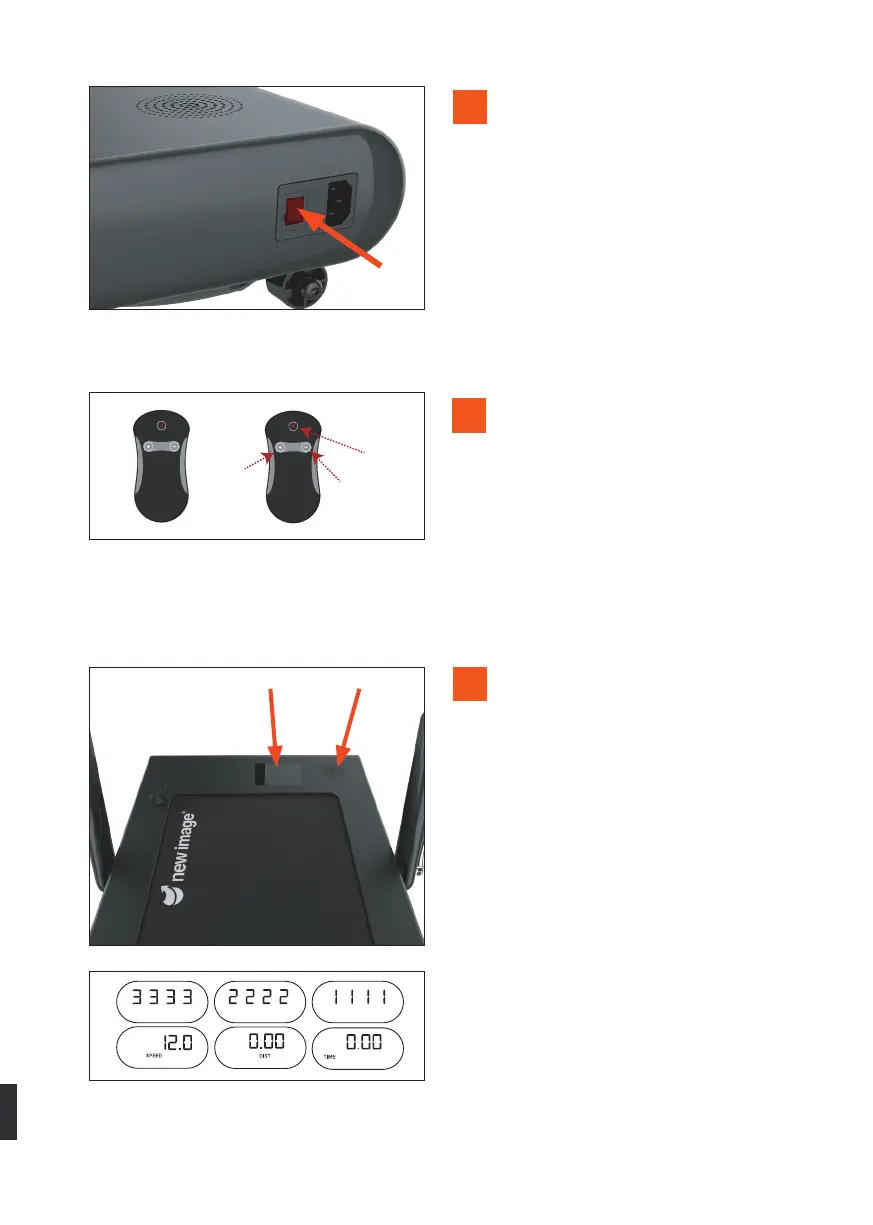
Power
button
Increase
Decrease
Power
button
Increase
Decrease
Page 5/6/7
8.
SpeakerDisplay
7
8
9
Turn on power switch located next
to the power input. This should light
up red and an audible beep should
sound. If an error message shows
on the display window, ensure the
magnetic safety clip is correctly in
place.
Once ready to operate the product,
holding the remote-control step on
to the treadmill and attach the safety
clip to clothing. When in use, ensure
the safety clip is attached firmly to
clothing and is clear of becoming
entangled with any part of body or
clothing during exercise. (Waistband
or bottom of a T-shirt is advised).
Prepare to start exercise. Using the
remote, press the power button and
listen for a further audible beep and
countdown on the display. Numbers
counting downwards to 1 will display.
The unit will then start to move at low
speed setting and will toggle between
screens (Time, speed & distance). Use
the plus and minus buttons to alter
the speed to suit requirement.
7


 To Next Page