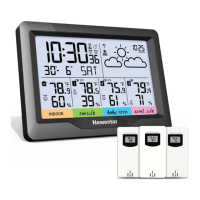
This document describes the Newentor Weather Station, a functional product designed to provide comprehensive weather and environmental information. Correct setup is crucial for its normal operation, and support is available via email, WhatsApp, Facebook, and Telegram.
The weather station features a 7.5-inch LED screen and displays data from both a main unit and a remote outdoor sensor. It measures indoor temperature from 15°F (−9.9°C) to 122°F (50°C) and outdoor temperature from -4°F (-20°C) to 140°F (60°C), with a temperature unit selection between °F and °C. Humidity is measured in the range of 20%RH to 95%RH for both indoor and outdoor environments. The barometric pressure measurement range is 600 hPa/mb (17.72 inHg) to 1100 hPa/mb (32.48 inHg).
Function Description:
The Newentor Weather Station provides a wide array of functions, including:
- Weather Forecast: Based on barometric pressure trends over the next 12-24 hours, not current weather. It displays symbols for Sunny, Slightly Cloudy, Cloudy, Rainy, Heavy Rainy, and Snowy. Barometric calibration takes 7-10 days for accurate local forecasts, but the current weather icon can be manually calibrated. The snowy icon appears only when the outside temperature is -4°C / 24.8°F.
- Time and Calendar: Displays time in 12/24-hour format, time zone, DST switch, hour, minute, month/date format, year, month, and date. It supports automatic time setting via WWVB radio signal, which synchronizes at 1:00/2:00/3:00 am daily. Manual time setting is also available.
- Daily Alarm and Snooze: Allows users to set a daily alarm. The alarm signal can be switched ON/OFF. A snooze function provides an additional 5 minutes of sleep.
- Temperature and Humidity Display: Shows current indoor and remote temperature and humidity, along with their respective trend indicators (rising, stable, or falling).
- Comfort Display: Calculates and displays indoor comfort levels across 5 levels (Comfortable, too cold, too hot) based on indoor temperature and humidity.
- Maximum/Minimum Temperature and Humidity: Records and displays the maximum and minimum temperature and humidity data for the past 24 hours. This data can be cleared and re-recorded.
- Outdoor Temperature Alert: Users can set upper and lower limits for outdoor temperature alerts. An alarm sounds for 5 seconds if the remote sensor temperature exceeds these limits. A frost alarm activates when the remote sensor temperature is between +30°F and +37°F or -1°C and +3°C.
- Barometric Trend Display: Indicates whether barometric pressure has risen, remained stable, or dropped by more than 1 hPa within 1 hour. A histogram visually represents atmospheric pressure trends.
- Lunar Phases and Tide Indicator: Displays 12 different moon phases according to the calendar.
- USB Charger: Includes a USB charger output socket (DC 5V 1A) for charging electronic devices. The weather station must be powered by its original power cord for this feature to work; batteries alone are insufficient.
- Low Battery Indicator: An icon appears when the outdoor sensor batteries need replacement.
Technical Specifications:
- LED Screen Size: 7.5 inches
- Indoor Temperature Range: 15°F (−9.9°C) to 122°F (50°C)
- Outdoor Temperature Range: -4°F (-20°C) to 140°F (60°C)
- Humidity Range (Indoor & Outdoor): 20%RH ~ 95%RH
- Barometric Pressure Range: 600 hPa/mb (17.72 inHg) to 1100 hPa/mb (32.48 inHg)
- Remote Receiving Frequency: 433.92MHz RF
- Transmission Range: 200 feet in an open area
- Power Supply (Main Unit): 2 x AA batteries (not included) or Power Adapter (included)
- Power Supply (Remote Sensor): 2 x AA batteries (not included)
- USB Charger Output: DC 5V 1A
- Temperature and Humidity Detection Cycle: Main unit: 60S; Remote sensor: CH1: 68S, CH2: 72S, CH3: 76S
- Default Temperature Alert Limits: Upper: 140°F/60℃; Lower: -4°F/-20℃
Usage Features:
- Package Contents: Includes the Weather Station, Outside Sensor, Power Charger, User Manual, and Button Function Manual.
- Initial Setup: Requires inserting 2 x AA batteries into both the main unit and remote sensor, observing polarity. The remote sensor channel (1, 2, or 3) must match the main unit's selected channel.
- Remote Sensor Connectivity: The main unit can connect to up to 3 remote sensors simultaneously, provided each sensor is on a different channel. The device comes with one remote sensor.
- Backlight Control: When powered by batteries, the backlight is on for 15 seconds after pressing the "O/zz" button to save power. When plugged in, the backlight brightness can be adjusted or kept continuously on using the dedicated brightness button.
- WWVB Signal Search: The station automatically searches for WWVB signals to set time and date. During this process, the screen darkens, and only the "O/zz" and "▲" buttons are active. A strong signal is indicated by a solid radio mast icon, while a weak signal shows a flashing icon. For optimal reception, place the device at least 8 feet from interference sources and near a window if in a concrete room.
- Button Functions: Various buttons on the front and back of the unit allow for mode switching, setting adjustments (time, alarm, alerts), display changes (calendar, alarm, max/min data), and channel selection.
- Temperature/Humidity Deviation: There may be ±1℃/1.8°F deviation for temperatures between 0℃~40℃/32°F~104°F, and ±2℃/3.6°F in other ranges. Humidity may have ±5% deviation between 40%~80%, and ±8% in other ranges.
- Error Display: "LLLL" or "HHHH" will be displayed for barometric pressure readings below or above the minimum/maximum range, respectively. "LL.L" or "HH.H" will be displayed for temperature readings below or above range. "--" indicates a channel not connected to a remote sensor.
Maintenance Features:
- Battery Replacement: The low battery icon indicates when outdoor sensor batteries need to be replaced.
- Cleaning: Clean battery and device contacts if necessary before inserting batteries.
- Battery Safety: Remove drained batteries promptly. Do not mix used and new batteries, or different types of batteries. Avoid extreme environmental conditions. Remove batteries if the device will not be used for a long period.
- Repair: Do not make changes to the item. Repairs should only be performed by professional repair shops.
- Warranty: Newentor provides a 1-year warranty from the date of purchase.
The Newentor Weather Station is designed to be user-friendly, providing essential weather and environmental data for daily planning and comfort monitoring.

 Need help?
 General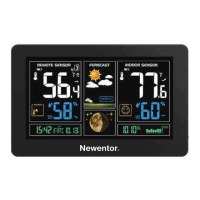

 To Next Page