Need help?
Do you have a question about the Newentor Weather Station and is the answer not in the manual?
Lists all components included in the package with their respective quantities and figures.
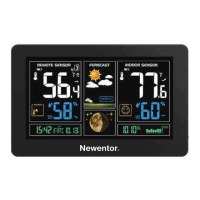
Details the physical components and display elements of the weather station with corresponding labels.
Explains the function of each button on the weather station under different modes and operations.
Instructions for installing batteries and connecting the outdoor sensor to the main unit for initial operation.
Step-by-step guide to manually set the time, date, time zone, DST, and display formats.
Explains the automatic time synchronization process using WWVB signal and how to initiate manual reception.
Instructions on how to set, manage, and configure daily alarms for Alarm 1 and Alarm 2.
Procedure for stopping a ringing alarm signal and understanding its repeat behavior.
How to activate the snooze mode when an alarm is ringing, and the duration before it sounds again.
How to view and reset the recorded maximum and minimum temperature and humidity values using the MEM button.
Guide on using the °C/°F/- button to toggle between Celsius and Fahrenheit temperature display.
Details when the ice alert symbol appears and flashes, indicating specific outdoor temperature ranges.
Explanation of weather symbols indicating future fluctuations and how the forecast is calculated.
Defines the conditions (temperature and humidity) under which comfort level icons are displayed.
Explains the meaning of arrows indicating rising or falling barometric pressure and trend stability.
How to turn on the backlight and its duration for better visibility in the dark.
Identifies the low battery icon and advises on timely battery replacement for the outdoor sensor.
Details the LCD screen size, calendar range, humidity/temperature ranges, and power supply requirements.
 Display
| LCD screen size | 5.2 inches x 3.5 inches |
|---|
 Operating Environment
| indoor humidity measurement range | 20%RH~95%RH |
|---|---|
| outdoor humidity measurement range | 20%RH~95%RH |
| indoor temperature measurement range | -9.9°C(14.2°F)~50°C(122°F) |
| outdoor temperature measurement range | -25°C(-13°F)~50°C(122°F) |
 Power
Power| weather station battery requirement | 2 x LR06AA |
|---|---|
| wireless outdoor sensor battery requirement | 2 x LR06AA |
Wireless Connectivity| RF transmitting frequency | 433.92MHz |
|---|---|
| transmission range in open area | 60m/200ft |

 To Next Page