Operation
1. Turning On/Off
• Press the power button on the top right-hand side of the display for three seconds.
The screen will light up as the display boots up and bike switches on.
• To switch off, press the power button for three seconds.
2. Power Assist levels
• There are ve levels of pedal assist: 1 is the lowest and 5 is the highest.
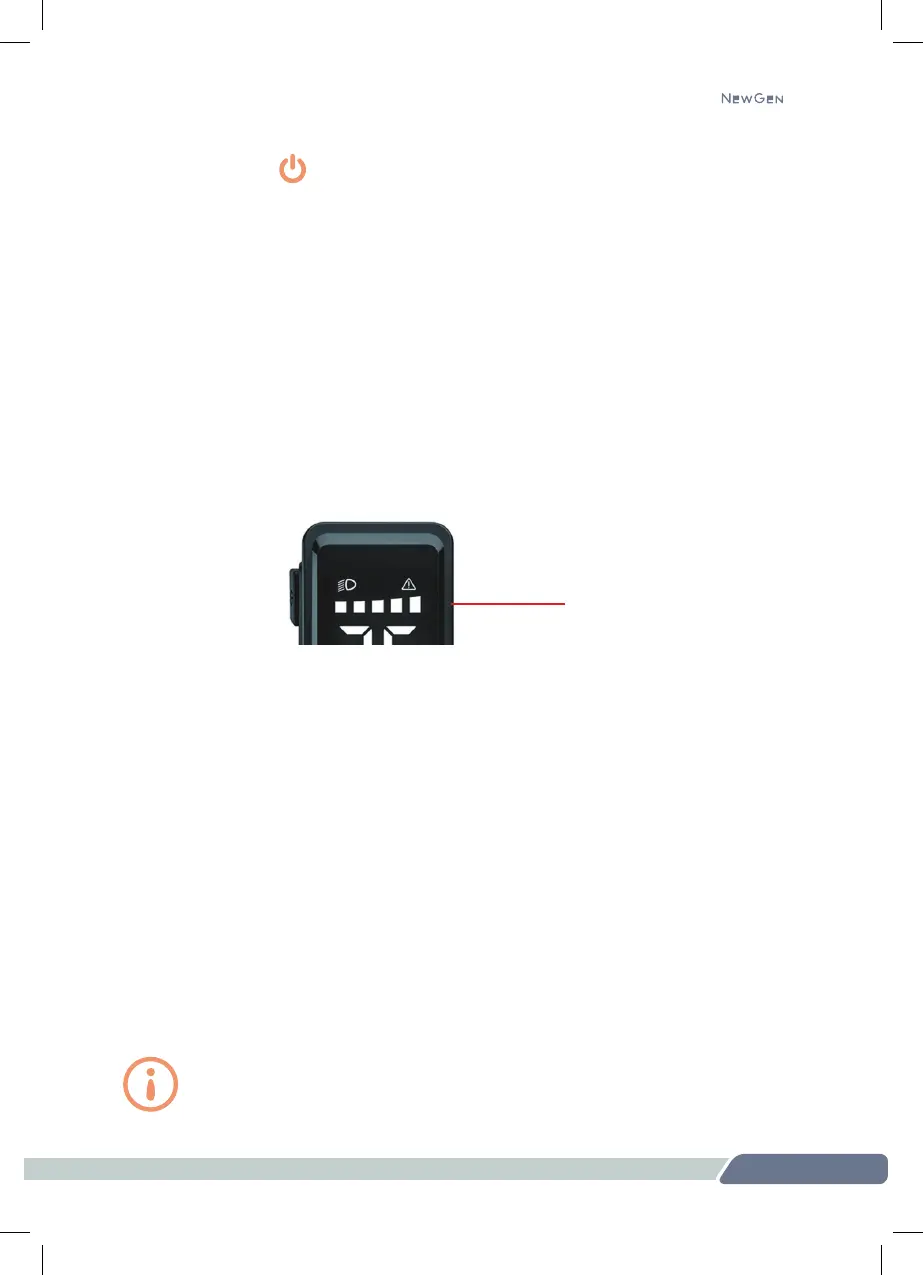
• The assist level is displayed along the top of the screen. Each square represents
a level of assist, 1- 5 across the screen.
• Press the top or bottom of the display to select the level of assist required. The
assist level will always default to level 1 when the bike is switched on.
3. Walk Assist Mode
• With the bike switched on, press the bottom of the display for two seconds to put
the bike into walk assist mode. This will gently engage the motor and accelerate
the bike to a walking pace (4 mph). Keep pressing the lower part of the display
to maintain walking mode.
• To exit walking mode and turn off the assist, stop pressing the display.
4. Headlight on/off
• With the bike switched on, press the top of the display for two seconds to turn
the light(s) on. The headlight icon will be displayed on the screen.
• To switch the light(s) off, press the top of the display for another two seconds.
18
345
Pedal assist level
Remember to use both the front and rear lights when riding at night
or in low-light conditions. If your 345-E doesn’t have a front light,
we strongly suggest you purchase one before riding at night.


 To Next Page