EasyManua.ls Logo

Newland NLS-NFT10 - User Manual

Newland NLS-NFT10
69 pages
Print Icon
To Next Page IconTo Next Page
Loading...
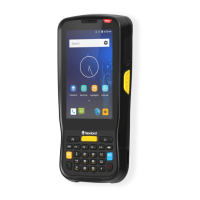
Portable Data Collector
NLS-NFT10

Table of Contents

Questions and Answers

Summary

About This Guide

Introduction

Provides an overview of the user guide and its purpose.

Documentation Set

Lists the available documentation for the NFT10 device.

Chapter Descriptions

Briefly describes the content of each chapter in the manual.

More Information

Directs users to the official website for additional product and support information.

Getting Started

Introduction

Explains the chapter's focus on device parts, charging, and initial power-on.

The NFT10

Details the physical components and layout of the NFT10 device.

Charging the Battery

Provides instructions and visual indicators for charging the NFT10 device.

On-screen Buttons

Explains the function of the virtual navigation buttons on the NFT10 screen.

Communicating with PC

Guides users on how to connect the NFT10 to a computer via USB for file transfer.

Installing SIM Card;TF Card

Step-by-step instructions for inserting SIM and TF cards into the NFT10.

Basics

Introduction

Introduces the basic setup and usage procedures for the NFT10.

Switching On;Rebooting;Switching Off the NFT10

Details the procedures for powering on, restarting, and powering off the NFT10 device.

Locking;Unlocking the NFT10

Explains how to secure the device using the power key and screen lock features.

Unlock with Fingerprint

Guides users on setting up fingerprint unlock for enhanced security.

Home Screen

Describes navigation, app management, and customization of the NFT10's home screen.

Status Icons

Explains the meaning of various icons displayed in the notification bar.

Installing App

Outlines methods for downloading and installing new applications on the NFT10.

Uninstalling App

Provides steps to remove applications from the NFT10 device.

Date & Time

Details how to configure the date and time settings on the NFT10.

Display

Covers adjusting display settings like brightness, dark theme, and wallpaper.

Ringtones

Explains how to set ringtones and notification sounds for the NFT10.

Restoring Factory Settings

Guides users on how to reset the device to its original factory state.

Language & Input Method

Describes how to change the device language and input method settings.

Shortcuts to Apps

Explains how to create app shortcuts on the home screen for quick access.

Widgets

Details how to view, open, and add widgets to the NFT10's home screen.

Scanning Barcodes

Introduction

Introduces scanning tips and scanner setup instructions for the NFT10.

Scanning 1 D Barcode

Provides guidance on optimal positioning and angle for scanning 1D barcodes.

Scanning 2 D Barcode

Explains how to align the NFT10 and adjust angles for scanning 2D barcodes.

Programming Scanner

Guides users on accessing scanner settings to configure parameters.

Enable Scan

Details how to enable or disable the scanning functionality on the NFT10.

Output Mode

Describes the different modes for outputting scanned barcode data.

Scan Mode

Explains the various scan modes available for barcode reading on the NFT10.

Scan Trigger

Explains how to configure the left/right scan keys as triggers.

Prefix & Suffix

Guides on setting hexadecimal values for prefixes and suffixes for barcode data.

Good Read Indicator

Explains how the device provides feedback for a successful barcode read.

Encoding

Describes character encoding options for interpreting barcode data.

Data Edit

Details how to edit barcode data using scripts.

Broadcast-output Settings

Explains how to configure scan information output via broadcast.

Symbologies

Covers enabling and configuring various barcode symbologies.

Advanced

Discusses advanced scanning features like Acuscan and Multiple Barcodes.

Other

Explains other advanced settings related to scanning, such as noise reduction.

Bluetooth

Introduction

Introduces the chapter on connecting the NFT10 to Bluetooth devices.

Connecting to Bluetooth Devices

Provides step-by-step instructions for pairing and connecting Bluetooth devices.

Unpair;rename a paired Bluetooth device

Guides on how to manage paired Bluetooth devices by unpairing or renaming.

Wi-Fi

Introduction

Introduces the chapter on connecting the NFT10 to Wi-Fi networks.

Join a Wi-Fi network

Provides instructions for connecting to available Wi-Fi networks by entering credentials.

Wi-Fi Settings

Covers configuring advanced Wi-Fi options like Metered, Proxy, and IP settings.

Metered

Explains how to manage Wi-Fi connections as metered or unmetered.

Proxy

Details the different proxy types and their configuration for network access.

IP Settings

Guides on setting IP addresses using DHCP or static configuration.

Add Network

Explains methods for adding new Wi-Fi networks, including QR code scanning.

Wi-Fi Preferences

Covers enabling automatic Wi-Fi connection and notifications for public networks.

Saved Networks

Describes how to view, manage, and share previously connected Wi-Fi networks.

Wi-Fi Data Usage

Provides information on how to review Wi-Fi data usage statistics.

Mobile Network

Introduction

Introduces the chapter on using the NFT10 with a 4G mobile network.

Turn on the cellular network

Guides on enabling cellular data for internet connectivity.

APN Settings

Details how to configure Access Point Names for cellular data connection issues.

Others

Camera

Explains how to launch and use the NFT10's camera features.

GPS

Guides on enabling and using the GPS location services on the NFT10.

NFC

Explains how to enable and use the NFC feature for data exchange.

Whitelist Manager

Introduction

Introduces the Whitelist Manager app for controlling app installations.

Logging in to Whitelist Manager

Provides instructions for accessing and logging into the Whitelist Manager.

System Update

Introduction

Introduces the two methods for updating the terminal's system software.

Online Update

Guides on updating the NFT10 system software over the internet.

Local Update

Details how to update the system software using a local file on the NFT10.

App Development Guide

Development Environment

Advises on the appropriate Android SDK version for app development on the NFT10.

Use of Non-standard Interfaces

Refers users to the API handbook for non-standard interface information.

Maintenance & Troubleshooting

Introduction

Introduces safety, handling, and troubleshooting information for the terminal.

Important Safety & Handling Information

Provides critical safety guidelines for using and maintaining the NFT10.

Wireless Functionalities

Warns against using wireless functions in restricted areas or where they may cause interference.

Use & Maintenance

Offers essential advice on the proper use and maintenance of the NFT10.

Troubleshooting

Lists common problems and their solutions for the NFT10 device.

FCC Warning

Newland NLS-NFT10 Specifications

General IconGeneral
Touch ScreenYes
RAM2GB
ROM16GB
Humidity5%RH to 95%RH (non-condensing)
Interfaces SupportedUSB
Resolution480*800
CPUQuad-core 1.3 GHz
Expandable StorageMicro SD card
ConnectivityBluetooth 4.0, Wi-Fi 802.11 a/b/g/n
Barcode Scanning1D/2D barcode scanning
CertificationsRoHS, CE

Related product manuals