Multi-media Input Source Setting
Picture Setting
Projection
Mode
Image
Scaling
Aspect
Ratio
Picture
Mode
Color
Range
System Setting
OSD
Language
Software
Update
Restore
Factory Default
Auto
Sleep
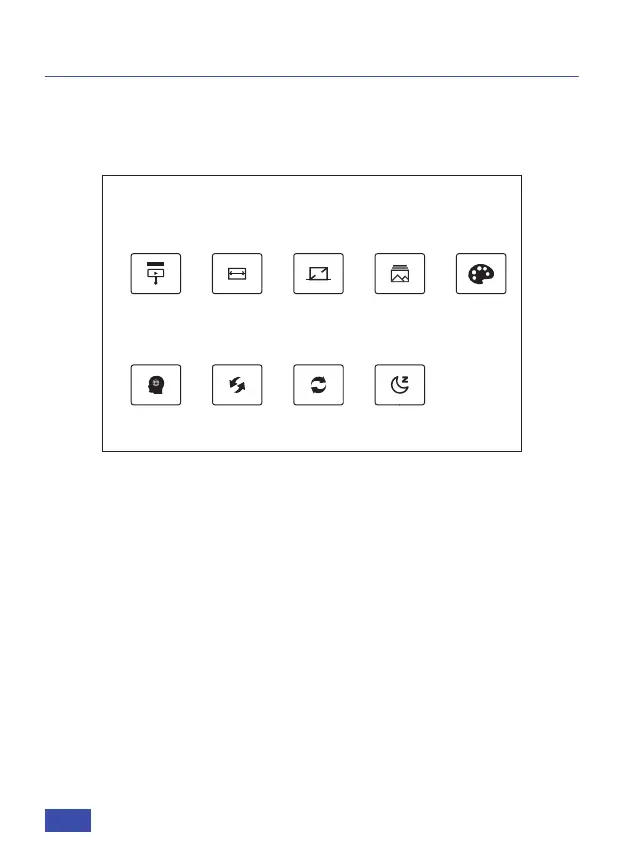
Under the Setting tab you will find the options listed below. The top
options are the Picture Setting.
Projection Mode: To shift the mode of the projector. The options are:
standard, mirrored, flipped, and flipped and mirrored.
Image Scaling: Changes the size of the objects shown on the screen.
Aspect Ratio: The aspect ratio is a figure that identifies the size of an
image by its width and height. Common aspect ratios are 4:3 and
16:9.
Picture Mode: Adjust projector settings. Adjust color, brightness,
contrast, and/or sharpness.
Color Range: Adjust the color range of the projector.
SETTINGS MENUS
PICTURE SETTING
Under the Setting tab you will find the options listed below. The
bottom options are the System Setting.
SYSTEM SETTING
US 21


 To Next Page