
 Need help?
Do you have a question about the NexLink NL102 and is the answer not in the manual?
Defines DTCs as codes stored by the onboard computer for vehicle problems.
Details the five-digit alphanumeric structure of OBD II Diagnostic Trouble Codes.
Explains fault codes for J1587/J1708 and J1939 protocols and their components.
Details SAE J1708, J1587, and J1939 automotive diagnostic protocol standards.
Explains how to power the NL102 using the vehicle's Data Link Connector (DLC).
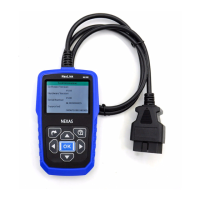
The NexLink NL102 is a diagnostic tool specifically designed for heavy-duty vehicles, offering comprehensive diagnostic capabilities for both OBDII-compliant vehicles and heavy-duty trucks. Its primary function is to enable users to read and clear Diagnostic Trouble Codes (DTCs) and view live data streams, including a color graphing feature for enhanced visualization. The device supports all 10 modes of OBDII testing, covering aspects like EVAP, O2 Sensor, I/M Readiness, MIL Status, VIN Information, and on-board monitor testing, ensuring a complete diagnostic overview. For heavy-duty applications, it supports multiple data bus protocols, including J1587 and J1939, making it compatible with a wide range of vehicles. The NL102 can be connected to a PC via a USB cable for software upgrades, ensuring it stays current with the latest vehicle diagnostic standards.
The NL102's core function revolves around vehicle diagnostics. It allows users to access and interpret Diagnostic Trouble Codes (DTCs) stored in the vehicle's on-board computer system. These codes are crucial for identifying specific problem areas within a vehicle. The device differentiates between OBDII DTCs, which are five-digit alphanumeric codes indicating the control system, origin, and operating conditions of a fault, and DTCs for J1587/J1708 and J1939 protocols, which include Subsystem Identifier (SID) or Suspect Parameter Number (SPN), Failure Mode Indicator (FMI), and Occurrence (OC) to detail the function that failed, how it failed, and how many times it occurred.
Beyond simply reading codes, the NL102 offers the ability to clear existing or historical trouble codes. This is a critical step after repairs have been made to confirm that the issue has been resolved and to reset the vehicle's diagnostic system. However, it's emphasized that users should retrieve and record codes before clearing them and recheck for codes afterward to ensure the problem is truly fixed.
A significant feature is the "Live Data" function, which allows users to view real-time data streams from the vehicle. This data can be displayed in character form or, for a more intuitive understanding, with a live color graphing feature. This visual representation of data helps in diagnosing intermittent problems or observing how various parameters change under different operating conditions. The device also supports viewing "Freeze Frame Data," which is a snapshot of vehicle operating parameters recorded at the moment an emission-related fault occurs. This information is invaluable for identifying the conditions under which a problem manifested.
For emissions-related diagnostics, the NL102 includes "I/M Readiness" status, indicating whether the vehicle's emissions-related systems have completed their diagnostic tests and are ready for inspection. It also provides "O2 Sensor Test" results, which are the ECU's last recorded O2 sensor test values, and "On-Board Monitor Test" results for specific components/systems. The "Evap System" function allows the initiation of a leak test for the vehicle's EVAP system, although the NL102 itself signals the vehicle's computer to perform the test rather than conducting it directly. Finally, the "Vehicle Information" option allows users to view important vehicle details such as VIN, CID, and CVN.
Operating the NL102 involves a straightforward process. After ensuring the vehicle's ignition is off, the user locates the heavy-duty vehicle's Data Link Connector (DLC). Depending on the vehicle, either a 6-pin or 9-pin DLC diagnostic adaptor is selected and connected to the included OBDII 16-pin connector, which then plugs into the vehicle's DLC. Once connected, the ignition is turned on (engine can be off or running), and the system automatically enters the main menu interface.
The main menu presents several key options: "OBDII/EOBD" for diagnosing cars, "HD OBD" for heavy-duty trucks, "DTC Lookup" for searching trouble code definitions, "Review Data" for accessing stored diagnostic information, and "Setup" for configuring system settings.
Navigating the menu is facilitated by scroll buttons (up/down) for selection and left/right buttons for moving between characters or turning pages when viewing detailed information. An "OK" button confirms selections, and an "ESC" button returns to the previous menu.
For "DTC Lookup," users can input characters and digits to search for specific DTC definitions, with the ability to scroll through multiple screens of information if a definition is extensive. The "Review Data" function allows users to view previously recorded data, including codes and live data, from the last test performed.
The "Setup" menu offers customization options such as turning the beeper ON/OFF, selecting the system language, and setting the measurement unit system.
When diagnosing, the NL102 first scans for supported protocols. If an OBDII vehicle is tested, it proceeds to a function selection screen. If a heavy-duty truck is diagnosed, it continues scanning for truck protocols and then enters a system selection screen, allowing the user to choose specific systems like Engine, Transmission, Brake, Cluster, Body Control, or Chassis for diagnosis.
Within the "HD OBD Diagnosing" section, users can select "Read DTC" to view current or historical trouble codes, "Clear DTC" to erase them, and "Live Data" to monitor real-time parameters. The "Live Data" feature further allows users to "View All Items," "Select Items" for specific monitoring, or "View Graphic Items" to display selected data in a live graphic form (supporting one item at a time).
For OBDII diagnosing, the "Diagnostic Menu" provides options like "Read Codes," "Erase Codes," "I/M Readiness," "Data Stream," "Freeze frame," "O2 Sensor Test," "On-Board Monitoring," and "Evap System (modes$8)." When reading codes, the NL102 displays detailed descriptions, and for manufacturer-defined DTCs, it allows selection of the manufacturer to view specific content, including sensor structures, fault causes and results, and inspection methods.
The NL102 is designed with ease of maintenance in mind, primarily focusing on software updates and physical care. The device features a USB port that connects to a computer, enabling users to update the software online. This ensures the tool remains compatible with new vehicle models and diagnostic standards, keeping its functionality current over time.
Physical maintenance involves keeping the device dry, clean, and free from oil, water, or grease. A mild detergent on a clean cloth can be used to clean the exterior of the NL102 when necessary. This simple care routine helps prolong the device's lifespan and ensures reliable operation.
The manual also outlines safety precautions that, while not directly maintenance features, contribute to the longevity of the device and the safety of the user. These include performing automotive testing in a safe environment, avoiding operating the tool while driving, wearing safety eye protection, keeping hands and tools away from moving or hot engine parts, operating in well-ventilated areas, using wheel blocks, exercising caution around high-voltage ignition components, ensuring the transmission is in P or N with the parking brake engaged, and having a fire extinguisher nearby. Crucially, it warns against connecting or disconnecting test equipment while the ignition is on or the engine is running, which could prevent damage to both the vehicle and the NL102.
The device also incorporates a "Battery Monitor" function, which provides warnings if the vehicle's battery voltage drops below certain thresholds (11.8V and 10.8V). While this is a diagnostic feature for the vehicle, it indirectly serves as a maintenance alert for the user, prompting them to charge the battery or stop testing to prevent potential issues with the vehicle's power supply, which could affect the NL102's operation.
In summary, the NL102 is a robust diagnostic tool that combines comprehensive functionality with user-friendly operation and simple maintenance requirements, making it a valuable asset for diagnosing both light-duty and heavy-duty vehicles.
 General
| Type | OBD2 Scanner |
|---|---|
| Screen Size | 2.8 inches |
| Protocols | KWP2000, ISO9141, CAN |
| Display | LCD |
| Compatibility | All OBDII/EOBD compliant vehicles |
| Functions | Read and clear trouble codes, live data stream, freeze frame data |

 To Next Page