NexLink NL102 User Manual
11
5. Diagnose
In Figure 4-1, press [
OK
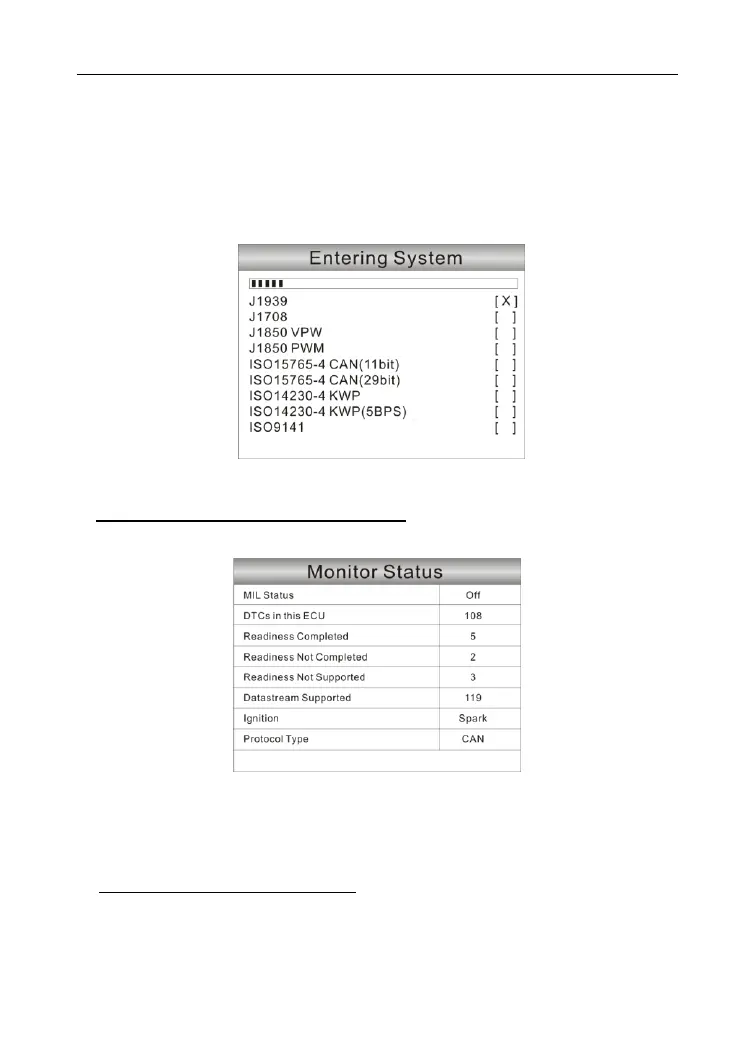
] to scan the protocols of heavy-duty trucks and OBDII
vehicles, a screen similar to figure 5-1 will appear:
Figure 5-1
If a vehicle equipped with OBDII is tested, the system will enter the function
selection screen once scanning has finished successfully.
Figure 5-2
Press [
OK
] to enter the system selection screen. For detailed operations,
please refer to
Chapter 5.2 “OBDII Diagnosing”
.
If a heavy-duty truck is diagnosed, the system will continue scanning the
protocols the truck supports and then enter the system selection screen. See
figure 5-3.


 To Next Page