
 Need help?
Do you have a question about the Next Level Racing ERS2 and is the answer not in the manual?
Important warnings regarding the use of tools, alignment, and the assembly process.
Cautionary notes concerning small parts and potential choking hazards.
Contact details for assistance and inquiries regarding the product.
Remove pre-installed bolts and washers from the seat back.
Lift recliner lever and adjust seat back to perpendicular position.
Align seat back threaded inserts with seat recliner mounting holes.
Bolt and secure the seat back using M8 bolts and washers.
Align and secure top covers with M5 machine screws.
Adjust seat back to desired angle using recliner levers.
Uninstall seat brackets and loosen ratchet handles from cockpit frame.
Slide seat rails back to access rear mounting holes on the slider.
Align seat spacers and rails, then secure with M8 low profile bolts.
Align front rails with extrusion, place spacer, and secure with M8 bolts.
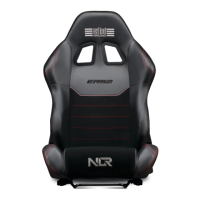
Indicates the completion of the ERS2 seat installation.
Slide GTTrack seat back to access front bolts.
Remove the front bolts securing the seat sliders to the frame.
Slide GTTrack seat forward to access rear bolts.
Remove the rear bolts securing the seat sliders to the frame.
Complete removal of the GTTrack seat assembly from the frame.
Align ERS2 seat slider mounting holes with GTTrack frame inserts.
Align rear slider holes with spacers and secure with M8 bolts.
Slide ERS2 seat back to access front holes for attachment.
Align middle slider holes with spacers and secure with M8 bolts.
Final step confirming the ERS2 seat installation is complete.
Repeated warnings about tool usage, alignment, and forcing parts.
Warning about small parts being a hazard for children under 3 years.
Links to assembly video and contact information for customer support.
 General
| Product Type | Racing Simulator Cockpit |
|---|---|
| Frame Material | Steel |
| Seat Type | Bucket Seat |
| Color | Black |
| Foldable | No |
| Material | Steel, Fabric |
| Weight Capacity | 150 kg |
| Product Weight | 50 kg (110 lbs) |
| Weight | 25 kg |

 To Next Page