DRAFT 3 06 09 2021
17
23. Update your Control Box Firmware per this link:
www.nextwavecnc.com/firmware
Controller Firmware version v4.5.x.x or higher is required.
24. Update your VCarve/Aspire post processor per this link:
www.nextwavecnc.com/postprocessor
25. RPM settings from VCarve/Aspire will now be saved in your .tap file. When you run the .tap file the spindle will
now automatically turn on and run at the RPM speed that was set for that toolpath in VCarve/Aspire.
NOTE: It takes about 5-6 seconds for the spindle to come up to speed. The spindle will not start cutting until this
time has elapsed.
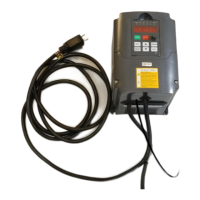
26. Plug in the VFD and the Control Box into a switched power strip. They can be plugged into the same or
separate power strips – either setup is OK.
27. Switch ON the power strip and let the VFD turn on fully (about 3-5 seconds).
28. Turn OFF the Control Box (if it’s ON) using the switch on the back the Control Box or the red E switch on the
front of the Control Box. Wait 2 seconds and turn switch back ON.
NOTE: The VFD MUST be turned ON and fully active before turning on the Control Box. This allows the VFD
and the Control Box to correctly sync. Failure to do so will prevent the spindle from starting automatically.
If you have problems with the setup outlined in this document, please contact Tech support at
support@nextwavecnc.com


 To Next Page