12
CHANNEL FREQUENCY USE
Channel 63 Reserved for Future Expansion
Channel 64 477.0125 Simplex
Channel 65 477.0375 Simplex
Channel 66 477.0625 Simplex
Channel 67 477.0875 Simplex
Channel 68 477.1125 Simplex
Channel 69 477.1375 Simplex
Channel 70 477.1625 Simplex
NOTE: This frequency guide is just for use with the same channels of walkie talkies,
can not be used in channel converting function.
CHANNEL CONVERTING FUNCTION
TURN ON CHANNEL CONVERTING FUNCTION
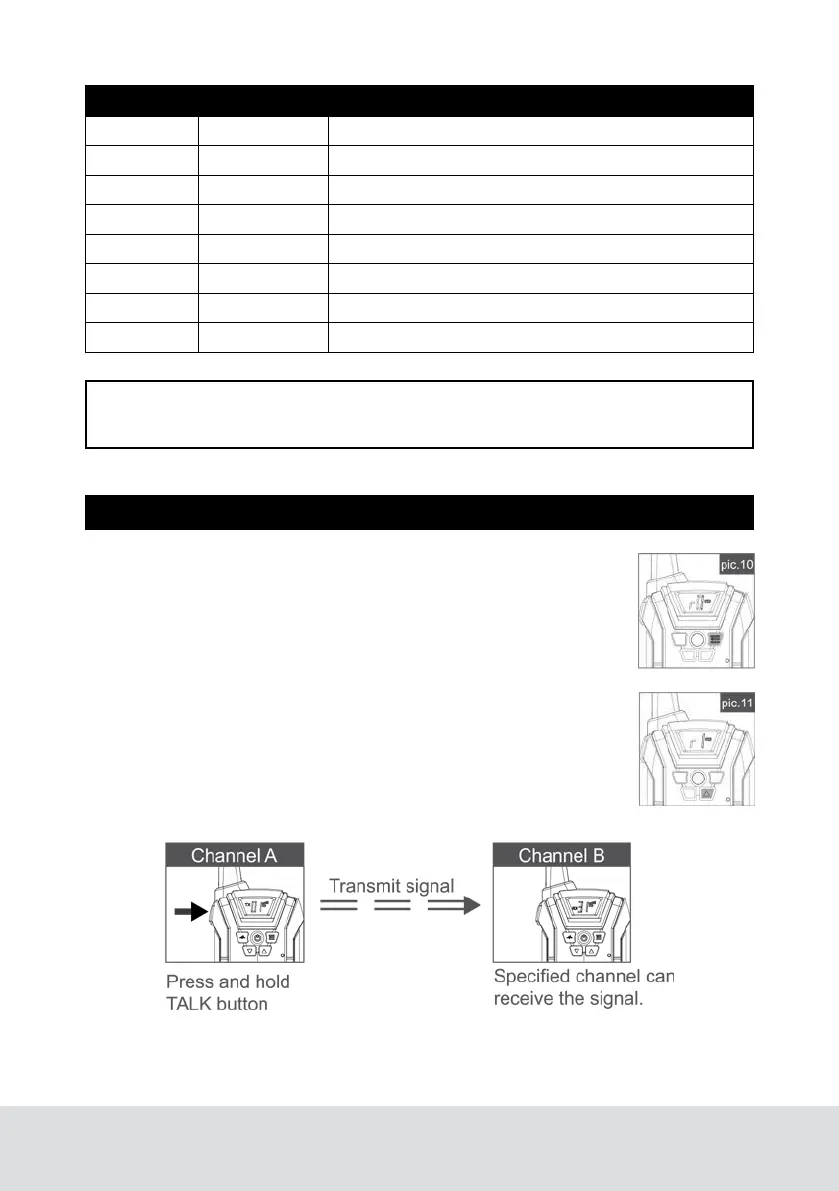
Press the menu button 4 times to enter the channel converting
mode (See pic.10).
Press the up button, the LCD frequency will display “r 1” (See
pic.11), indicating that channel converting function is turned on.
Press the TALK button to confirm.
Press and hold the TALK button, the signal will be transmitted to
the specified channel (Please refer to converting channel guide),
the walkie talkies which in the same channel will not be able to
receive the signal (See below picture).



 To Next Page