In the following content, all the SMS content is mark by “”, and this “” is not include
in the SMS content, it is only to used to mark the SMS content.
Before Using
1 Power on / off
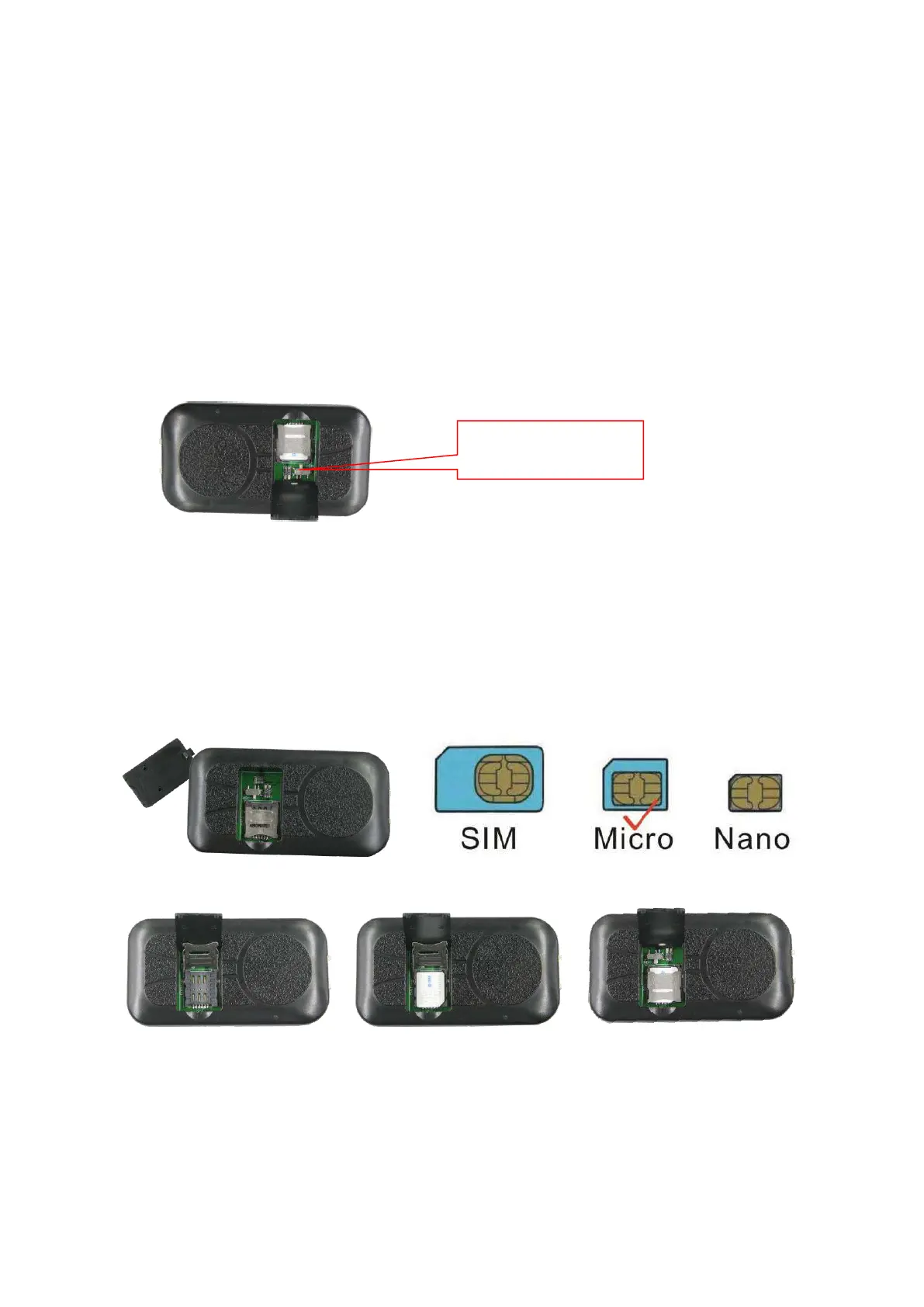
Open SIM card room cover with finger, slide the switch to the ON position (please refer the following
diagram), in the direction of the arrow , the tracker will power on, if the tracker battery is low, the power & GND
wire connect to car battery is OK, after the tracker is powered on, the LED will flash, if the Green LED flash
once every 4 seconds, it means the tracker work well, please refer the above detail LED flash indicator.
2 Install SIM card (Micro SIM Card)
This tracker use 2G/3G/4G Micro sim card, open the SIM card room cover, the SIM card holder can be
seen, slide the metal cover to “OPEN” direction to open the sim card holder, put the SIM card to the SIM card
holder (pay attention to the SIM card direction), press and slide the metal cover to “LOCK” direction to lock the
SIM card.
Note:
1> This tracker use 2G/3G/4G network, and it upload tracking only through internet.
2> Enable the SIM card data service (some SIM card need send SMS or USSD command to enable
GPRS function), order a data package (20-30M/month) can save data charge (Normally most of the
tracker every month data cost is lower than 20MB).
Slide the switch
To “ON” position


 To Next Page