3
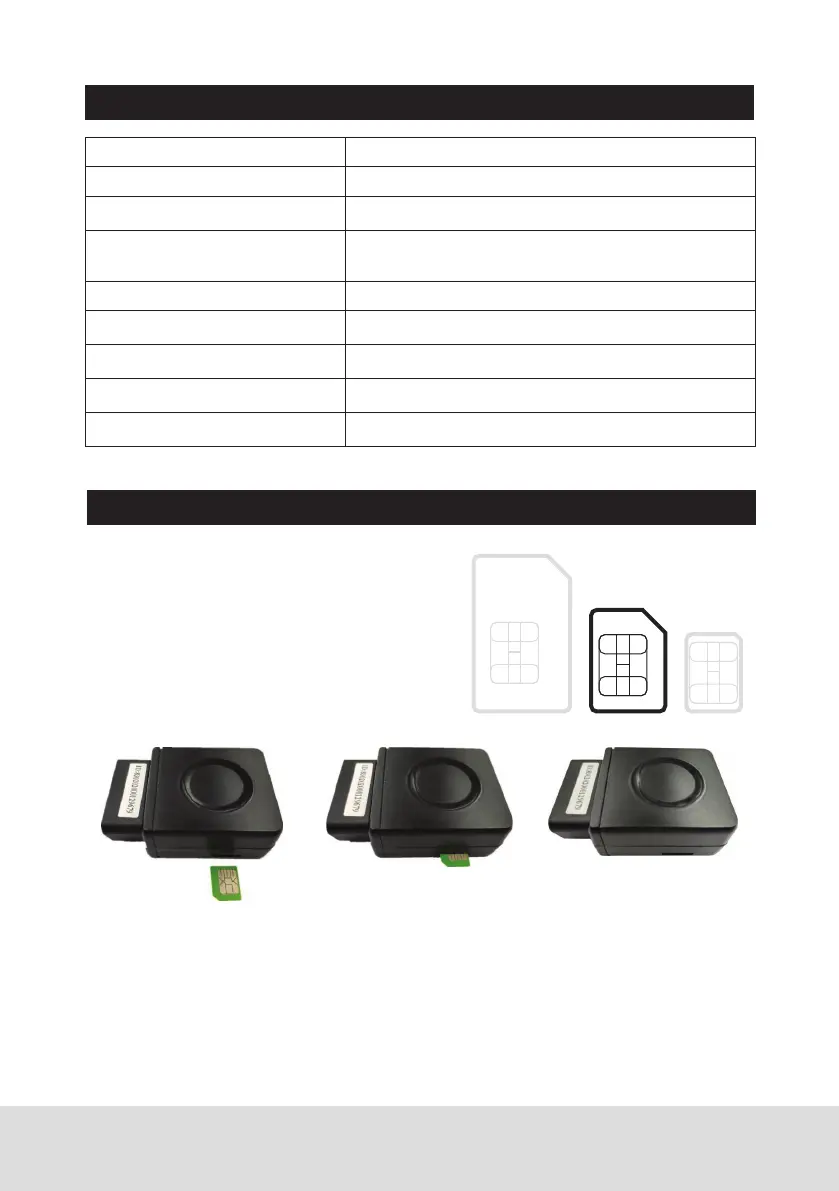
INSTALLATION:
LED INDICATOR DESCRIPTION:
Note:
• This tracker uses 2G GSM 3G WCDMA & 4G LTE network, and it upload
information by internet, it can not work in CDMA network or CDMA2000
network.
• Before installing or uninstalling the SIM card, please power off the tracker.
• APN and user name & password for internet visiting need to be set, the
SMS command please refer the following.
1. Install SIM Card (Micro SIM ONLY)
Just push the SIM card into the tracker by
the following direction, the SIM card will
lock in the SIM card holder, please pay
attention the SIM card direction & metal
pin face down. To eject the SIM card, push
the SIM card in, the SIM card will come out
a little and then it is safe to remove.
GREEN LED Flash once 2G/3G/4G & GPS working well
GREEN LED Flash twice 2G/3G/4G working well but no GPS signal
GREEN LED Flash three times 2G/3G/4G & GPS working well but battery low
GREEN LED Flash four times 2G/3G/4G working well but battery low and no
GPS signal
GREEN LED ON continuously 2G/3G/4G searching network
GREEN LED OFF continuously Power off
GREEN LED Flash fast Incoming a call or sending SMS
RED LED Flash once Uploading current tracking
RED LED Flash twice Can not upload tracking now
Micro
SIM


 To Next Page