Rear panel
1. Preliminary steps
2. Product layout
Thank you for purchasing the new Nebula 1200-AC dual band router
from Nexxt Solutions™. If any of the following items are mismatched,
missing or damaged, please contact the store from whom you
purchased the unit for immediate replacement.
This advanced network device works as wireless router, universal
repeater and WISP client. Before setting up the router, you must verify
that you have high-speed internet access available. The most widely
used connection nowadays is broadband DSL or Cable. The description
used in this guide is based on that type of connection.
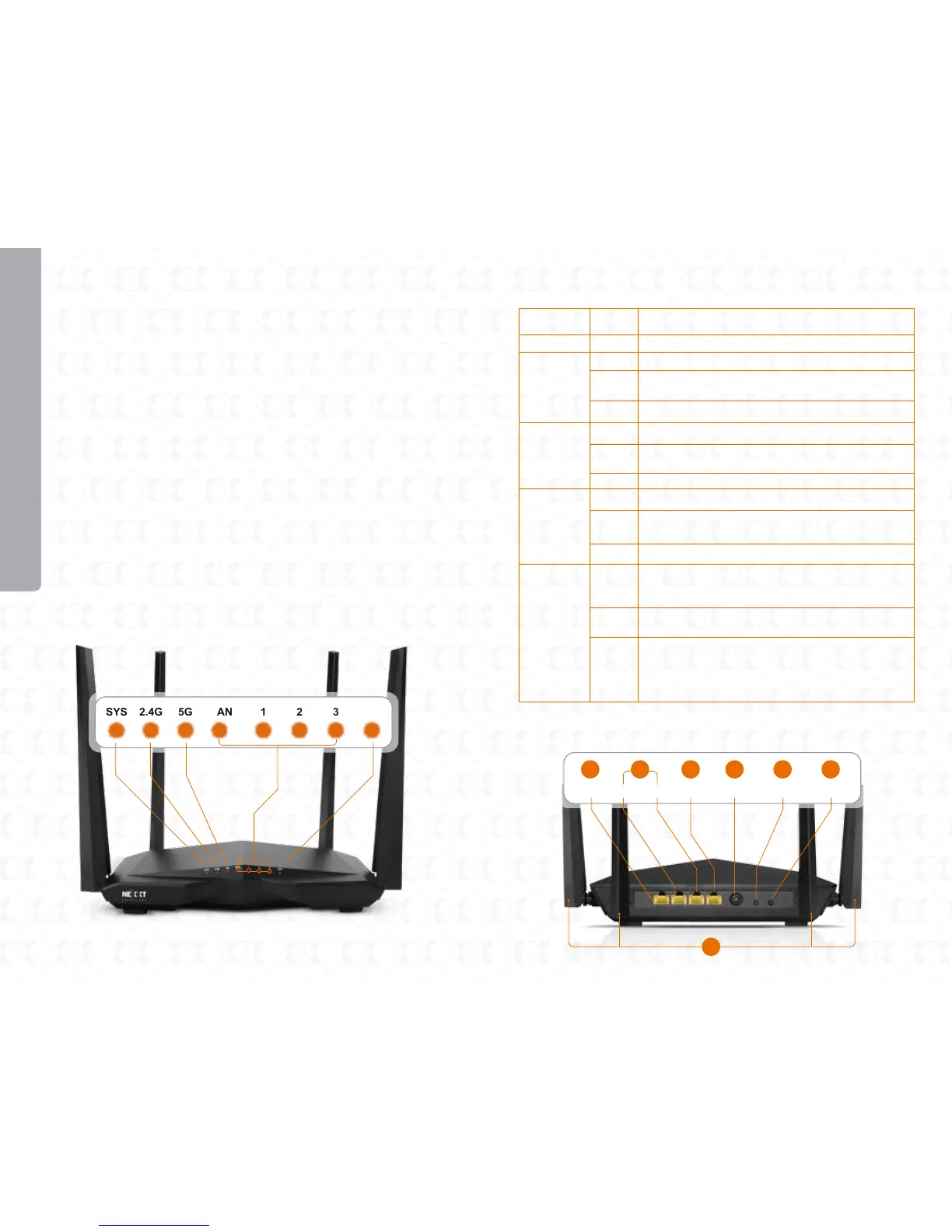
LED indicators on the front panel provide information about network
activity, the connection and link status of the ports in real time. They
also facilitate activity monitoring and troubleshooting the performance
of the device.
• Dual band AC wireless router
• Power adapter 110/220V
• Network cable
• User guide
LED
indicator
SYS
2.4G
5G
WAN/1/2/3
WPS
Description
The system is working properly
The device is actively sending or transmitting data
wirelessly over the 5GHz band
The 2.4GHz wireless connection is enabled
The device is actively sending or transmitting data
wirelessly over the 2.4GHz band
The 5GHz wireless connection is enabled
The device is actively sending or transmitting
packets over that port
The 5GHz connection is disabled
The 2.4GHz connection is disabled
An ethernet cable is connected in this port
No ethernet connection is detected on this port
The router is performing WPS authentication
on a client device
After a client device is successfully added to the
network via WPS, this LED stays illuminated for
about 2 ~ 5 minutes, before turning off completely.
Status
Blinking
Off
Blinking
Solid
Blinking
Solid
Blinking
Off
Solid
Off
Blinking
Solid
Off
WPS is disabled
WPS set up failed
Or, the LED is extinguished after a wireless
device has been successfully added to the
network via WPS
English
USER GUIDE
SYS 2.4G 5G WAN 1 2 3 WPS
3/IPTV 2 1 WAN POWER WIFI RST/WPS
2 3 4 5 6 7
1


 To Next Page