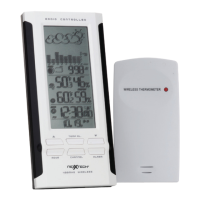
MAIN UNIT
A. WEATHER/PRESSURE window
B. TEMPERATURE/HUMIDITY window
C. CLOCK window
D. DOWN (▼) button
• Select the next available mode.
• Press and hold for 2 seconds to search for wireless
signal from remote sensor.
• Decrease parameters.
E. ALARM button
• When time mode has been selected, press once to
display the alarm time for weekday alarm (W), single
alarm (S) and pre-alarm (Pre-AL).
• Hold for 2 seconds, set weekday, single or pre-alarm’s
alarm time.
• When temperature mode has been selected, press once
to display the highest or lowest temperature alarm’s
value.
• Hold for 2 seconds, set the highest or lowest temperature
alarm’s value.
• When alarm is on, press once to stop the alarm
temporarily.
F. CHANNEL button
• Press to display the outdoor temperature reading of
Channels 1, 2 and 3.
• Hold for 2 seconds, enter into circulation mode and the
outdoor temperature readings of Channels 1, 2 and 3 will
be displayed automatically every 5 seconds.
G. MODE button
• When pressure mode has been selected, press once to
display the local pressure, altitude and sea level.
• Press and hold for 2 seconds to set altitude and sea
level.
• When time mode has been selected, press once to
toggle between time with seconds display or time with
weekday display.
10


 To Next Page