CLOCK WINDOW
• During night-time hours, atmospheric disturbances are
typically less severe and radio signal reception may
improve. A single daily reception is sufcient enough to
keep the clock accuracy within 1 second.
• Make sure the unit is positioned at 8 feet (2 meters)
distance from any interference source such as a TV,
computer monitor, microwave, etc.
• Within concrete wall rooms such as basements or ofce
buildings, the received signal may be weakened. Always
place the main unit near the window for better reception.
Once the atomic time signal is received, the date and time
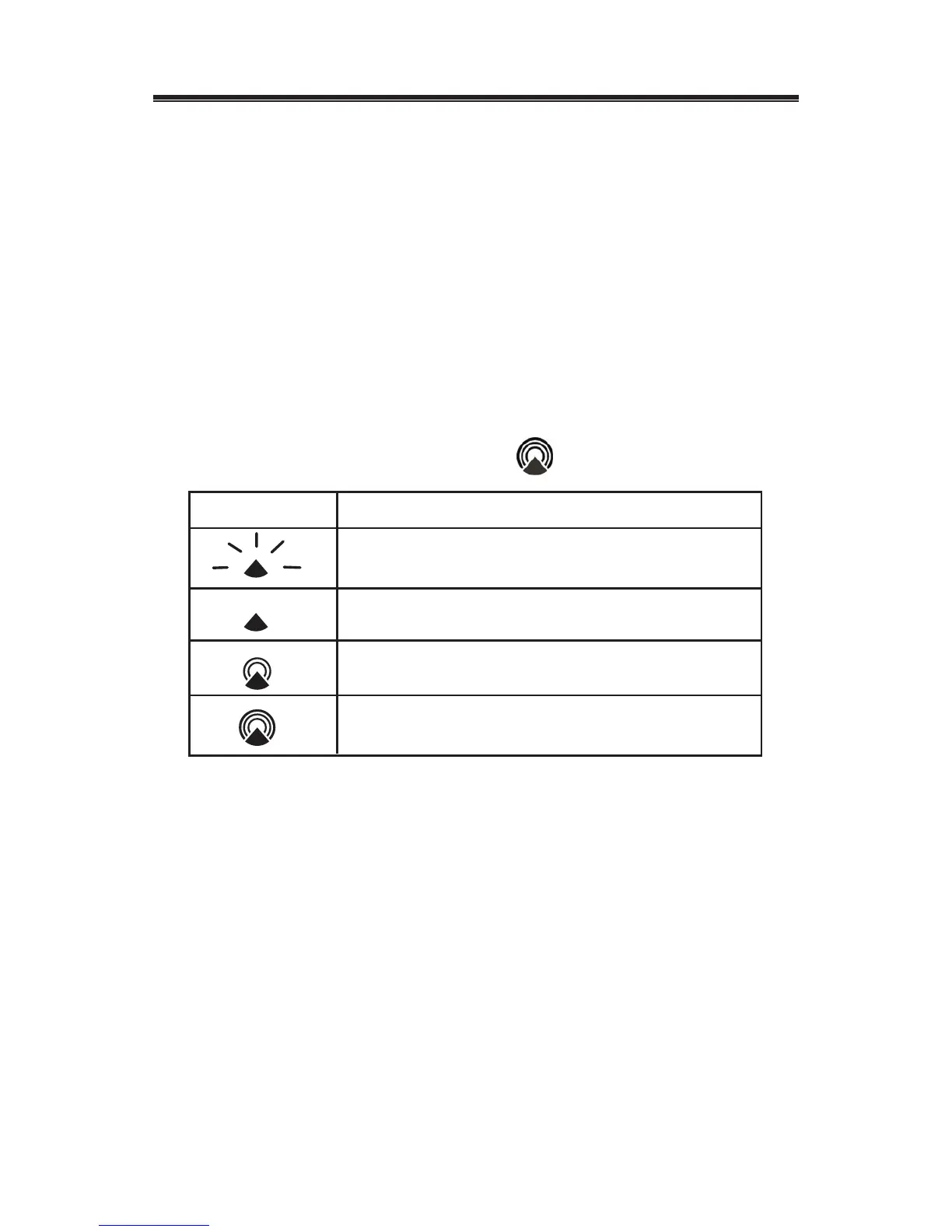
will be set automatically, and the icon will appear.
• The atomic clock receiver is programmed to search
for the atomic time signal daily at 0:00, 3:00, 6:00, and
12:00 am.
• To enable or disable the atomic time receiver, press
and hold UP (▲) button for 3 seconds. If atomic time
reception is activated, a tower icon will start ashing. If
reception is disabled, the tower icon will disappear.
• If the time signal has not been received in 8 minutes, you
may set the time manually.
20
IconAtomic Time Reception Strength
Undefined data
No Reception for the past 24 hours
Weak signal, but can be decoded
Strong signal


 To Next Page