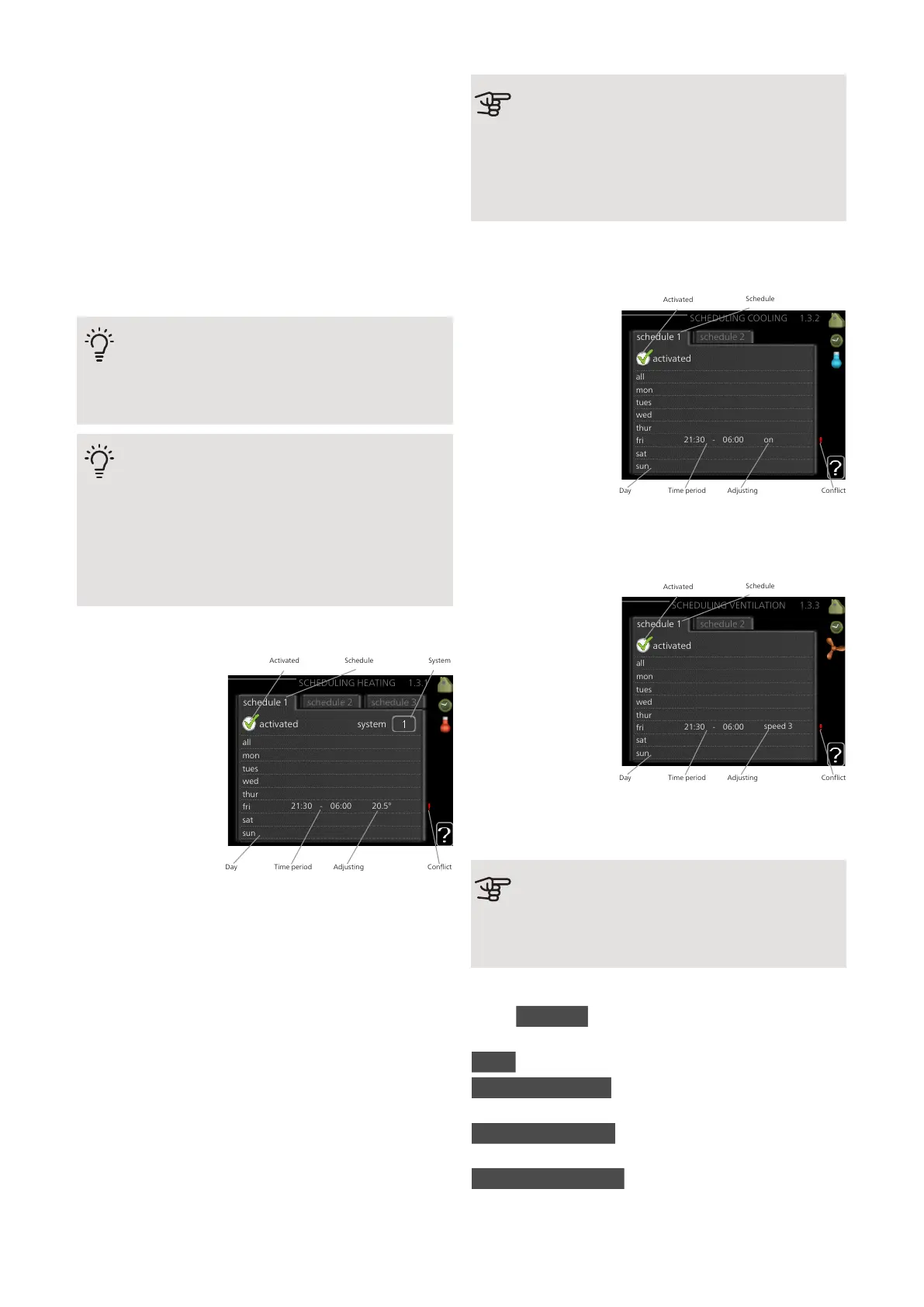
Day: Select which day or days of the week the
scheduling is to apply to here. To remove the scheduling
for a particular day, the time for that day must be reset
by setting the start time to the same as the stop time.
If the row "all" is used, all days in the period are set ac-
cording to that row.
Time period: The start and stop time for the selected
day for scheduling are selected here.
Adjusting: See relevant sub menu.
Conflict: If two settings conflict with each other, a red
exclamation mark is displayed.
TIP
If you wish to set similar scheduling for every
day of the week start by filling in “all” and then
changing the desired days.
TIP
Set the stop time earlier than the start time so
that the period extends beyond midnight.
Scheduling then stops at the set stop time the
day after.
Scheduling always starts on the date that the
start time is set for.
MENU 1.3.1 - HEATING
SCHEDULING HEATING 1.3.1
activated
schedule 2
system
schedule 3schedule 1
all
mon
tues
wed
thur
fri
sat
sun
21:30 - 06:00
20.5°
Time period AdjustingDay
Activated Schedule System
Conflict
Increases or de-
creases in the ac-
commodation tem-
perature can be
scheduled here for
up to three time
periods per day. If a
room sensor is in-
stalled and activated
the desired room
temperature (°C) is
set during the time
period. Without an
activated room sensor the desired change is set (of
setting in menu 1.1). One step is usually enough to
change the room temperature by one degree, but in
some cases several steps may be required.
Adjustment: How much the heating curve is to be offset
in relation to menu 1.1 during scheduling is set here. If
a room sensor is installed, the desired room temperature
is set in °C.
Caution
Changes of temperature in accommodation
take time. For example, short time periods in
combination with underfloor heating will not
give a noticeable difference in room temperat-
ure.
MENU 1.3.2 - COOLING (ACCESSORY RE-
QUIRED)
SCHEDULING COOLING 1.3.2
activated
schedule 2schedule 1
all
mon
tues
wed
thur
fri
sat
sun
21:30 - 06:00
on
Activated
Schedule
Time period AdjustingDay Conflict
Here you can sched-
ule when cooling is
permitted in the ac-
commodation for up
to two different time
periods per day.
Adjustment: Here,
you schedule when
cooling will not be
permitted.
MENU 1.3.3 - VENTILATION (ACCESSORY
REQUIRED)
all
mon
tues
wed
thur
fri
sat
sun
activated
schedule 2schedule 1
SCHEDULING VENTILATION 1.3.3
21:30 - 06:00
speed 3
Activated
Schedule
Time period AdjustingDay Conflict
Increases or de-
creases in the ventil-
ation to the accom-
modation can be
scheduled here for
up to two time peri-
ods per day.
Adjustment: The de-
sired fan speed is
set here.
Caution
A significant change over a longer period of
time may cause poor indoor environment and
worse operating economy.
MENU 1.9 - ADVANCED
Menu advanced has orange text and is intended for
the advanced user. This menu has several sub-menus.
curve Setting the curve slope for heating and cooling.
external adjustment Setting the heat curve offset when
the external contact is connected.
min. flow line temp. Setting minimum permitted flow
line temperature.
room sensor settings Settings regarding the room
sensor.
NIBE F1355Chapter 3 | Control - Menus14



 To Next Page