search installed slaves
Mark “search installed slaves" and press the OK button
to automatically find connected slaves for the master
heat pump.
NOTE
Before these settings are made, each slave
must have received a unique ID (see menu
5.2.1).
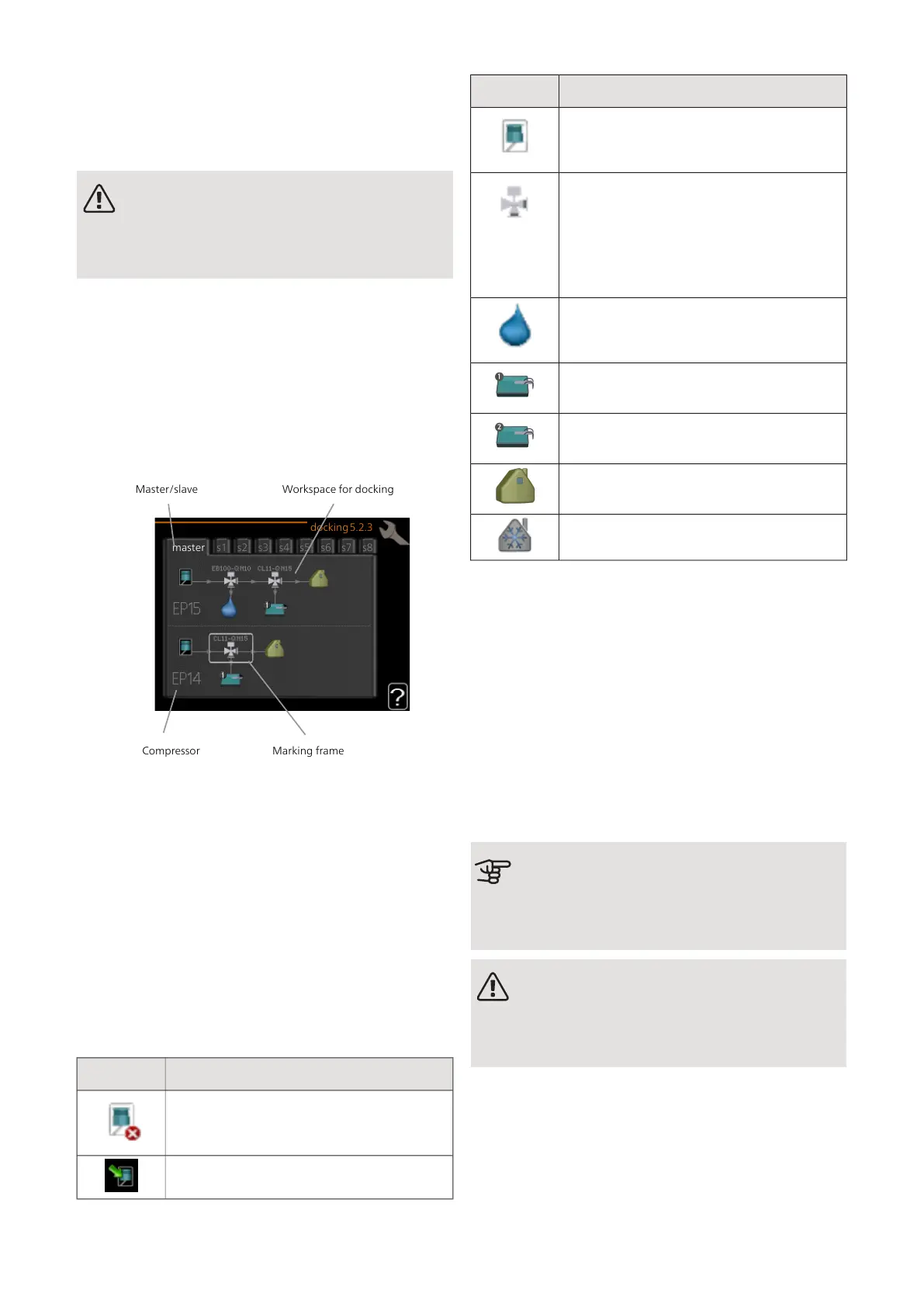
MENU 5.2.3 - DOCKING
Enter how your system is docked regarding pipes, for
example to pool heating, hot water heating and heating
the building.
This menu has a docking memory which means that the
control system remembers how a particular reversing
valve is docked and automatically enters the correct
docking the next time you use the same reversing valve.
s1
master
docking5.2.3
s2 s3 s4 s5 s6 s7 s8
Marking frameCompressor
Master/slave Workspace for docking
Master/slave: Select the heat pump for which the
docking setting is to be made (if there is only one heat
pump in the system, only master is displayed).
Compressor: Select here if your compressor (EP14 or
EP15) is blocked (factory setting), externally controlled
via soft input or standard (docked for example to pool
heating, hot water charging and heating the building).
Marking frame: Move around the marking frame using
the control knob. Use the OK button to select what you
want to change and to confirm the setting in the options
box that appears to the right.
Workspace for docking: The system docking is drawn
here.
DescriptionSymbol
Compressor (blocked)
Compressor (externally controlled)
DescriptionSymbol
Compressor (standard)
Reversing valves for hot water, cooling re-
spectively pool control.
The designations above the reversing valve
indicate where it is electrically connected
(EB100 = Master, EB101 = Slave 1, CL11
= Pool 1 etc.).
Hot water charging
Pool 1
Pool 2
Heating (heating the building, includes any
extra climate system)
Cooling
MENU 5.2.4 - ACCESSORIES
Inform the heat pump which accessories are installed
here.
If the water heater is connected to F1355 hot water
charging must be activated here.
There are two ways of activating connected accessories.
You can either mark the alternative in the list or use the
automatic function "search installed acc.".
search installed acc.
Mark “search installed acc." and press the OK button to
automatically find connected accessories for F1355.
Caution
Certain accessories are not found with the
search function, but must be selected instead
in menu 5.4.
NOTE
Only mark the option for ground water pump
if the accessory AXC 50 is to be used to control
the circulation pump.
MENU 5.3 - ACCESSORY SETTINGS
The operating settings for accessories that are installed
and activated are made in the sub-menus for this.
37Chapter 3 | Control - MenusNIBE F1355



 To Next Page