16
CONNECTING TO THE PHONE USING WI-FI
InstalltheOnRealapplication(forfree)onyourmobilephone(inthe
AppstoreforiOSandGooglePlayforAndroid).Afterinstallation,do
notlaunchtheapplicationandfollowtheinstructions:
1. Turnonthecamerausingthepowerconnection
2. OpentheWiFisettingsonyourmobilephoneandconnectto
thecameranetwork(name:PILOTS5andpassword:12345678).
Afterconnection,thereddiode(8)willash.
3. Afterconnectingthecamera,starttheapplicationandfollowthe
instructionsintheapplication.
Warning: before using the app in your phone settings, please enable all app
permissions, turn o your mobile phone‘s „data connection“ and keep only
Wi-Fi on. The application can only be installed on mobile phones with iOS
version 8.0 and above and devices with Android version 10.0 and above.
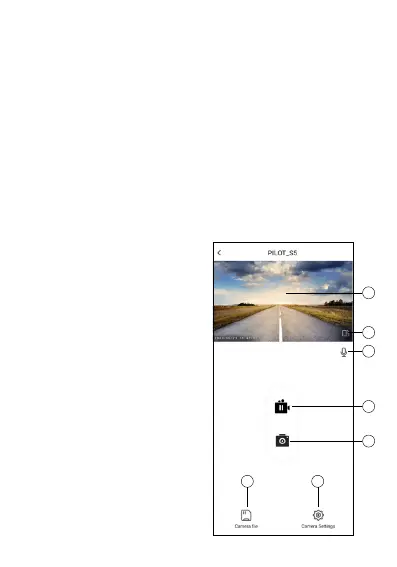
CONTROLLING THE CAMERA USING THE APP
1. Preview:showsalivepreview
ofthecamerashot
2. Optiontorotateto
landscape
3. Turnon/othecamera
microphone
4. Turnsrecordingon/o
5. Photofromvideo:allowsyou
tocreateapicturefromthe
recordedvideo
6. Recordedvideos:accessthe
recordedvideosontheSD
cardofthecamera
7. Settings:settingsoptions
1
2
3
4
5
6 7



 To Next Page