EasyManua.ls Logo

Nidec Shimpo DT-5TS - User Manual

Nidec Shimpo DT-5TS
20 pages
Print Icon
To Next Page IconTo Next Page
Loading...
Instruction Manual
DT-5TXR / DT-5TS
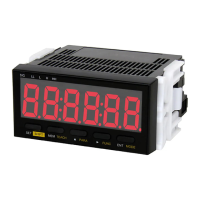
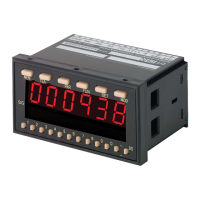
DIGITAL PANEL MOUNT TACHOMETER
www.calcert.com sales@calcert.com1.888.610.7664
0
5
10
15
20
25
30

Questions and Answers

  • R
    Robert BrownAug 4, 2025
    What to do if Nidec Shimpo DT-5TS Measuring Instruments display is blank?
    • C
      Christine OrtizAug 5, 2025
      If the display is blank, check all connections. Specifically, check the power source (AC type: 85-264VAC 50/60Hz; DC type: 9-35VDC), power cord, and wires. For DC applications, make sure the correct voltage polarity is used.
  • S
    Seth DuncanAug 9, 2025
    What to do if Nidec Shimpo DT-5TS displays error codes?
    • M
      Michael BakerAug 9, 2025
      If error codes are displayed, turn the power OFF and then ON.
  • P
    paynebradAug 15, 2025
    What to do if Nidec Shimpo DT-5TS Measuring Instruments display overflows?
    • W
      Whitney FosterAug 15, 2025
      If the display value overflows (exceeds the display limit), change the parameter settings or the input signal.
  • W
    William MyersAug 20, 2025
    What to do if the input signal width is under 10 msec in MODE 3 for Nidec Measuring Instruments?
    • R
      Randy WilliamsAug 20, 2025
      If the input signal width is under 10 msec in MODE 3, change the input signal width.
  • J
    Jessica FloresAug 25, 2025
    What to do if Nidec Shimpo DT-5TS Measuring Instruments is beyond the limit of TEA function?
    • D
      Dean DavisAug 26, 2025
      If the device is beyond the limit of the TEA function, decrease the input RPM.
  • K
    Katie PetersenAug 30, 2025
    What to do if Nidec Shimpo DT-5TS Measuring Instruments shows EE PROM reading error?
    • M
      Mckenzie Green MDAug 30, 2025
      If there is an EE PROM reading error, press the SET key.

Summary

Unit Setup Procedures

Power Connection

Details on how to supply power to the DT-5TXR/DT-5TS unit.

Sensor Connection Guide

Guidelines for connecting various types of sensors to the meter.

Self-Test Function

Procedure to verify the functionality of all display LEDs.

Panel Installation

Factory Settings Overview

Default parameter and function settings as programmed by the factory.

Device Operation Modes

Mode Operation Selection

How to choose between different operating modes of the DT-5TXR/DT-5TS.

Setting Mode Parameters

Configuration of parameters specific to selected operating modes.

Mode -01- Operation

Detailed setup and configuration for RPM or Rate Measurement.

Limit and Function Settings

Setting High and Low Limits

Programming visual high and low limits using secondary displays.

Setting Functions

Customizing meter behavior through various programmable functions.

Memory Feature

Memory Functionality

How to memorize and display maximum and minimum display values.

Setting Examples

Mode -01- Example

Practical example for programming RPM or Rate Measurement settings.

Mode -02- Example

Practical example for programming Elapsed Time Measurement.

Available Modules

DT-5 TXR Module Types

Overview of available input/output modules for the DT-5TXR.

Module Combinations

Listing of available module combinations for the DT-5TXR.

Dimensions and Specifications

Technical Specifications

Detailed technical specifications for the DT-5TXR/DT-5TS.

Troubleshooting and Warranty

Troubleshooting Guide

General checkpoints and error code resolution for the device.

Limited Express Warranty

Terms and conditions of the product warranty.

Nidec Shimpo DT-5TS Specifications

General IconGeneral
ModelDT-5TS
CategoryMeasuring Instruments
ManufacturerNidec Shimpo
DisplayLCD
Operating Temperature0 to 40°C
Weight (Tachometer)Approx. 300 g
TypeDigital Tachometer/Torque Meter
Accuracy (Torque)±0.5% of full scale
Resolution0.1 r/min
Sensing MethodContact
UnitsRPM
Power SupplyAA batteries or AC adapter
Sampling Time1 sec

Related product manuals