1
Instruction ManualVer.9.2
Nishi-ShinjukuPrimeSquare.,7-5-25
Nishi-ShinjukuShinjuku-kuTokyo160-0023,Japan
https://www.nidec-copal-electronics.com
Formoredetailedinformationpleaseaskforthenearest
distributororthefollowingsalescenter.
Thankyouforpurchasinga
NIDECCOPALELECTRONICSCORP.product.
Inordertousetheproductcorrectlyandmost
appropriately,pleasecompletelyreadthismanualbefore
useandkeepitforfuturereference.
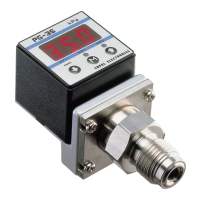
SMALLSIZEPRESSUREGAUGE
PG-35/PG-30
ImportantInformationandWarnings
①SelecteitherthePG-30orthePG-35dependinguponthetypeofpressurizedmedia.
②ThemaximumimpressedpressureofthePG-30-102Ratthetimeofvacuumbreakis500kPa.
③Forstability,usearegulateddirectcurrentpowersupply.
Surge absorbing devices (diodes,varistors, etc.) are necessary if inductive loads such as relays or solenoids are connected to the same
circuitasthePG-30/PG-35.
IfusingaDCpowersupplyunitsuchasaswitchingpowersupply,theFGterminalshouldbeearthed.Donotwireinparalleltohigh
tensioncablesorpowerlines,orusecableductswhichcontainhightensioncablesorpowerlines.
④Becarefulnottocrimpanywiresduringhandling,orputanypressureonthedisplayareaofthemainbodywhileassemblingpiping.The
fittingtorqueofsealingscrewsandM5fittingscrewsshouldbe3.0N・mmaximum.
⑤UsepHneutraldetergentstocleanthebody.Donotusesolventssuchasthinners.
⑥This product is dust proof and drip proof (to IP65 of IEC standards) and is not suitable for use in environments requiring higher
standards.
⑦Donotusepointedobjectssuchaspenstopressthesettingbuttonsonthedisplaypanel,asthismaypushholesinthesettingbuttonsand
damagethem.
⑧Donotinsertwires,etc.inthepressureport,asthismaydamagetheinternaldiaphragmandcausemalfunctioning.
⑨PG-35G3/8type:
Do not touch or scratch the diaphragm at the edge of the fitting, as this may alter the performance characteristics or damage the
diaphragm,andcausemalfunctioning.
⑩PG-35gaskettype:
Do not touch or scratch the edge of the fitting, as this may damage the sealing and
causeleakage.
⑪ThePG-30/35seriesdonothavean explosion proofstructure.Donotuseitforthe
detectionofflammablegases.
⑫Whenanalogoutputissuppliedtoanoise-sensitivedevice,alow-passfilterisrequested
inacustomer'scircuit.
⑬Countermeasuresfornoiseinterference.
PleaseconnecttheshieldedwireofthisproducttoFGterminalofthepowerline.(The
shieldwireisconnectedwiththemetalpartinsideoftheproduct.)
marking
(CompliancewithEMCStandards)
Powersupplyunit
Surgeabsorbingcircuit
+V
FG←Theshieldwire
PG30/35
FG
DCoutputACinput


 To Next Page
 General