EasyManua.ls Logo

Nikon 35Ti - Page 9

Nikon 35Ti
98 pages
Print Icon
To Next Page IconTo Next Page
To Previous Page IconTo Previous Page
Loading...
(2)
(3)
FCA22001—-R.
3399.
A
HOW
TO
ENTER
THE
MANUAL
MODE
Confirm
that
Power
is
off
Turn
~
selector
dial
to
“P”
position,
while
keeping
the
SET
button
pressed,
ae
that
the
display
shows
(00
0
00)
with
the
two
on
left
side
blinking,
Keep
hare
AF
button
without
operating
any
other
switches,
ee
that
the
display
shows
(00
0
00)
with
no
segments
blinking,
Move
na
lens
barrel
by
pressing
several
times
MODE
or
SET
button,
and
confirm
the
dispaly
(00
0
00).
Eee
number
of
desired
mode
by
pressing
SET
button,
The
re
will
be
displayed
by
pressing
the
release
button
halfway,
NOTE:
The
selector
mode
number
(00
0
00)
can
be
pbtained
generally
only
after
the
lens
barrel
movement
operation
is
done,
However,
it
is
also
possible
to
have this
(00
0
00)
mode
by
pressing
the
release
button
halfway
when
you
reach
(3
0
00)
in
the
loop
of
modes,
Please
refer
to
the
diagram
below,
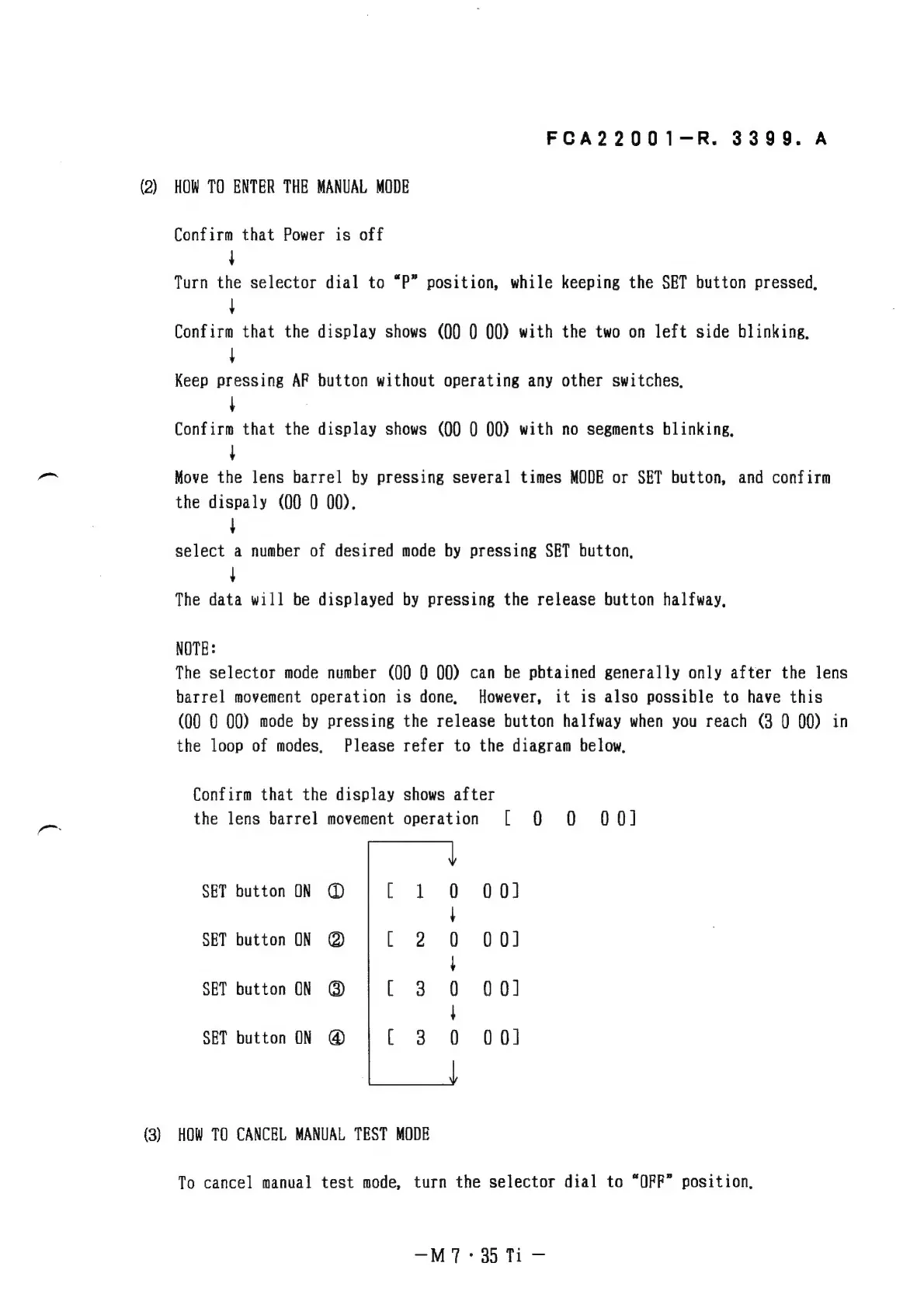
Confirm
that
the
display
shows
after
the
lens
barrel
movement
operation
[
0
QO
OO]
SET
button
ON
@
00]
SET
button
ON
@
00)
SET
button
ON
@
00]
SET
button
ON
@
00)
HOW
TO
CANCEL
MANUAL
TEST
MODE
To
cancel
manual
test
mode,
turn
the
selector
dial
to
“OFF”
position,
—MT:
35
Ti

Related product manuals