EasyManua.ls Logo

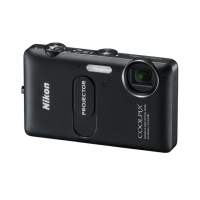
Nikon CoolPix S1100pj - User Manual

Nikon CoolPix S1100pj
216 pages
Print Icon
To Next Page IconTo Next Page
Loading...
No reproduction in any form of this manual, in whole or in part
(except for brief quotation in critical articles or reviews), may be
made without written authorization from NIKON CORPORATION.
####01(11)
########-01
DIGITAL CAMERA
Users Manual
En
En

Table of Contents

Other manuals for Nikon CoolPix S1100pj

Questions and Answers

  • V
    vdiazSep 9, 2025
    Why does my Nikon CoolPix S1100pj Digital Camera take so long to save images?
    • M
      mjohnsonSep 9, 2025
      It may take more time to save images on your Nikon Digital Camera in the following situations: * When the noise reduction function is in operation. * When the flash mode is set to b (auto with red-eye reduction). * When the skin softening function is applied while shooting.
  • J
    Jonathon MillerAug 22, 2025
    Why doesn't the flash fire on my Nikon Digital Camera?
    • D
      destiny31Aug 23, 2025
      The flash on your Nikon Digital Camera might not fire because: * The flash mode is set to c (off). * A scene mode with which the flash does not function is selected. * 'On' is selected for Blink proof in smart portrait mode. * Another function that restricts flash is enabled.
  • O
    oliverginaAug 25, 2025
    What to do if the monitor is blank on my Nikon CoolPix S1100pj?
    • T
      Tonya SantanaAug 25, 2025
      If the monitor on your Nikon Digital Camera is blank: * Ensure the camera is on. * Check if the battery is exhausted. * If it's in standby mode, press the power switch, the shutter-release button, A button, c button, or b (movie-record) button. * If the flash lamp is blinking, wait until the flash has charged. * Check if the camera and computer are connected via USB cable or if the camera and TV are connected via audio/video cable. * Note that the monitor turns off when using the remote control to operate the camera in projector mode.
  • B
    brownteresaAug 26, 2025
    How to correct the date and time on my Nikon CoolPix S1100pj?
    • K
      Kevin LoweryAug 26, 2025
      If the date and time of recording are not correct on your Nikon Digital Camera: * If the camera clock hasn't been set, the “Date not set” indicator will blink during shooting and movie recording. Pictures and movies recorded before the clock is set are dated “00/00/ 0000 00:00” or “01/01/2010 00:00” respectively. Set the correct time and date from the Date option in the setup menu. * Check the camera clock regularly against more accurate timepieces and reset as required.
  • T
    Tony ColemanAug 27, 2025
    Why does my Nikon CoolPix S1100pj Digital Camera turn off without warning?
    • C
      carterjackAug 27, 2025
      Your Nikon Digital Camera might turn off without warning because: * The battery is exhausted. * The camera has turned off automatically to save power. * The camera has become hot due to the heat of the projector. Leave the camera off until it has cooled and then turn it on again. * The camera and battery may not work properly at low temperatures.
  • B
    Beth MorrisonAug 29, 2025
    Why isn't the date appearing on my Nikon CoolPix S1100pj pictures?
    • J
      Joseph LeAug 29, 2025
      The date might not appear on your Nikon Digital Camera pictures even when Date imprint is enabled because: * Another function that restricts the Date imprint option is enabled. * The current shooting mode is one that does not support Date imprint.
  • N
    Nicholas PriceSep 17, 2025
    Why doesn't Nikon Transfer 2 start when my Nikon Digital Camera is connected?
    • S
      Scott OconnellSep 18, 2025
      Nikon Transfer 2 may not start when your Nikon Digital Camera is connected due to: * Incorrect USB settings: Select the Interface setting from the setup menu, set the USB option to MTP/PTP, and try connecting the camera again. * Camera is off. * Battery is exhausted. * USB cable is not correctly connected. * Camera is not recognized by the computer. Also, confirm system requirements and refer to help information contained in ViewNX 2.
  • R
    Randy StewartSep 18, 2025
    What to do if the PictBridge startup screen is not displayed when connecting my Nikon CoolPix S1100pj Digital Camera to a printer?
    • K
      Kelly SimonSep 18, 2025
      If the PictBridge startup screen is not displayed when connecting your Nikon Digital Camera to a printer, select the Interface setting from the setup menu and set the USB option to MTP/PTP, then try to connect the camera again.
  • N
    navarrolisaSep 7, 2025
    Why isn't my Nikon CoolPix S1100pj Digital Camera responding to the remote control?
    • A
      Annette BaileySep 7, 2025
      Your Nikon Digital Camera may not respond to the remote control because: * The remote control's battery is exhausted. * You are not pointing the remote control at the infrared receiver on the front or rear of the camera within approximately 5 m (16 ft.). * The remote control cannot be used when Smile timer is set to On in smart portrait mode and the camera detects human faces. * The shutter may not be released when attempting to use the remote control to take pictures of scenes exhibiting severe backlighting.
  • D
    David RosalesSep 4, 2025
    How to fix overexposed pictures on Nikon CoolPix S1100pj?
    • J
      Jane WilliamsSep 4, 2025
      To fix overexposed or too bright pictures on your Nikon Digital Camera, adjust the exposure compensation.

Summary

Nikon COOLPIX S1100 pj Camera Overview

The Camera Body and Components

Identification and location of external parts of the camera body.

Basic Camera Operations

Key Buttons and Touch Panel Usage

Explanation of shutter, shooting mode, playback, movie, and projector buttons, plus touch panel gestures.

Getting Started: First Steps with Your Camera

Charging the Battery and Initial Setup

Steps for charging the battery, setting language, date, time, and daylight saving.

Inserting, Removing, and Managing Memory Cards

Procedures for inserting/removing batteries and memory cards, formatting, and handling precautions.

Basic Photography and Playback: Easy Auto Mode

Step 1: Power On and Easy Auto Mode Setup

Turning on the camera, selecting Easy Auto mode, indicators, touch shutter, and vibration reduction.

Step 2: Framing Pictures and Using Zoom

Camera readiness, framing, using optical and digital zoom features.

Step 3: Focusing and Capturing Images

Focusing procedures, autofocus, touch shutter, blink warning, and AF-assist illuminator.

Step 4: Playback, Deleting, and Viewing Pictures

Playing back photos, deleting unwanted images, and navigating playback modes.

Using Basic Shooting Functions

Flash Mode: Settings and Operation

Selecting flash modes, red-eye reduction, and flash lamp indicators.

Self-Timer and Touch Shutter Operations

Using the self-timer for photos and operating the touch shutter function.

Image Mode and Exposure Compensation

Adjusting image quality/size and controlling brightness via exposure compensation.

Touch AF;AE and Other Shooting Settings

Using touch AF/AE, ISO sensitivity, continuous shooting, and white balance.

More on Shooting Modes

Selecting Shooting Modes and Scene Features

Overview of shooting modes and features for Portrait and Landscape scene modes.

Scene Mode Details: Sports to Sunset

Features for Sports, Night Portrait, Party/Indoor, Beach, Snow, and Sunset scene modes.

Editing Your Pictures In-Camera

Movie Recording and Playback

Connecting Your Camera to Devices

Basic Camera Setup and Settings

Caring for Your Nikon Camera

Technical Notes and Index

Troubleshooting Common Camera Issues

Solutions for problems related to display, settings, power, shooting, playback, and electronic controls.

Nikon CoolPix S1100pj Specifications

Camera Specifications IconCamera Specifications
camera resolution14.1 megapixel
zoom lens range28-140 mm
ISO sensitivity6400
Display IconDisplay
display size3 inch
display resolution460, 000 dot
macro shooting distance1.2 inches
Projector Specifications IconProjector Specifications
brightness14 lumens
image size5 to 47 in
throw distance10 in. to 7 ft. 10 in.
Battery IconBattery
battery typeLi-ion rechargeable battery EN-EL12
battery life220 shots
endurance1 hour
Dimensions and Weight IconDimensions and Weight
dimensions100.8 x 62.7 x 24.1 mm
weight155 g
dimensions (inches)4.0 x 2.5 x 1.0 in

Related product manuals