TUTORIAL—FIRST STEPS
28
NTSC
En
– –
– –
OFF
2
SET UP MENU
Format
Language
Video Output
Date
GPS Input
LCD Brightness
Monitor Off
4
—Choosing a Language
Camera menus and messages can be displayed in English, French, German, Japanese,
and Spanish. Before setting the time and date, choose a language for the camera
menus as described below.
4
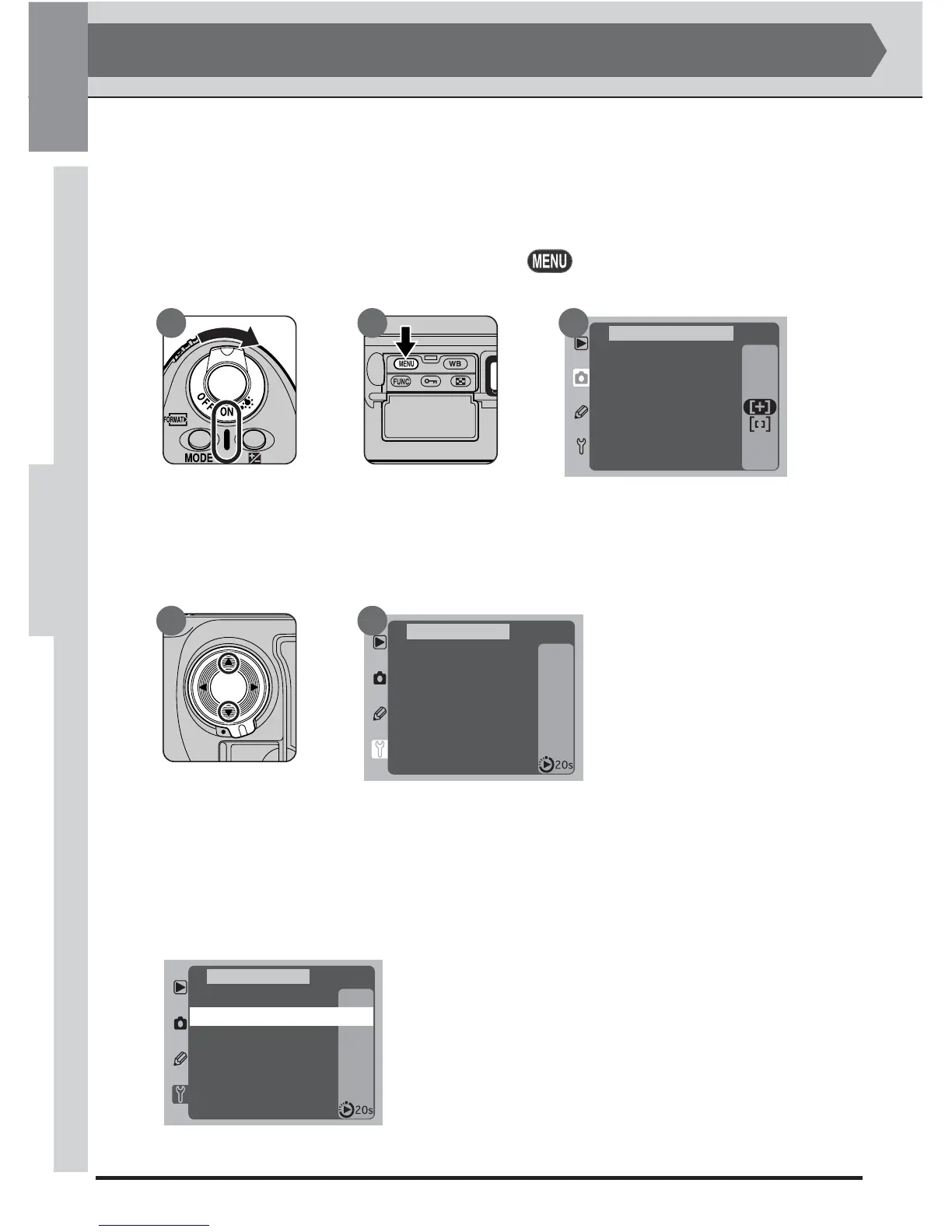
.1 Display the camera menus
Tu rn the camera on (A) and press the button (B). The menu for the
current operating mode will be displayed in the monitor (C).
4
.2 Display the SETUP menu
Unlock the multi selector and press it up or down (A) until the SETUP menu
is displayed (B).
4
.3 Highlight Language
Press the multi selector to the right to enter the SETUP menu, then press the
multi selector down until the second item from the top is highlighted (de-
pending on the language currently selected, the second item from the top will
include the word Language or LANG).
STEP 4
A
200
NORM
OFF
OFF
White Bal
ISO
Image Quality
Assign FUNC
AF Area Mode
File No. Seq.
Command Lock
SHOOTING MENU
A B C
Format
Language
Video Output
Date
GPS Input
LCD Brightness
Monitor Off
NTSC
En
– –
– –
OFF
2
SET UP MENU
A B



 To Next Page