81
ADVANCED PHOTOGRAPHY—MANUAL FOCUS
Manual Focus
Manual focus can be used with lenses that do not support autofocus (non-AF Nikkor
lenses) or in situations in which autofocus will not produce the desired results.
Adjusting Focus in the Viewfinder
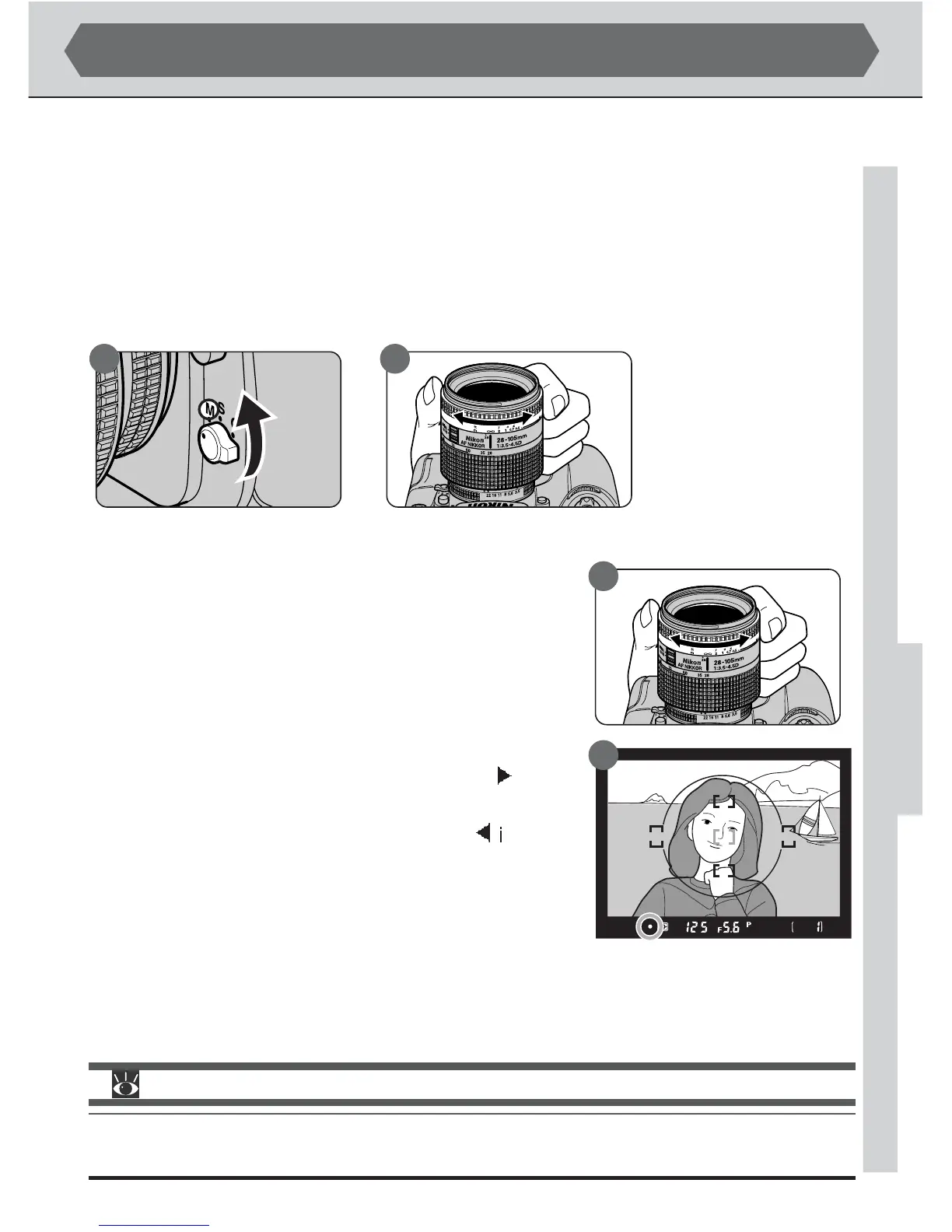
To use manual focus, turn the focus-mode selector (A) all the way to M and turn the
lens focusing ring (B) until the image displayed on the clear matte field in the viewfinder
is in focus. Photographs can be taken even when the in-focus indicator (●) does not
appear in the viewfinder.
Using the Electronic Range Finder
When a lens with a maximum aperture of f/5.6 or
faster is used in manual focus mode, the in-focus indi-
cator (●) can be used to confirm focus in any of the
five focus areas. With the focus-mode selector set to
M, press the shutter-release button halfway. Before
the focus indicator in the viewfinder disappears, rotate
the lens focusing ring (A) until the in-focus indicator
(●) is displayed in the viewfinder (B). If the
indica-
tor is displayed, the camera is focused on a point be-
tween the camera and the subject. If the ndicator
appears, the camera is focused on a point behind the
subject.
A B
For more information on:
pg. 80 Getting good results with autofocus
pg. 73 Focus-area selection
A
B



 To Next Page