194
TECHNICAL NOTES—CARING FOR YOUR CAMERA
Caring for Your Camera
Replacing the Focusing Screen
Your Nikon digital camera is supplied with a type B BriteView focusing screen. A
type E clear-matte Fresnel screen for cameras in the D1 series, with a grid suitable
for tracing and architectural photography, is available for separate purchase.
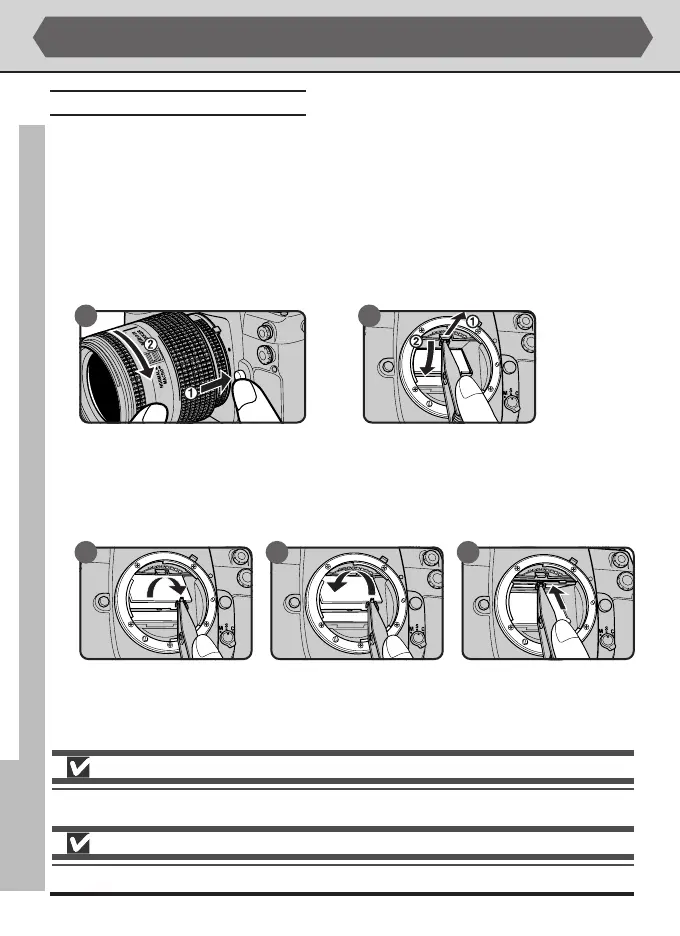
To change focusing screens:
1
After turning the camera off, remove the lens (A). Using the tweezers supplied
with the focusing screen, pull the focusing screen latch towards you (B). The
screen holder will spring open.
2
Remove the existing screen, using the tweezers supplied and being careful to
handle the screen by the tab to avoid scratches (A). Using the tweezers to hold
the screen by the tab, set the replacement screen in the holder (B). Push the
front edge of the holder upward until it clicks into place (C).
A B
Do not touch the mirror or the surfaces of the focusing screens.
Use only focusing screens designated for use with cameras in the D1 series.
CBA



 To Next Page