78
Focus Lock
Focus lock can be used in combination with autofocus to focus on a subject that is
not in any of the five focus areas, or on other occasions when the camera would not
otherwise be able to focus using autofocus (
pg. 80).
Focus lock differs depending on whether you are using single- or continuous-servo
AF. Follow the steps below.
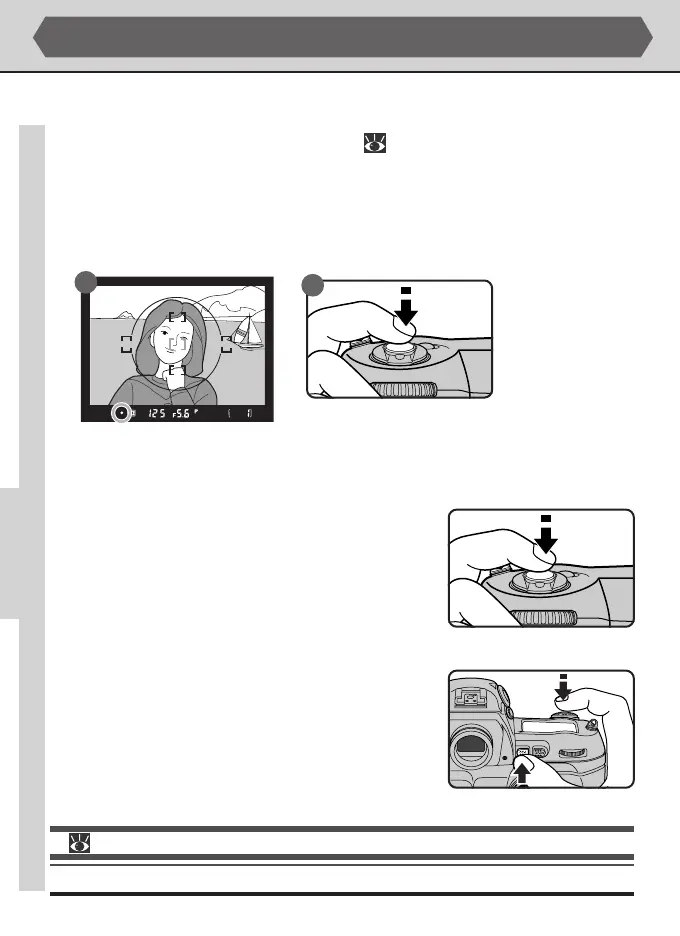
1
Position the subject in the selected focus area (A) and press the shutter-release
button halfway (B).
ADVANCED PHOTOGRAPHY—FOCUS LOCK
A
B
2
Lock focus when the in-focus indicator (●) appears in the viewfinder.
• In single-servo autofocus:
Once the in-focus indicator has appeared in the
viewfinder, focus will lock when the shutter-re-
lease button is pressed halfway, and remain locked
while the button is held in this position. Focus
can also be locked by pressing the AE-L/AF-L but-
ton (see below).
• In continuous-servo autofocus:
After the in-focus indicator appears in the
viewfinder, press the AE-L/AF-L button to lock both
focus and exposure. Focus will remain locked while
the AE-L/AF-L button is pressed, even if you re-
move your finger from the shutter-release button.
For more information on:
pg. 96 Auto-exposure lock



 To Next Page