16
Introduction—First Steps
1
EN-EL4 Batteries ( 17)
EN-EL4 rechargeable Li-ion batteries can provide compatible devices with information
on battery charge state, enabling the MH-21 Quick Charger to display the current
charge level and charge the battery appropriately. When the EN-EL4 is inserted in the
camera, the battery charge state is shown in six levels. Detailed information on bat-
tery charge, battery life, and the number of pictures taken since the battery was last
charged can be viewed using the Battery info option in the setup menu ( 216).
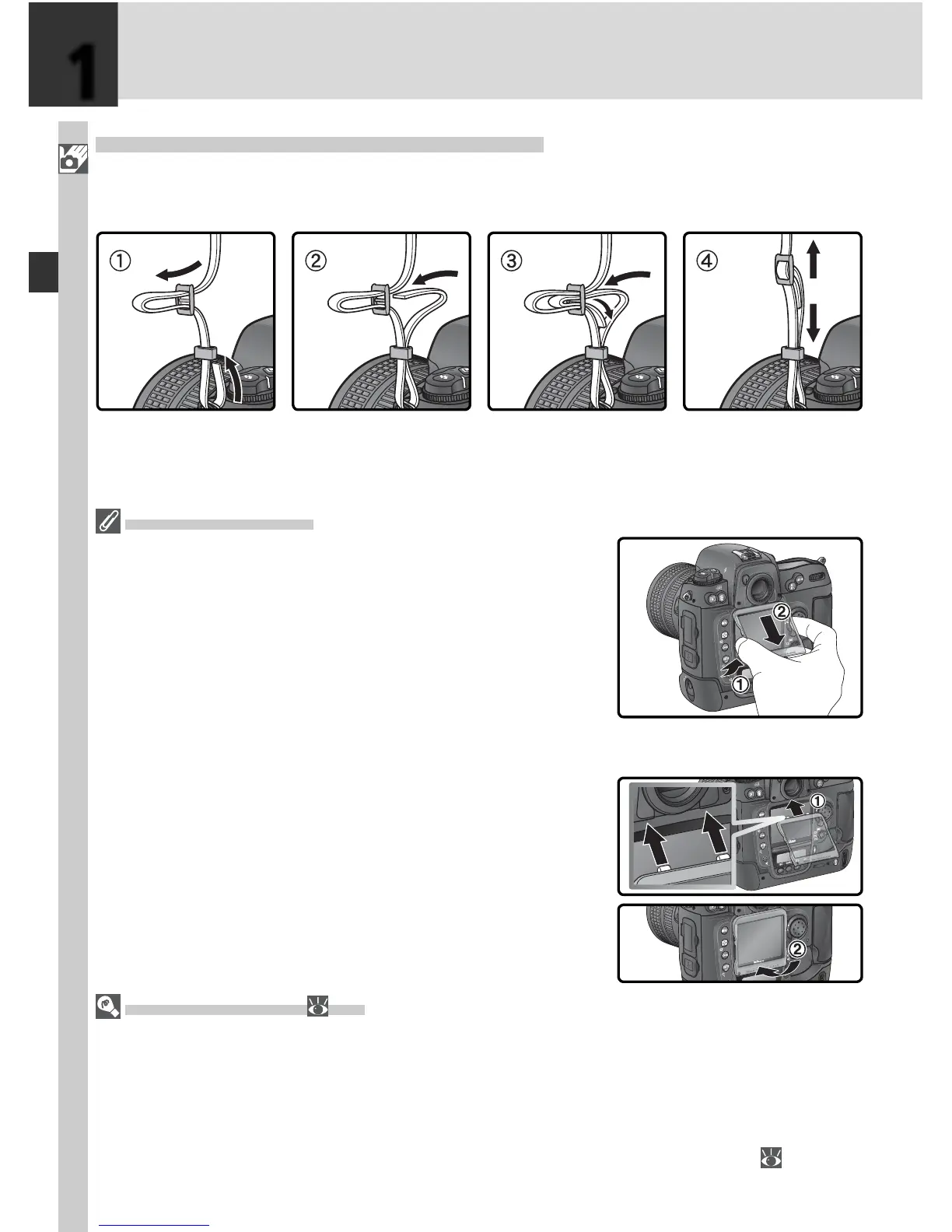
Step 1—Attach the Camera Strap
Attach the camera strap securely to the two eyelets on the camera body as
shown below.
The Monitor Cover
A clear plastic cover (the BM-3 LCD monitor cover) is
pro vid ed with the cam era to keep the monitor clean,
and to pro tect the mon i tor when the camera is not in
use or when you are trans port ing the camera. To re-
move the mon i tor cover, hold the cam era fi rmly, take
the cover by its edges, and pull the bot tom of the cover
gen tly out wards as shown at right (
). Once the cover
is un latched, you can move it slightly away from the
mon i tor and then remove it as shown (
).
To replace the cover for shooting or stor age, insert the
two projections on the top of the cover into the match-
ing in den ta tions above the camera monitor (
), then
press the bot tom of the cover un til you hear it click into
place (
).



 To Next Page