Nikon D5300 Digital Field Guide Chapter 1 Exploring the Nikon D5300
3
1
Image courtesy of Nikon, Inc.
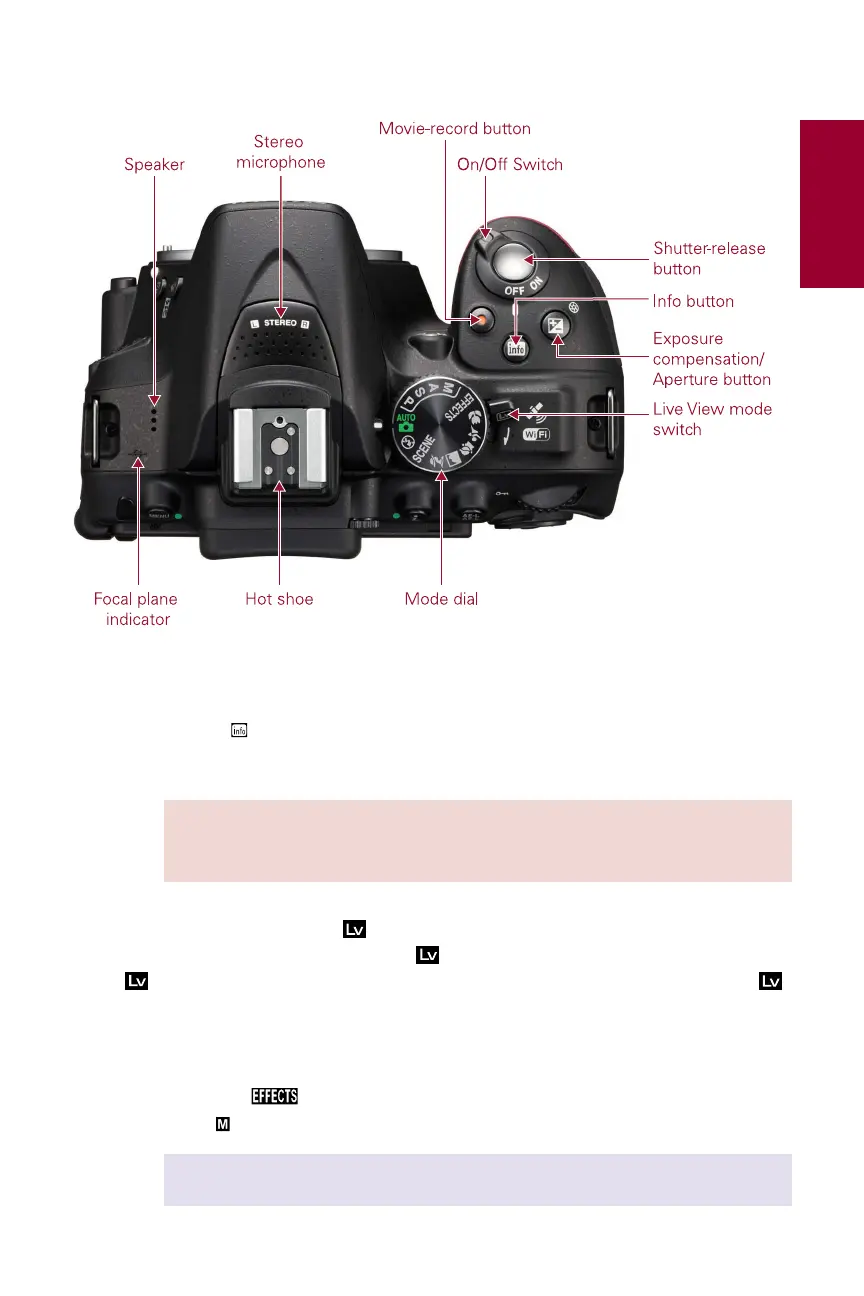
1.1 The controls on top of the camera.
▶
Info button ( ). Press this button to display information on the LCD screen. The
information display shows all of the exposure and camera setting options.
NOTE If you’re stepping up from the D5200 you may notice that the shutter-
release mode button has been moved to the bottom left side of the cam-
era near the lens mount.
▶
Live View mode switch ( ). Of all Nikon cameras, the D5300 has my favorite
implementation for Live View mode ( ). A quick flick of the Live View mode switch
( ), which is right next to the Mode dial, puts the camera in Live View mode ( ),
so you can shoot stills or videos using the LCD monitor as a viewfinder.
▶
Mode dial. This is an important dial. Rotating the Mode dial allows you to change
your shooting mode quickly. You can choose one of the scene modes, the
Special Effects
mode, one of the semiautomatic modes, or Manual expo-
sure mode
, which lets you pick the exposure settings.
CROSS REF For a detailed description of all exposure modes, see Chapter 2.



 To Next Page
 Loading...













