Nikon D5300 Digital Field Guide Chapter 1 Exploring the Nikon D5300
5
1
▶
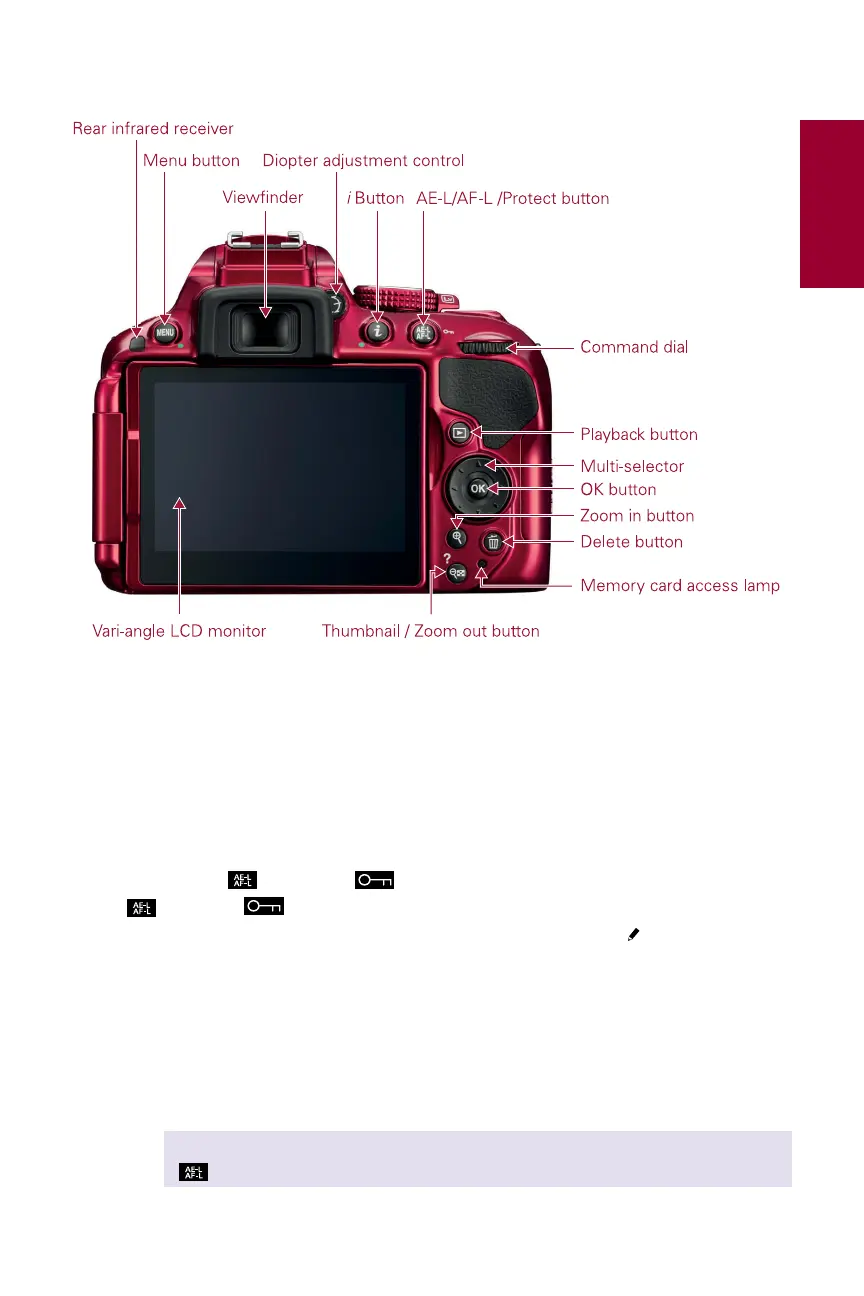
Diopter adjustment control. Just to the right of the viewfinder (hidden behind
the eyecup) is the diopter adjustment control. Use this control to adjust the
viewfinder lens to suit your individual vision strength (not everyone’s eyesight is
the same). The best way to do this is to look at the viewfinder display and rotate
the dial until the information in the viewfinder display is sharp.
▶
AE-L/AF-L ( )/Protect ( ) button. The Auto Exposure/Autofocus Lock
(
)/Protect ( ) button locks the Auto Exposure (AE) and Autofocus (AF).
You can customize this button in the Custom Setting menu ( ) f2 to provide AE/
AF Lock, AE Lock only, AE Lock (hold), AF Lock only, or AF-ON. AE Lock (hold)
locks the exposure when you press the shutter-release button once; the expo-
sure remains locked until you press the button again or the shutter releases.
AF-ON engages the AF in the same way that half-pressing the shutter-release
button does. When the camera displays an image in Playback mode, press this
button to lock the image and protect it from being deleted.
CROSS REF See Chapter 3 for more detailed information about the AE-L/AF-L button
(
).
Image courtesy of Nikon, Inc.
1.2 The controls on the back of the camera.



 To Next Page
 Loading...













