3
MENU: 1. Job
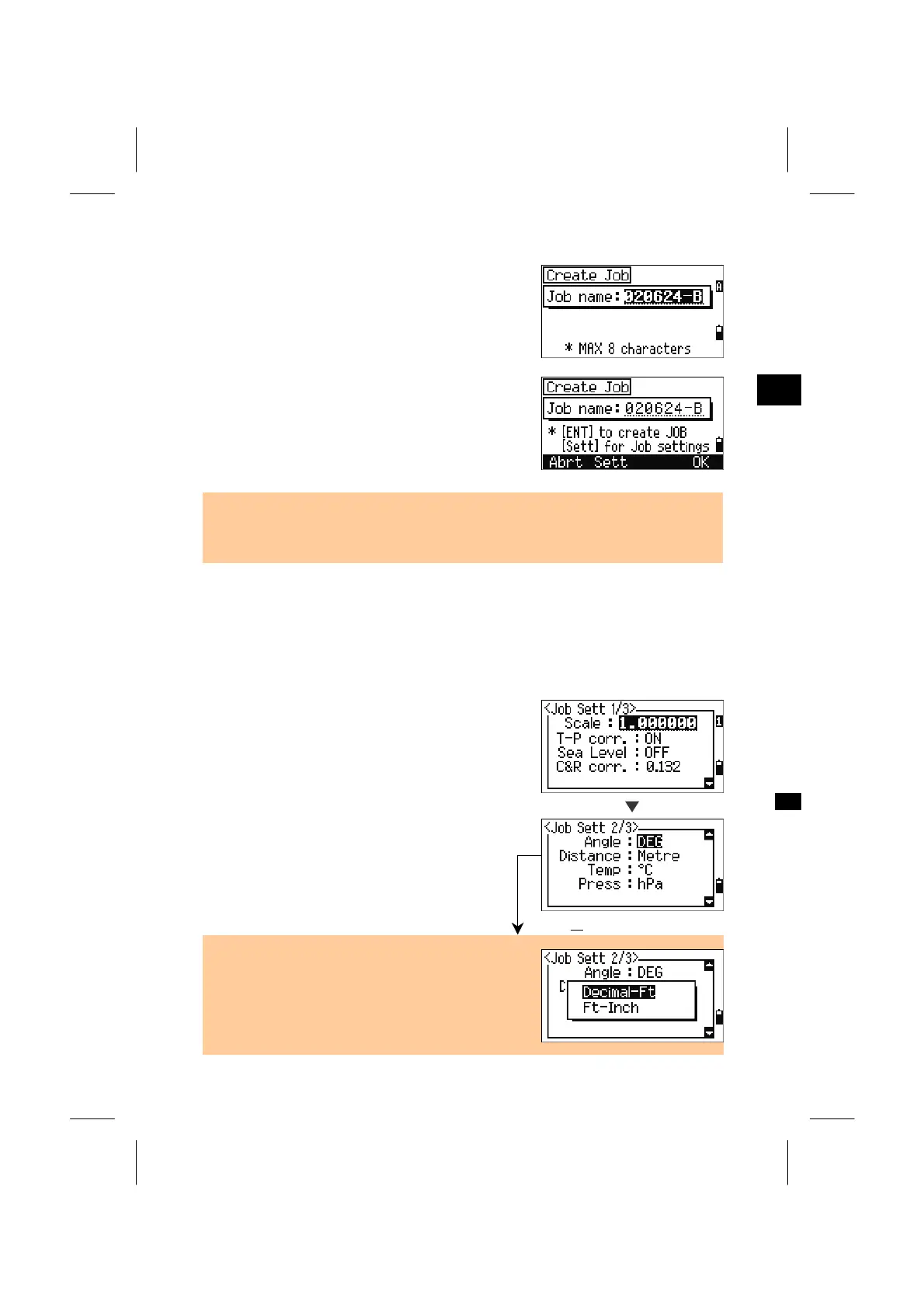
Input a Job name maximum eight characters and
press the [ENT] key.
When you want to check the Job settings, press the
[Sett] softkey.
Otherwise, you can just press the [ENT] key or
[OK] softkey to create a new job.
• If you don’t have to change any settings from the previous Job, just press [ENT] or
[OK] to create the new Job. The current Job settings will be transferred to the newl
created Job.
Job settings
The following 12 settings are fixed in a Job and cannot be changed once the Job is
created. These settings are separated from other temporary settings. By this way,
the data is clearly and purely stored in the database with all necessary corrections
applied at the time you store each record.
Scale Factor: 0.999600 ~ 1.000400
T-P correction: ON/OFF
Sea Level: ON/OFF
C&R correction: OFF/0.132/0.200
Angle unit: DEG / GON / MIL
Distance unit: Metre / US-Ft / I-Ft
Temp unit: °C/°F
Press unit: hPa / mmHg / inHg
US-Ft or I-Ft
• For Feet users, there is an option to display and
input values in Feet-Inch.
• After the “Distance:” field, the option screen is
opened only for the Feet unit. You can select either
“Decimal-Ft” or “Ft-Inch” by Up/Down arrow keys.
3-86












 To Next Page