EasyManua.ls Logo

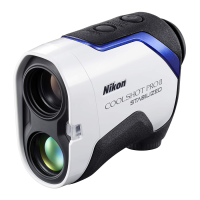
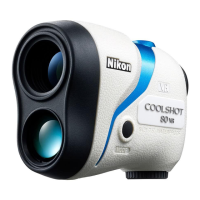
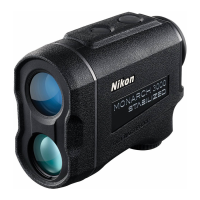
Nikon CoolShot Pro Stabilized - User Manual

Nikon CoolShot Pro Stabilized
356 pages
Print Icon
To Next Page IconTo Next Page
Loading...
En
Es
Fr
De
It
Sv
Nl
Ru
Pl
Fi
No
Dk
Cz
Ro
Hu
Pb
Instruction manual/Manual de instrucciones/Manuel d’utilisation/Bedienungsanleitung/
Manuale di istruzioni/Bruksanvisning/Gebruiksaanwijzing/Pуководство по
продукции/Manual de instruções/Instrukcją obsługi/Käyttöohje/Instruksjonsmanual/
Brugsvejledning/Návod k použití/Manual de instrucţiuni/Kezelési útmutató
LaserRangefinder/Telémetro láser/Télémètre laser/
Laser-Entfernungsmesser/Telemetro laser/Laseravståndsmätare/
Laserafstandsmeter/Лазерный дальномер/Telêmetro a laser/
Dalmierz laserowy/Laseretäisyysmittari/Laseravstandsmåler/
Laserafstandsmåler/Laserový dálkoměr/Telemetru cu laser/
Lézeres távolságmérő

Table of Contents

Questions and Answers

  • A
    Alexis HoodJul 27, 2025
    How to turn on Nikon Measuring Instruments?
    • J
      Jessica BurchJul 27, 2025
      If your Nikon Measuring Instruments device does not turn on, ensure you press the PWR button located on the top of the body. Also, verify that the battery is correctly inserted. If the issue persists, try replacing the battery with a new one.
  • K
    Kevin HallAug 2, 2025
    How to turn off STABILIZED function on Nikon Measuring Instruments?
    • A
      Ashley WalkerAug 2, 2025
      If you cannot turn off the STABILIZED function on your Nikon Measuring Instruments, note that this function activates automatically when the Laser Rangefinder is on. It deactivates when the Laser Rangefinder is off and cannot be controlled manually.
  • E
    Emily TrujilloAug 6, 2025
    Why is it difficult to see the internal display of Nikon CoolShot Pro Stabilized Measuring Instruments?
    • R
      Rebekah RamosAug 6, 2025
      If you're having difficulty seeing the internal display on your Nikon Measuring Instruments, first check the brightness and adjust it as needed. If visibility is still poor, try covering the objective lens to make viewing the internal display easier.
  • T
    Tonya HollowayAug 11, 2025
    What to do if Nikon CoolShot Pro Stabilized Measuring Instruments is unable to measure or shows anomalous results?
    • E
      Edwin CarsonAug 11, 2025
      If you are unable to measure or are getting anomalous results with your Nikon Measuring Instruments, first confirm your settings. Then, check if the device can measure a large target close to you, like a building approximately 15 meters ahead. If problems persist, clean the lens surface.
  • K
    Kelly FitzpatrickAug 17, 2025
    How to check if STABILIZED function is working on Nikon Measuring Instruments?
    • J
      Jeffrey WaltonAug 17, 2025
      If you are uncertain whether the STABILIZED function is working on your Nikon Measuring Instruments, compare the vibration of the target in the viewfinder when the Laser Rangefinder is both ON and OFF. When the Laser Rangefinder is ON, the STABILIZED function is always active.
  • B
    Brad BuchananAug 21, 2025
    Why are there motion sounds when Nikon CoolShot Pro Stabilized Measuring Instruments turns on and off?
    • K
      kelly61Aug 21, 2025
      The minute motion sounds you hear when turning your Nikon Measuring Instruments on and off are normal. These sounds are caused by the STABILIZED system motor. You can continue to use the Laser Rangefinder without concern.

Summary

Introduction

Read This First

Thank you for purchasing. Read this manual thoroughly for proper use.

SAFETY AND OPERATION PRECAUTIONS

General Safety Precautions

Covers guidelines for safe use, injury prevention, and warning/caution symbols.

Device-Specific Safety Precautions

Addresses laser and monocular safety, including eye protection and child safety.

PRECAUTIONS (Lithium Battery)

Battery Handling and Safety

Instructions for correct lithium battery use, including insertion, removal, and protection from heat/water.

HANDLING AND OPERATION PRECAUTIONS

Physical Handling and Environment

Precautions against physical shock, water, extreme temperatures, and heat exposure.

Getting to know the Laser Rangefinder

Changing Measurement Display Mode (F1)

Mode Selection and Usage

Describes switching between Golf, Actual distance, Horizontal distance, and Actual distance & height modes.

Adjusting Internal Display Luminance (F2)

Brightness Level Adjustment

Explains adjusting internal display brightness from Auto (A) to 5 levels.

Changing Distance Display Unit (F3)

Unit of Measure Selection

Describes switching display unit between yards (YD) and meters (m).

Switching Actual Distance Indicator (F4)

Indicator ON;OFF Toggle

Explains how to turn the Actual Distance Indicator ON or OFF.

Measurement Procedures

Measurement Types

Troubleshooting and Repair

Common Problems and Solutions

A table listing common problems, their causes, and solutions.

Nikon CoolShot Pro Stabilized Specifications

General IconGeneral
CertificationFCC Part15 SubPartB class B, EU:EMC, AS/NZS, VCCI classB, CU TR 020
Product colorBlack, Blue, White
Exit pupil3.5 mm
Eye relief18 mm
Laser class1M
Magnification6 x
Measurement range7.5 - 1090 m
Objective diameter21 mm
Real field of view7.5 °
Measurement accuracy0.75 - 1.75 m
Battery typeCR2
Auto power offYes
Battery technologyLithium
Weight and Dimensions IconWeight and Dimensions
Depth96 mm
Width42 mm
Height74 mm
Weight180 g

Related product manuals