EasyManua.ls Logo

Nikon F3 High-Eyepoint - Interchangeable Focusing Screens

Nikon F3 High-Eyepoint
47 pages
Print Icon
To Next Page IconTo Next Page
To Previous Page IconTo Previous Page
Loading...
Interchangeable
focusing
screens
Nikon offers you a
choice
of
21
interchangeable
focusing
screens:
A-U.
The
type
K
screen
comes
with
the
camera
as
standard
equipment.
On
the
following
page
is a
chart
listing all
the
screens
.
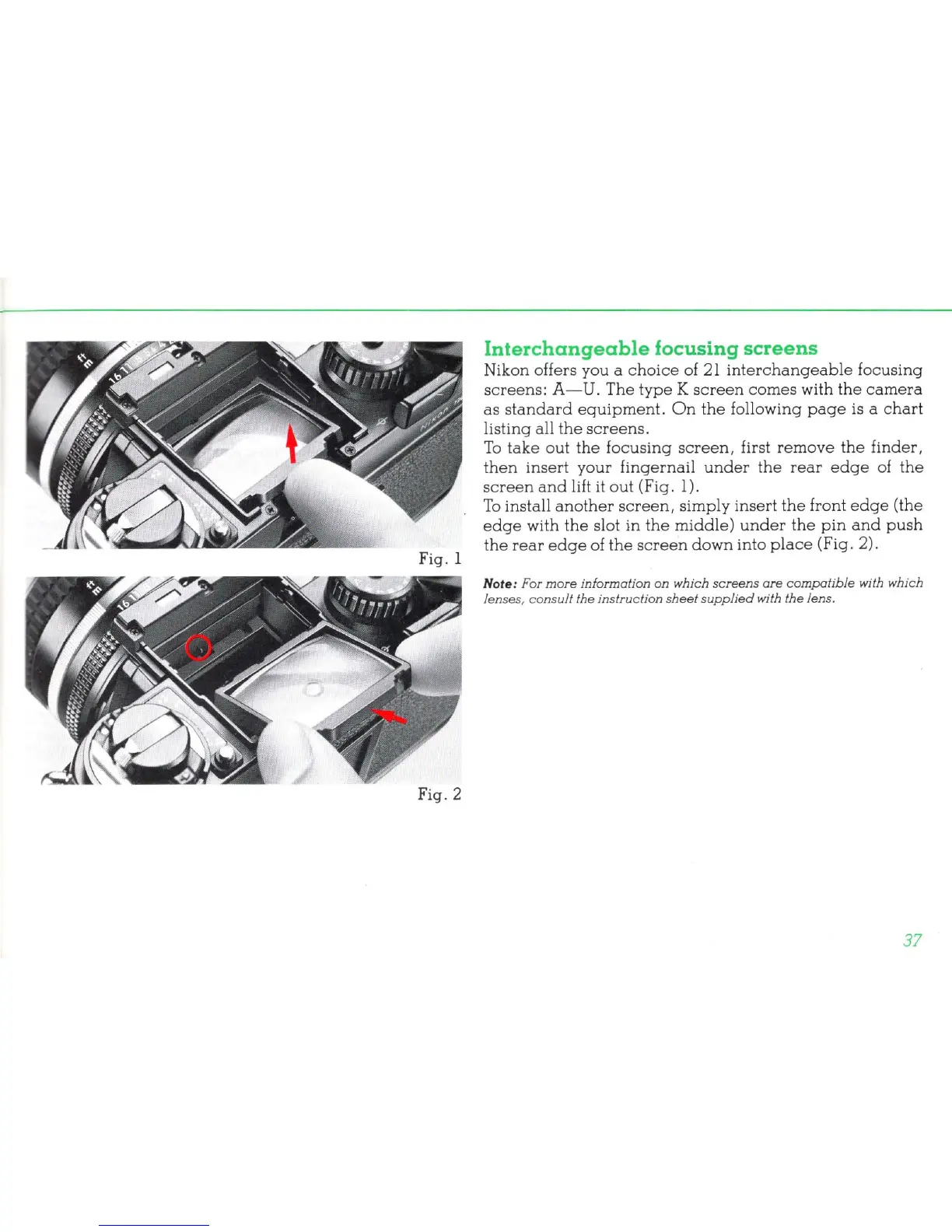
To
take
out
the
focusing
screen,
first
remove
the
finder,
then
insert
your
fingernail
under
the
rear
edge
of
the
screen
and
lift
it
out (Fig.
1)
.
To
install
another
screen,
simply insert
the
front
edge
(the
edge
with
the
slot in
the
middle)
under
the
pin
and
push
the
rear
edge
of
the
screen
down
into
place
(Fig. 2).
Note: For
more
information on which
screen
s
are
compatib
le with which
len
ses,
co
nsult
the
instructi
on
sheet
supplied
with
the
lens.
37