- CONTROLS IN
DETAIL-continued----------
Shutter
Speed/Mode
Selector
Dial
@
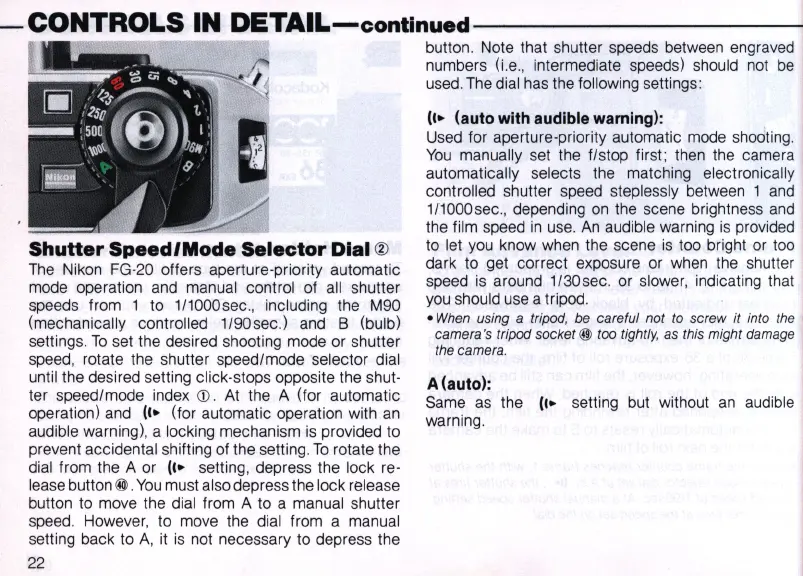
The
Nikon FG-20 offers aperture-priority automatic
mode operation and manual control of
all
shutter
speeds from 1 to 1I1000sec
.,
including the M90
(mechanically controlled 1/90 sec.) and B (bulb)
settings.
To
set the desired shooting mode or shutter
speed, rotate the shutter speed/mode selector dial
until the desired setting click-stops opposite the shut-
ter speed/mode index
CD.
At
the A (for automatic
operation) and
(I.
(for automatic operation with
an
audible warning), a locking mechanism
is
provided to
prevent accidental shifting of the setting.
To
rotate the
dial from the A or
II.
setting, depress the lock re-
lease button
@.
You
must also depress the lock release
button to move the dial from A to a manual shutter
speed. However, to move the dial from a manual
setting back to
A,
it
is
not necessary to depress the
22
button. Note
th
at shutter speeds between engraved
numbers (i.e., intermediate speeds) should not
be
used. T
he
dial has the following settings:
II.
(auto with audible warning):
Used for aperture-priority automatic mode shooting.
You
manually set the f/stop first ; then the camera
automatically selects the matching electronically
controlled shutter speed steplessly between 1 and
1/1000sec
.,
depending
on
the scene brightness
and
the film speed
in
use.
An
audible warning
is
provided
to
let
you
know when the scene
is
too bright or too
dark to get correct exposure or when the shutter
speed
is
around 1/30sec. or slower, indicating that
you
should use a tripod.
•
When
using a tripod, be careful not
to
screw
it
into the
camera's tripod socket
@ too tightly, as
th
is
might damage
the camera.
A (auto):
Same
as
the
II.
setting but without
an
audible
warning.



 To Next Page