- CONTROLS IN DETAIL-continued
------------::
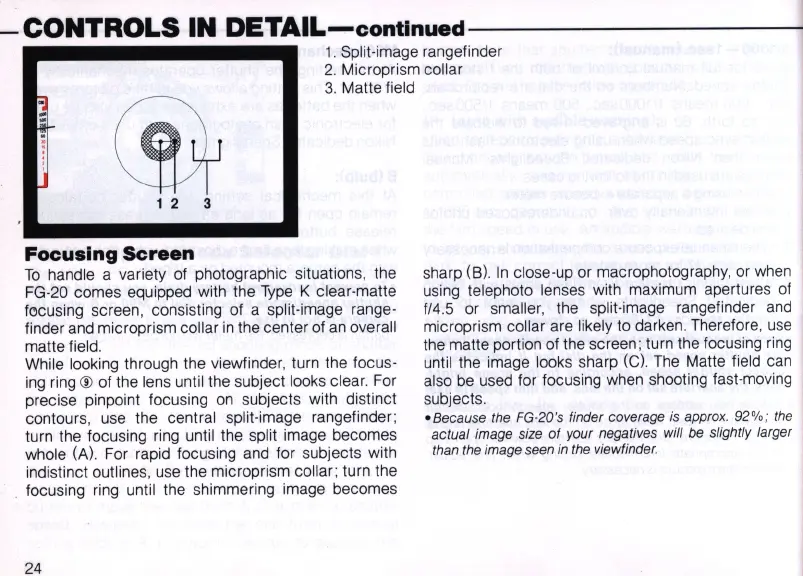
1.
Split-image rangefinder
2.
Microprism collar
3. Matte field
1 2 3
Focusing
Screen
To
handle a variety of photographic situations, the
FG-20
comes equipped with the
Type
K clear-matte
focusing screen, consisting of a split-image range-
finder
and
microprism collar
in
the center of
an
overall
matte field.
While looking through the viewfinder, turn the focus-
ing
ring ® of the lens until the subject looks clear. For
precise pinpOint focusing
on
subjects with distinct
contours, use the central split-image rangefinder;
turn the focusing ring until the split image becomes
whole
(A).
For rapid focusing and for subjects with
indistinct outlines, use the microprism collar; turn the
focusing
ring
until the shimmering image becomes
24
sharp (8).
In
close-up or macrophotography,
or
when
using telephoto lenses with maximum apertures
of
fl4.5
or
smaller, the split-image rangefinder
and
microprism collar are likely to darken. Therefore,
use
the matte portion of the screen; turn the focusing
ring
until the image looks sharp (e).
The
Matte field can
also
be
used for focusing when shooting fast-moving
subjects.
- Because the
FG
-2
0's finder coverage
is
approx. 92%; the
actual image size
of
your negatives will be slightly larger
than the image seen
in
the viewfinder.



 To Next Page