15
En
Fr
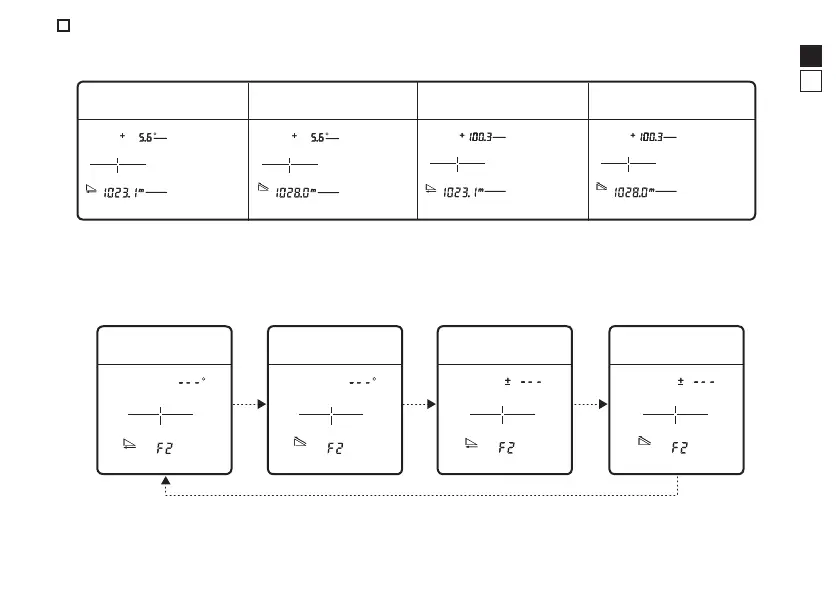
Changing the measurement display mode (F2)
The following four modes are available. The displayed information differs depending on the mode.
Factory default setting is horizontal distance and angle mode.
Horizontal distance and
angle mode
Actual distance and
angle mode
Actual distance and
height mode
Horizontal distance and
height mode
Horizontal
distance
Horizontal
distance
Actual
distance
Actual
distance
HeightHeightAngle Angle
1. Press the PWR button to turn on the Laser Rangefinder.
2. Press and hold the MODE button.
3. Press the MODE button twice.
• You can now change the measurement display mode.
4. The setting switches every time you press the PWR button.
Horizontal distance
and angle mode
Actual distance and
angle mode
Horizontal distance
and height mode
Actual distance and
height mode
• If you press and hold the MODE button or do not operate the buttons for about 8 seconds, the
displayed setting is saved and the Laser Rangefinder returns to standby.
• The setting is saved even when the Laser Rangefinder is turned OFF.








 To Next Page