6 Checking and Adjustment
170 Pulse Laser Station NPL-302 Series Instruction Manual
Checking and Adjusting the Plate Level 6.1
The axis of the plate level vial must be at right angles to the vertical axis of the
instrument.
To check and adjust the plate level:
1. Set up the instrument on the tripod.
2. Follow the leveling procedures described in Leveling, page 16.
3. Rotate the alidade 180°.
4. Check whether the bubble is in the center of the vial.
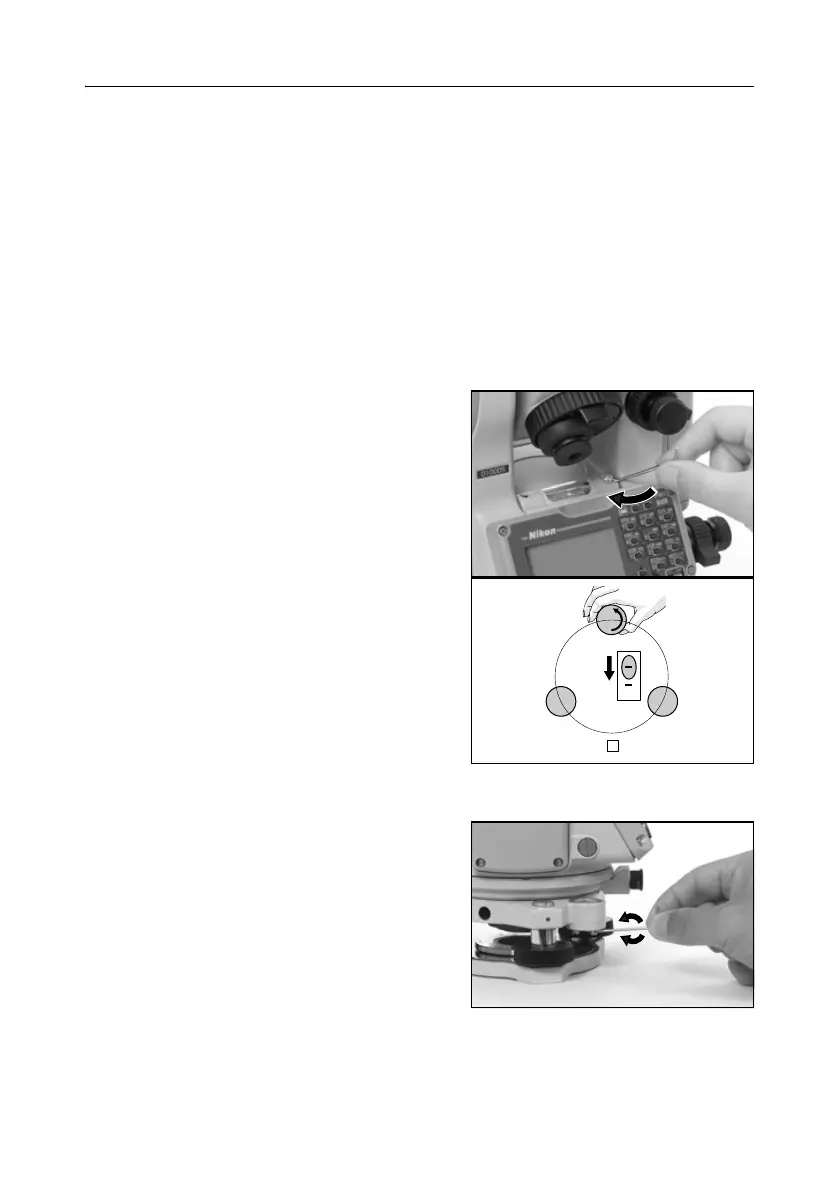
5. If the bubble is not in the center of the vial, adjust the plate level:
a. Using the adjusting pin supplied, rotate
the plate level’s adjustment screw until
the bubble has moved half of the
distance back to the center.
b. Using leveling screw A, move the
bubble into the center of the vial.
c. Repeat from Step 4.
Checking and Adjusting the Circular Level 6.1
Once you have checked and adjusted the plate
level, check the circular level.
If the bubble is not in the center of the level,
use the adjusting pin to rotate the three
adjustment screws until the bubble is centered.
CB
A
2



 To Next Page