PROGRAMMING
AUTO TOTALING TIME CLOCK INSTRUCTIONS
Model 4500PP
5nileproducts.com
PROGRAMMING
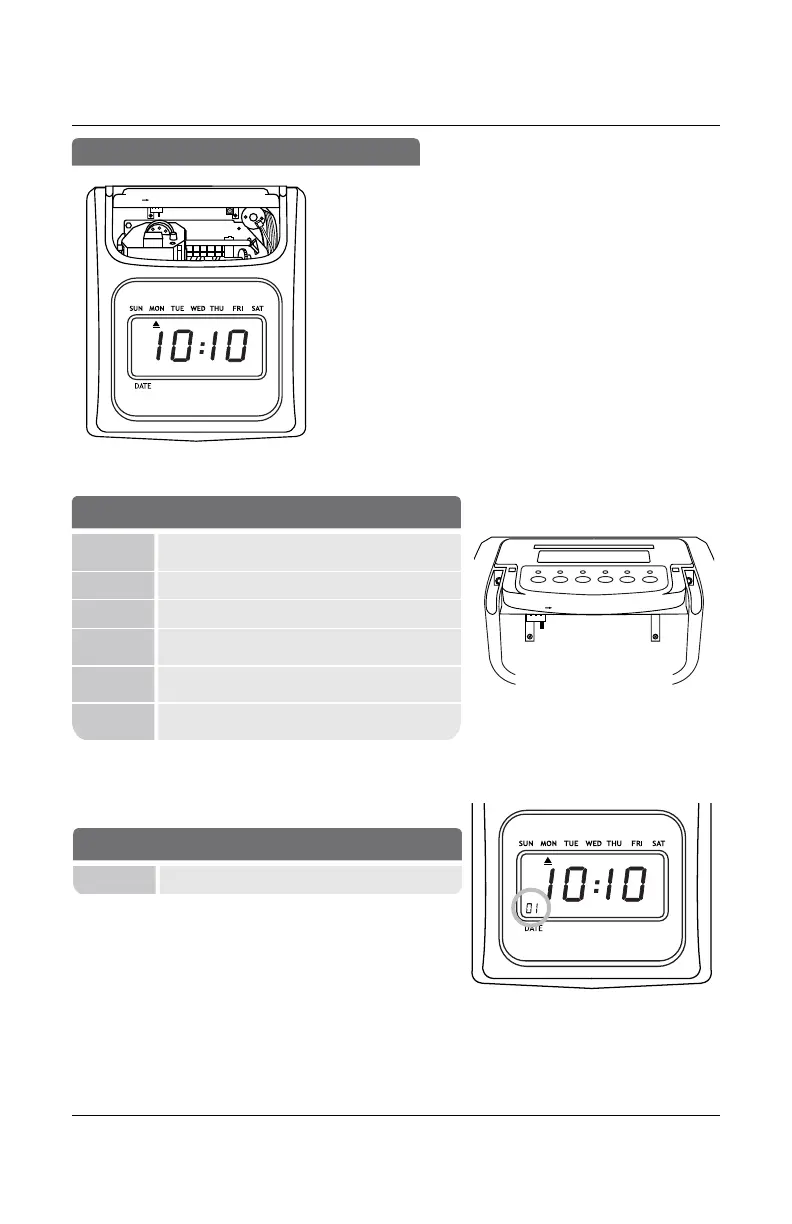
Use the key to unlock and remove top/front cover.
SETTING
Activates SETTING Mode (right) or
Operation Mode (left).
Button 1 (+)
Next setting or adjust setting.
Button 2 (-)
Previous setting or adjust setting.
Button 3
(Enter)
Save current or new settings and advance to
next function.
Button 4
Back
Previous setting Mode.
Button
6+5+1
Master reset. Reset time clock to factory
settings.
BUTTONS
PM
24
+
Enter Back
01 Indicates active setting mode or function
DISPLAY/BUTTONS
Setting
Enter Back Clear
Reset
+
+
-
Enter Back
Set
+
-
Enter Back
Set
1 2 3 4 5 6


 To Next Page