SETTINGS ADJUSTMENTS
TWEETER SWITCH (RWC7.3, RWC7.5, RWC8.5, RWC7.7, RWC8.7)
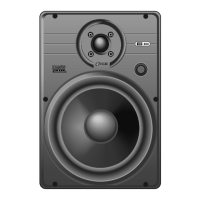
The three-position tweeter switch allows you to adjust the high frequency output of
the loudspeaker to compensate for environmental issues. The center position does
not affect the tweeter output. Moving the switch to the – position reduces the tweeter
output by 3dB to compensate for bright rooms (tile or wood floors, spare furnishing,
tall ceilings). Moving the switch to the + position increases the tweeter output by 3dB
to compensate for absorptive rooms (carpeting, lots of drapery, plush furniture, etc.).
DIALOG COMPENSATION SWITCH (RWC7.3, RWC7.5, RWC8.5,
RWC7.7, RWC8.7)
This switch provides additional definition at critical midrange frequencies where
the human voice is reproduced. This switch is generally used only for home theater
center speaker applications. Engage the switch if you wish to enhance the dialog.
DIFFUSE / DIRECT SWITCH (RWC7FX, RWC8FX)
Use the Diffuse setting for movies and general music listening since most films are
mixed using non-localized surround effects and music is usually recorded in a
favorable acoustic environment. Use the Direct setting for discrete multi-channel
recordings that equally emphasize front and surround sounds. For 7.1-channel
surround sound systems, use the Diffuse setting on the side effects loudspeakers and
the Direct setting for the rear effects loudspeakers.
PAINTING THE GRILLES
ICS loudspeaker grilles can be painted without priming, but the fabric scrim must
first be removed. The installation template has die cut standoffs that can be used to
position the grille off the ground while painting. Use several light coats sprayed from
different sides and angles to cover all surfaces and not fill in any holes. If you do
fill some holes, use compressed air to open them before the paint dries. It may be
helpful to dilute the paint.
INSTALLING THE GRILLES
The ICS MicroThin™ speaker grille installs magnetically over the speaker. Carefully
center the grill over the speaker and let the magnets do their work, verifying that the
grill sets flush against the ceiling at all edges.


 To Next Page