EasyManua.ls Logo

Nilfisk-Advance SC430 - User Manual

Nilfisk-Advance SC430
17 pages
Print Icon
To Next Page IconTo Next Page
Loading...
Nilfisk A/S
Kornmarksvej 1
DK-2605 Brøndby
Denmark
Tel.: +45 43 23 40 50
Fax: +45 43 43 77 00
mail.com@nilfisk.com
www.nilfisk.com
If the machine has been used until the red light illuminates on the battery level indicator on the machine, a full recharge of the batteries (10-12 hours) will be required. Failure to carry out this this
procedure may cause damage to the batteries. Charging the batteries after every use is recommended.
Use & maintenance
- SC430
17. Park the machine with the recovery
tank cover open.
16. Charge the batteries: Connect the
battery charger cable to the mains
electricity supply.
15. Clean the machine using a damp
cloth and where needed use a
neutral cleaning product.
14. Check and clean the squeegee
blades.
10. Wash with clean water the recovery
tank and the vacuum grid.
11. Remove the brush/pad and clean
them.
12. Take the squeegee off and remove
debris.
13. Check and clean the squeegee
blades.
5. Place the brush or the pad-holder
under the deck. Use the appropriate
brush to clean the floor.
9. At the end of the work. Empty the
recovery tank with the hose. Then
empty the solution tank with the
trasparent hose.
6. Adjust the eco solution flow control
valve.
8. Press the handle switch to engage
the brush and run the machine.
7. Switch on the brush and vac motors
to activate the machine.
2. Fill the tank with a clean water. The
clean water temperature must not
exceed 40 °C.
1b. Disconnect the battery charger
cable from the mains electricity
supply.
3. If the squeegee is not connected to
the machine: install and fasten it with
the handwheels, then connect to the
suction hose.
1a. Switch off charger by unplug
charger cable from red battery plug.
Reconnect the red battery plug to
the machine.
.
4. If the squeegee is in upper position,
lower it with the lever.
ATTENTION! Do not use the machine before you have read and understood the Instructions for User Manual
Question and Answer IconNeed help?

Do you have a question about the Nilfisk-Advance SC430 and is the answer not in the manual?

Overview

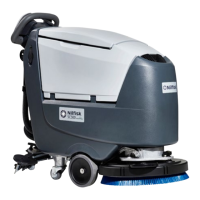
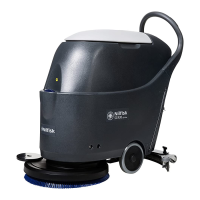
The provided document is a user manual for the Nilfisk SC430 floor scrubber, detailing its use, maintenance, and troubleshooting.

Function Description

The Nilfisk SC430 is a floor scrubber designed for cleaning floors. It operates by applying a cleaning solution, scrubbing the floor with a brush or pad, and then vacuuming up the dirty solution using a squeegee system. The machine is battery-powered and features controls for activating the brush and vacuum motors, as well as adjusting the eco solution flow.

Important Technical Specifications

  • Clean Water Temperature: The clean water used to fill the tank must not exceed 40 °C.
  • Battery Charging: A full recharge of the batteries takes 10-12 hours if the machine has been used until the red light illuminates on the battery level indicator. Charging the batteries after every use is recommended to prevent damage.
  • Model: SC430 (also referred to as SC430 GO-Line in one image).

Usage Features

The usage of the SC430 involves several steps to prepare the machine for operation and then to clean the floor.

Preparation for Use:

  1. Disconnect Charger: First, switch off the charger by unplugging the charger cable from the red battery plug. Then, reconnect the red battery plug to the machine.
  2. Disconnect from Mains: Disconnect the battery charger cable from the mains electricity supply.
  3. Fill Tank: Fill the tank with clean water. Ensure the water temperature does not exceed 40 °C.
  4. Install Squeegee (if not connected): If the squeegee is not connected to the machine, install and fasten it with the handwheels, then connect it to the suction hose.
  5. Lower Squeegee: If the squeegee is in the upper position, lower it with the lever.
  6. Place Brush/Pad-holder: Place the appropriate brush or pad-holder under the deck for cleaning the floor.
  7. Adjust Eco Solution Flow: Adjust the eco solution flow control valve to the desired setting.
  8. Activate Motors: Switch on the brush and vacuum motors to activate the machine.
  9. Engage Brush and Run: Press the handle switch to engage the brush and begin running the machine for cleaning.

Maintenance Features

Regular maintenance is crucial for the SC430's performance and longevity. The manual outlines several steps for post-operation cleaning and general upkeep.

End of Work / Cleaning:

  1. Empty Recovery Tank: At the end of the work, empty the recovery tank using its hose.
  2. Empty Solution Tank: Then, empty the solution tank using the transparent hose.
  3. Wash Recovery Tank and Vacuum Grid: Wash the recovery tank and the vacuum grid with clean water.
  4. Remove and Clean Brush/Pad: Remove the brush or pad and clean them thoroughly.
  5. Clean Squeegee: Take the squeegee off and remove any debris.
  6. Check and Clean Squeegee Blades: Inspect the squeegee blades for damage or dirt and clean them as needed.
  7. Clean Machine: Clean the machine using a damp cloth. If necessary, use a neutral cleaning product.
  8. Charge Batteries: Connect the battery charger cable to the mains electricity supply to charge the batteries. Charging after every use is recommended.
  9. Park Machine: Park the machine with the recovery tank cover open to allow for drying and ventilation.

Troubleshooting

The manual provides guidance for common issues that may arise during operation.

The machine doesn't work as it should?

  1. Check Power Cable: Verify if the power cable is correctly connected.
  2. Check Battery Charge: Check if the battery is charged.

The suction doesn't work as it should?

  1. Check Suction Hose: Check if the suction hose is correctly installed and clean.
  2. Check Recovery Tank: Open the recovery tank and check if the vacuum grid and gasket are clean.
  3. Check Squeegee Blades: Check if the squeegee blades are damaged or dirty.
  4. Check Recovery Tank Cover: Close the recovery tank cover properly and/or verify the gasket wear.

The machine doesn't clean as it should?

  1. Check Water Settings: Check if you have the right water settings.
  2. Check Solution Filter: Check if the solution filter is clean.

The brush don't work as they should?

  1. Check Brush Installation and Wear: Check if the brush is correctly installed and not worn out.
  2. Check Brush Motor Overload: Check if there isn't any brush motor overload (indicated by 3 battery LED lights flashing simultaneously).
  3. Check for External Materials: Check if there are external materials preventing the brush from rotating.

This comprehensive guide ensures users can effectively operate, maintain, and troubleshoot their Nilfisk SC430 floor scrubber.

Nilfisk-Advance SC430 Specifications

General IconGeneral
BrandNilfisk-Advance
ModelSC430
CategoryFloor Machine
LanguageEnglish

Related product manuals